
Port 6000 - McAffee
- Thread starter Skyline
- Start date

You are using an out of date browser. It may not display this or other websites correctly.
You should upgrade or use an alternative browser.
You should upgrade or use an alternative browser.


- Jul 20, 2004
- 5,258
- 3
- 275
Is MCAfee even a firewall??? I thought it is simply a virus scanner, in wich case you cant block port 6000 using that, but if someone knows that i am not right, correct me.
BTW. add me to MSN skyline, im bored :P, i think you remember who i am from euro mir.
BTW. add me to MSN skyline, im bored :P, i think you remember who i am from euro mir.

Select the site, group or node in the console tree that you want to configure.
NOTE: It is suggested to perform these steps at the site level, to maximize protection.
Open the "McAfee Desktop Firewall" option in the top-right pane
Select "Administrative Options"
Uncheck "Inherit" from the bottom-right pane
Click the "Add" button and select "New Rule"
Configure the rule as follows:
Description: Port6000
Action: Block
Protocol: TCP
Direction: Either
Local Service: Single
6000
Remove Service: Any
Address: Any
Click OK
you will have to add the same thing.. but allow only your localhost/lan to connect.
NOTE: It is suggested to perform these steps at the site level, to maximize protection.
Open the "McAfee Desktop Firewall" option in the top-right pane
Select "Administrative Options"
Uncheck "Inherit" from the bottom-right pane
Click the "Add" button and select "New Rule"
Configure the rule as follows:
Description: Port6000
Action: Block
Protocol: TCP
Direction: Either
Local Service: Single
6000
Remove Service: Any
Address: Any
Click OK
you will have to add the same thing.. but allow only your localhost/lan to connect.

ingel said:Is MCAfee even a firewall??? I thought it is simply a virus scanner, in wich case you cant block port 6000 using that, but if someone knows that i am not right, correct me.
BTW. add me to MSN skyline, im bored :P, i think you remember who i am from euro mir.
Thrs a fw too, thought u wudda known tht mr know it all.
- Jul 20, 2004
- 5,258
- 3
- 275
Well, as i have only ever saw it once, and that was on a friends machine, and that was only a virus scanner, but that was also a year ago or so, so i might remember it wrong.~Webby~ said:Thrs a fw too, thought u wudda known tht mr know it all.
I cant know everything, no one can, but i just got a little bit smarter
 .
.i dont really understand that...lolKaori said:Select the site, group or node in the console tree that you want to configure.
NOTE: It is suggested to perform these steps at the site level, to maximize protection.
Open the "McAfee Desktop Firewall" option in the top-right pane
Select "Administrative Options"
Uncheck "Inherit" from the bottom-right pane
Click the "Add" button and select "New Rule"
Configure the rule as follows:
Description: Port6000
Action: Block
Protocol: TCP
Direction: Either
Local Service: Single
6000
Remove Service: Any
Address: Any
Click OK
you will have to add the same thing.. but allow only your localhost/lan to connect.
Well you are not helping us at all... mcafee is a brand... what is the name of the product and what's the version?
http://www.hackerwatch.org/img/docs/TutorA/internetapplications.gif
now READ YOUR MANUAL on how to BLOCK NEW APPLICATION.... and you are blocking DB SERVER
http://www.hackerwatch.org/img/docs/TutorA/internetapplications.gif
now READ YOUR MANUAL on how to BLOCK NEW APPLICATION.... and you are blocking DB SERVER

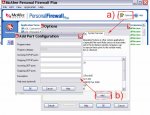
what do you mean no manual?
http://us.mcafee.com/root/package.asp?pkgid=103
http://us.mcafee.com/common/en-us/redirects/mpfp/userGuide.asp
http://us.mcafee.com/root/package.asp?pkgid=103
http://us.mcafee.com/common/en-us/redirects/mpfp/userGuide.asp
Skyline said:Dont speak to me like im a little kid please....
its version 2005 7.0 and there is no manual.