Help Weird white screen

Mu online season 21 - grand opening

bumonyourlips

Dedicated Member
Dedicated Member
Jan 22, 2015
12
4
29
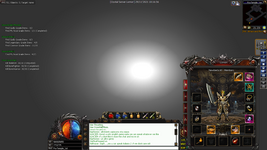
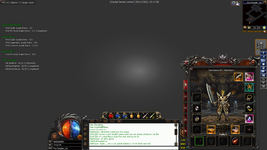
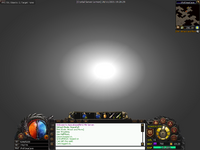
I'm having a very odd issue with the screen going white on some maps. This was happening yesterday in ShandaTown but re-downloading the Data/Map files seemed to fix it somehow. However, it's back and affecting most of the caves for me.

Things I've done to troubleshoot this:
- I have deleted all of the files and downloaded the client twice
- Deleted and auto patched the map files in /Map and /Data/Map several times
- Installed and double-checked the 3 files (https://www.lomcn.org/forum/threads/howtofix-issues-regarding-getting-ingame.107073/)
- Tested in the following resolutions: 1366, 1440, 1768, 1600, 1680
- Set Effect=False in the Mir2Config (maybe I could try other settings?)

Might be relevant in helping find a fix:
- Running Windows 10 on Parallels VM
- The bright white areas are the Torches / Town lights / Doors. The torch on my character will move around the map
- Mobs & spells don't show up
- Mob names show up if you mouse over them
- Items show up all of the time
- Can still kill and pick up items
- Can still be killed

In the adventure caves option on the Teleport stone, a lot of the maps are affected. The maps that are not affected are:
- Jichon Temple, Ice Temple, underground, Great sea, Golden temple, Road to hell, chaotic temple, FOrgotten, Mystery and Fury.


Appreciate any ideas/additional things I could try.
 

Attachments

  • Image 2.png
    Image 2.png
    349.4 KB · Views: 12

bumonyourlips

Dedicated Member
Dedicated Member
Jan 22, 2015
12
4
29
I think that's a strong possibility. It's odd how a good majority of the maps are working for me though. Maybe to do with the recalling or indexing of files?

I will post any error longs once the Map files download again
 

Far

tinmymouthpl0x
Staff member
Administrator
May 19, 2003
20,683
34
3,287
520
I think that's a strong possibility. It's odd how a good majority of the maps are working for me though. Maybe to do with the recalling or indexing of files?

I will post any error longs once the Map files download again

It's 100% your issue, this has been reported many times by users using crystal client on a mac. Unfortunately I don't have a mac so have never been able to test and find the cause behind it.

Definitely strange to be only certain maps, as the lighting code is the same throughout. Maybe its the amount of lights in one places? On the maps which break maybe try teleporting to random places, see if theres any change.
 

zedina

Mir3 Dev
Legendary
Dec 22, 2005
3,259
2
1,152
370
It's 100% your issue, this has been reported many times by users using crystal client on a mac. Unfortunately I don't have a mac so have never been able to test and find the cause behind it.

Definitely strange to be only certain maps, as the lighting code is the same throughout. Maybe its the amount of lights in one places? On the maps which break maybe try teleporting to random places, see if theres any change.

Even in parallels or bootcamp it can happen on a Mac. not 100% but still.
 

bumonyourlips

Dedicated Member
Dedicated Member
Jan 22, 2015
12
4
29
It doesn't appear to be the number of lights on screen, Towns are fine, I RTd and ran around a lot of the blank maps, in oma I got to the old KR and it was the same white screen throughout.

I've re downloaded the map files and I've lost Shanda town again where it was working before. I have a few more things to try and will see if any other solutions come up from old posts. Thanks.
Post automatically merged:

Not really expecting a solution now, the search on historic issues hasn't come up with much.

I guess it is something to do with the rendering of certain maps because I got Shanda working by redownloading the maps again. But sorting through storage and the screen has gone weird again. I can still use the store and teleport etc. Very odd.


Post automatically merged:


I will look into this for you. Will pop back if i need more information
I think I have solved what the issue is. It must be to do with the way mir layers light. Shanda town is OK during the in game 'daytime' but goes white screen at night.

All of the maps that work for me are the towns where daylight seems to be perpetual. Any cave that doesn't require a torch works fine.

I bet there is something like a z-index setting for the way light works (a gross oversimplification).

I understand this is an issue that will unlikely get a fix but thought I'd report back my findings.

Time to dig the PC out of storage
 
Last edited:

DiabloVodkaShot

LOMCN VIP
VIP
Feb 20, 2009
2,285
204
245
It doesn't appear to be the number of lights on screen, Towns are fine, I RTd and ran around a lot of the blank maps, in oma I got to the old KR and it was the same white screen throughout.

I've re downloaded the map files and I've lost Shanda town again where it was working before. I have a few more things to try and will see if any other solutions come up from old posts. Thanks.
Post automatically merged:

Not really expecting a solution now, the search on historic issues hasn't come up with much.

I guess it is something to do with the rendering of certain maps because I got Shanda working by redownloading the maps again. But sorting through storage and the screen has gone weird again. I can still use the store and teleport etc. Very odd.


Post automatically merged:


I think I have solved what the issue is. It must be to do with the way mir layers light. Shanda town is OK during the in game 'daytime' but goes white screen at night.

All of the maps that work for me are the towns where daylight seems to be perpetual. Any cave that doesn't require a torch works fine.

I bet there is something like a z-index setting for the way light works (a gross oversimplification).

I understand this is an issue that will unlikely get a fix but thought I'd report back my findings.

Time to dig the PC out of storage
Thanks for the response, if im honest i don't think its worth our time right now especially if you have a pc in storage :D
 
  • Like
Reactions: bumonyourlips

Far

tinmymouthpl0x
Staff member
Administrator
May 19, 2003
20,683
34
3,287
520
I think I have solved what the issue is. It must be to do with the way mir layers light. Shanda town is OK during the in game 'daytime' but goes white screen at night.

All of the maps that work for me are the towns where daylight seems to be perpetual. Any cave that doesn't require a torch works fine.

I bet there is something like a z-index setting for the way light works (a gross oversimplification).

I understand this is an issue that will unlikely get a fix but thought I'd report back my findings.

Time to dig the PC out of storage

Could you try a couple of things for me?

Go to a map with no light on your own (or in the woods where there are no light sources), is it white still? If so, it sounds like any light source breaks it (when its day there are no light sources generated).
If its working when you're on your own, does it break when you equip a candle/torch?
If its working with a candle equipped, does it break when others are on screen with their light sources?

I expect any light source at all is breaking it for you - as the screenshot simply looks like the alpha isn't applied.
 
  • Like
Reactions: bumonyourlips

mir2pion

TL;DR
Veteran
Feb 21, 2013
3,591
2
679
265
Did you try to play with Parallels settings? I recall vaguely advices on net when pple had issues with games that there is some radio button that may need to be checkmarked, like to use OpenGL (or not use?) or something of the sort for graphics to run properly.

Alternatively, you could try Fusion. No idea if it can be installed on the same mac with Parallels on it, probably yes. I could send you download link for it.
 
  • Like
Reactions: bumonyourlips

bumonyourlips

Dedicated Member
Dedicated Member
Jan 22, 2015
12
4
29
Could you try a couple of things for me?

Go to a map with no light on your own (or in the woods where there are no light sources), is it white still? If so, it sounds like any light source breaks it (when its day there are no light sources generated).
If its working when you're on your own, does it break when you equip a candle/torch?
If its working with a candle equipped, does it break when others are on screen with their light sources?

I expect any light source at all is breaking it for you - as the screenshot simply looks like the alpha isn't applied.

No problem.

I teled into Fox Cave with no torch on (doesn't appear to be a light source in the entrance to that cave). I tired every combination of teleing into the cave, taking torch off and on, RTing around, walking off screen etc. There is no change in the broken screen.

Not sure how helpful that is.

I've attached two screen shots - one that shows with torch on the character and one with no torch on.

Towns maps and some dungeons are working perfectly.
Post automatically merged:

Did you try to play with Parallels settings? I recall vaguely advices on net when pple had issues with games that there is some radio button that may need to be checkmarked, like to use OpenGL (or not use?) or something of the sort for graphics to run properly.

Alternatively, you could try Fusion. No idea if it can be installed on the same mac with Parallels on it, probably yes. I could send you download link for it.

Yeah I messed about with parallels settings a lot. I am new to parallels though so could have easily missed something. I did spend a lot of time tinkering with the graphics settings but nothing seemed to work

Appreciate the other suggestion, I may try in the coming days. I have dragged my PC out of hibernation for now
 

Attachments

  • Image 3.png
    Image 3.png
    612.2 KB · Views: 8
  • Image 4.png
    Image 4.png
    464 KB · Views: 7
  • Like
Reactions: Far

mir2pion

TL;DR
Veteran
Feb 21, 2013
3,591
2
679
265
Settings like these, even if mir is not 3D game and you are not concerned with speeding mir up 😉

With Parallels Desktop, you can run games and programs that require video cards with DirectX or OpenGL support. To do so, you must enable 3D acceleration.

For information on whether a program requires DirectX or OpenGL support, see the materials that came with the game or program.

To enable 3D acceleration:

  1. Shut down the virtual machine.
  2. Choose Actions > Configure.
  3. In the Video pane, select On or select a version of DirectX from the 3D acceleration menu.
Note: Parallels Tools must be installed before you can enable 3D acceleration. Parallels Tools are installed by default when you set up Windows.

 
  • Like
Reactions: bumonyourlips