Suggestion Move Location System

Jev

Mir 4 Incoming!
VIP
May 16, 2017
5,025
34
3,235
330
Worthing, West Sussex
I've been sent the following video showing off the "Move Location" feature from the Official Mir 2 Servers.


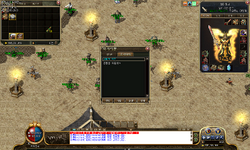
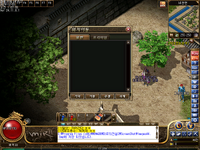
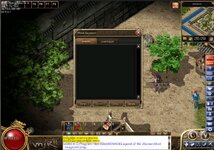
It looks like you open this new window (Marked in red)

1733083005385.png

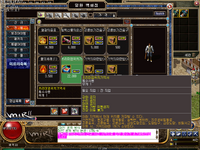
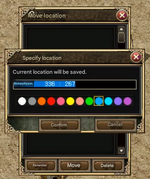
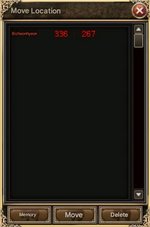
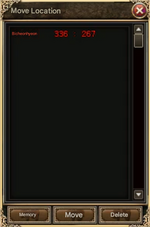
That then brings up the following Menu
1733083051515.png

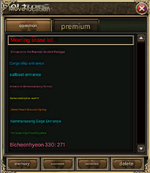
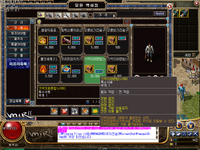
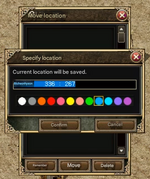
Clicking "Memory" brings up this window:
1733083088252.png

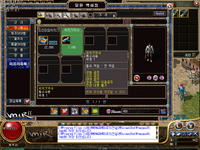
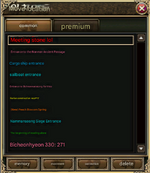
This grabs the user's current Map and Cords and allows you to save it with a colour code, Allowing you to teleport there whenever, I've been told there is a Free & Paid version of this system.

This will require an aditional Map Attribute "Allow Move Location Checkbox"

I can't find any info on Wemade's Mir 2 website detailing this system in any way so It's hard to find any info on:

- Are some maps restricted from this system?
- What's the difference between the Free & Paid version and the cost of the Paid version. (Free version is 3k gold)

More Images:
1733083298264.png
1733083310324.png

I've attached a Prguse2.zip which contains all the data images for this system.

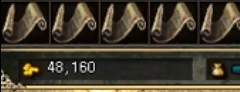
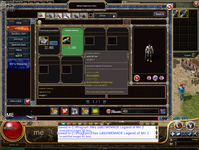
Edit: LCD has noticed that this item is being used when the player sets a new move location (Not when teleporting). Sadly the player never put his mouse over the item so we can't get a name but I'd assume it has no stats and is just called "Move Scroll" or something similar.
1733085431178.png
 

Attachments

  • Prguse2.zip
    8.9 KB · Views: 5
  • Love
Reactions: a3dam

Valhalla

Nexus Mir Developer
Veteran
Nexus
Game Master
Sep 7, 2012
2,112
6
597
180
127.0.0.1
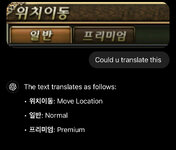
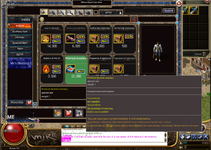
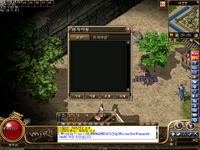
Your translation of the buttons image only has 3 buttons on it, but the two fullscreen screenshots the dialog has 4 buttons and 2 tab pages. maybe thats the difference between the free and the paid versions?
 

MonoxideLenny

Adwaa
Veteran
Jan 23, 2014
375
136
70
Interesting system but stinks of Korean p2w what is stopping people from setting up a teleport to every KR in the game and instantly teleporting there? ofc coders and GM's could change this but for the sake of extra ££'s why would you :p
 

Jev

Mir 4 Incoming!
VIP
May 16, 2017
5,025
34
3,235
330
Worthing, West Sussex
Interesting system but stinks of Korean p2w what is stopping people from setting up a teleport to every KR in the game and instantly teleporting there? ofc coders and GM's could change this but for the sake of extra ££'s why would you :p
Yea I do think the paid version would allow for that but maybe the free version only allows none cave locations like towns and provinces.

Even if the free version was coded in, with a new map attribute to allow server owners to decide where you can/can’t save locations.
 
  • Like
Reactions: MonoxideLenny

MonoxideLenny

Adwaa
Veteran
Jan 23, 2014
375
136
70
Yea I do think the paid version would allow for that but maybe the free version only allows none cave locations like towns and provinces.

Even if the free version was coded in, with a new map attribute to allow server owners to decide where you can/can’t save locations.
Oh for sure anything " new " for mir2 is a win in my books and i mean even if Gm's did monetize it its not like anyone is forced to use the system or even play the server :)
 
  • Like
Reactions: Jev

mir2pion

TL;DR
Veteran
Feb 21, 2013
3,591
2
679
265
You have to learn to use GTranslate. Mostly you need to screenshot just the area, like the panel here, then enlarge it to ~150 to 200% in some image editor, I use IrfanView (but don't over do it), then screenshot this bigger image and paste it into GT. That way you get legible text even if in small type and all elements like the buttons here will be shown.

1733153660098.png
Post automatically merged:


Probably only outdoor province maps might be allowed to be used and the difference between the free and premium might be the ability to use this panel to teleport back to you set location across maps, where the 'common' or free would only work if you are within a given province map.
 
Last edited:
  • Like
Reactions: Jev

Jev

Mir 4 Incoming!
VIP
May 16, 2017
5,025
34
3,235
330
Worthing, West Sussex
You have to learn to use GTranslate. Mostly you need to screenshot just the area, like the panel here, then enlarge it to ~150 to 200% in some image editor, I use IrfanView (but don't over do it), then screenshot this bigger image and paste it into GT. That way you get legible text even if in small type and all elements like the buttons here will be shown.

View attachment 36160
Post automatically merged:

Isn't it just being able to teleport to the location after you have visited it once for the first time? It is sort of like the feature some servers in the past had, first you needed to discover (enter) a location on foot and then find a 'teleport node' for that location, click on it and from that time on, you could use teleport NPC anywhere to move you there.

Here you would set your own locations marked by colors to easily spot them, like if you wanted to return to a quest NPC to hand in quest once finished, you would set its location in this panel when taking out the quest.
You write in your place description and click the memory button to enter it on the list of location. The panel must know coordinates and I suppose it inputs the current ones where you stand when pressing the memory button. That's why it is like that 'teleport node'.

Probably only outdoor province maps might be allowed to be used and the difference between the free and premium might be the ability to use this panel to teleport across maps, where the 'common' or free would only work within a given province map.
I've asked the guy who sent me the images/video for some more details on the system.

You click "memory" which then grabs your current map and current cords with a colour code.

Movement just means teleport

Correction, I believe this would be to change the cords of the selected fast travel and sets the cords to your current cords (If you're on that map). I'd imagine this would also cost a Teleport Scroll to reset the cords.

Waiting to hear back from him.
 

mir2pion

TL;DR
Veteran
Feb 21, 2013
3,591
2
679
265
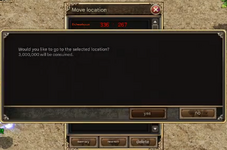
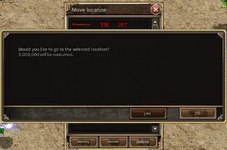
LOL they have some inflation there :p
1733155410602.png

1733155733212.png Before clicking Yes, the bag gold said 51,160 which means they display gold in millions.
 
Last edited:

Jev

Mir 4 Incoming!
VIP
May 16, 2017
5,025
34
3,235
330
Worthing, West Sussex
Not sure it's 3 mill, I looked at the video and watched their gold go down by 3k
Post automatically merged:

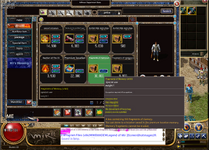
First of all, the requirement is that you must use a cash item. There are two types of movement: regular and premium.
1733155631508.png

This screenshot is a premium location memory order. When you remember a location, this item is consumed. It is just a material.
1733155655512.png

This item is a material for moving to premium locations. 1 is consumed per move.
1733155681464.png

This is a general location memory scroll. If you have this item, it saves the general area and moving costs 3000 gold.
1733155720075.png

To summarize, General Area Location Memory (Field) Materials needed to remember: General Location Memory Book Movement Material: 3000 Gold Premium Area Location Memory (Dungeon) Materials needed to remember: Premium Location Memory Book Movement Material: Premium Movement Material They are all just materials, and movement and memory are all done in the interface.

@tmvkfsha31 is the guy who sent these photos/video/info.
 

Jev

Mir 4 Incoming!
VIP
May 16, 2017
5,025
34
3,235
330
Worthing, West Sussex
Okay, so I've been trying to fix the PR, turns out the edit button doesn't edit it's set so the code is correct for it.

However. Some screenshots of the system use the same title images and buttons etc. as the one in PR, but most of the photos show a completely different UI with extra buttons and a Common & Premium option.

I would assume that maybe the title we're using was just a pre release version and they went and improved it and then also updated the UI.

I'd rather we use the newer move system with the extra features.

Three new map attributes will need to be made:

NoMoveScroll = Don't allow any locations within the map to be saved.

CommonLocation = Common Location tab, I'd assume this would be shops/caves

PremiumLocation= Premium Location tab. I'd assume this would be for KRs ?


1742245982409.png
1742246025774.png

1742246046880.png
1742246073059.png
1742246089174.png