3.55 LF Support

Mu online season 21 - grand opening

marti

LOMCN n00bie
Dec 9, 2025
9
0
1
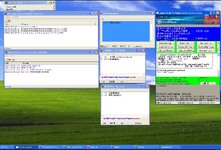
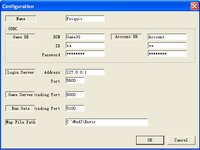
I’m currently trying to set up communication between the files to launch a Holley Mir 3.55 server. I believe all the IP and port settings are correct, as well as the SQL and ODBC configuration. However, I can’t seem to fix the Login Gate error… Everything else seems to be OK. Any suggestions?

''error
SQL ODBC连接错误, 请检查数据库名, ODBC, 密码
''
 

marti

LOMCN n00bie
Dec 9, 2025
9
0
1
"I managed to eliminate the errors, decode Armadillo..., but I can't access NetCheck or Loader3G. Can anyone tell me where to get the registration name and serial number?"
 
Upvote 0

ColosaL

Dedicated Member
Dedicated Member
Aug 25, 2016
75
35
45
"I managed to eliminate the errors, decode Armadillo..., but I can't access NetCheck or Loader3G. Can anyone tell me where to get the registration name and serial number?"
Open a clean .txt and drag Armadillo to the TXT. You also need TrialReset to clean armadillo if you need.
I’m currently trying to set up communication between the files to launch a Holley Mir 3.55 server. I believe all the IP and port settings are correct, as well as the SQL and ODBC configuration. However, I can’t seem to fix the Login Gate error… Everything else seems to be OK. Any suggestions?

''error
SQL ODBC连接错误, 请检查数据库名, ODBC, 密码
''
You need to go on Administrative tools and add there "Account,conlog,crueldragon3gbasedata,game3g,hero3g and manage" with details from sql + pw to link ODBC with server
 
Upvote 0

marti

LOMCN n00bie
Dec 9, 2025
9
0
1
Abra un archivo .txt limpio y arrastre Armadillo al archivo. También necesitas TrialReset para limpiar Armadillo si lo necesitas.

Debes ir a herramientas administrativas y agregar allí "Cuenta, conlog, crueldragon3gbasedata, game3g, hero3g y administrar" con los detalles de sql + pw para vincular ODBC con
Abra un archivo .txt limpio y arrastre Armadillo al archivo. También necesitas TrialReset para limpiar Armadillo si lo necesitas.

Debes ir a herramientas administrativas y
Abre un archivo .txt limpio y arrastra Armadillo al archivo. También necesitas TrialReset para limpiar Armadillo si lo necesitas.

Debes ir a Herramientas administrativas y agregar allí "Cuenta, conlog, crueldragon3gbasedata, game3g, hero3g y administrar" con los detalles de sql + pw para vincular ODBC con el servidor

agregue allí "Cuenta, conlog, crueldragon3gbasedata, game3g, hero3g y administrar" con los detalles de sql + pw para vincular ODBC con el
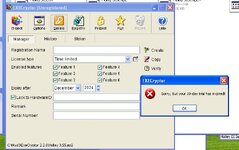
I managed to remove the login gate error and run dragon.exe with the result: "Magic Gate created." But I still can’t open NetCheck and Loader3G because of the message "Execryptor license expired." I think I’m not following the Execryptor steps correctly. I found a guide, but the images are no longer visible, so I don’t know how to continue

 
Upvote 0

marti

LOMCN n00bie
Dec 9, 2025
9
0
1
Envía alguna captura de pantalla y ¿qué archivos estás usando?
I'm using the Mud3-2013 files. The process I'm following for NetCheck is as follows: I enter the Execryptor serial number into NetCheck, then the NetCheck application closes. After that, I go to Execryptor, open the file holley 3.56.ep2, go to "Serials", and when I try to create one, it gives me an expiration error. This is where I get lost — everything else I believe is set up correctly.
Post automatically merged:

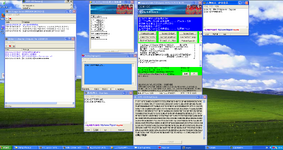
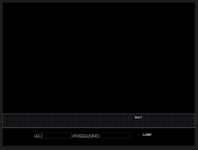
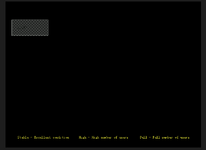
I managed to start NetCheck and Load, I added ListMake in the Sting client but it still shows as Offline. I'm running everything locally — where am I going wrong?
 

Attachments

  • IMG-20251225-WA0002.jpg
    IMG-20251225-WA0002.jpg
    370.3 KB · Views: 20
  • IMG-20251225-WA0001.jpg
    IMG-20251225-WA0001.jpg
    72.1 KB · Views: 20
  • Sting.png
    Sting.png
    1 MB · Views: 17
Last edited:
Upvote 0

ColosaL

Dedicated Member
Dedicated Member
Aug 25, 2016
75
35
45
ExeCryptor i never used, and for set up on offline mode i guess u using a virtual machine to make wind xp ?
 
Upvote 0

marti

LOMCN n00bie
Dec 9, 2025
9
0
1
ExeCryptor i never used, and for set up on offline mode i guess u using a virtual machine to make wind xp ?
1766679227017.png
Yes, I’m doing it through a virtual machine.
I deleted the .ini file so it would be regenerated, restarted the server, created a user, but I can’t get past this screen. What could I be doing wrong?
I installed the Hero3G database from the 2022 pack, could that be the reason?
Maybe some DLL..
thx
 
Upvote 0

ColosaL

Dedicated Member
Dedicated Member
Aug 25, 2016
75
35
45
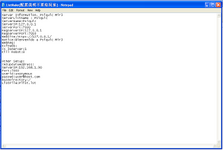
some ip is missing, if you want local with virtual machine, test with 127.0.0.1 all ips, and check holleydb txts and setup too.
you need also on vm adapter bridge and if that not works , try with 192.168.X.X ip from the virtual
View attachment 38451
Yes, I’m doing it through a virtual machine.
I deleted the .ini file so it would be regenerated, restarted the server, created a user, but I can’t get past this screen. What could I be doing wrong?
I installed the Hero3G database from the 2022 pack, could that be the reason?
Maybe some DLL..
thx
if im not wrong this (Online) message is missing is because of name from mir3server-> holleydb name server or tbl_account -> servername info
 
Upvote 0

marti

LOMCN n00bie
Dec 9, 2025
9
0
1
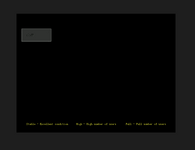
The names in SQL were incorrect, I fixed them and set the server name, checked ports and IPs, changed the client, yet I'm still in the same state. I did a ping to 127.0... and it was OK, checked the client configuration, but I can't detect the error.
 

Attachments

  • err1.png
    err1.png
    4.9 KB · Views: 6
  • err2.png
    err2.png
    4.4 KB · Views: 6
Upvote 0

ColosaL

Dedicated Member
Dedicated Member
Aug 25, 2016
75
35
45
The names in SQL were incorrect, I fixed them and set the server name, checked ports and IPs, changed the client, yet I'm still in the same state. I did a ping to 127.0... and it was OK, checked the client configuration, but I can't detect the error.
still missing data folder because everything is black and the problem about name still on Mir3 server -> Holley ->open it and on top u have configuration to set the name,pasw, and all details
 
Upvote 0

marti

LOMCN n00bie
Dec 9, 2025
9
0
1
still missing data folder because everything is black and the problem about name still on Mir3 server -> Holley ->open it and on top u have configuration to set the name,pasw, and all details
I’ve checked the configuration and I think everything is correct, but I’m still getting the error… I can’t find what’s wrong. I’ve reviewed the ports according to guides… maybe I’m configuring the client incorrectly?

ttt.png
 
Upvote 0

zedina

Mir3 Dev
Legendary
Dec 22, 2005
3,259
2
1,153
370
Nostalgic? This thread triggered my PTSD. I remember how much of a pain in the ass it was to set up these files.
I remember I set the shortcuts on desktop in order so in case I forget the sequence I get the hints :D
 
Upvote 0