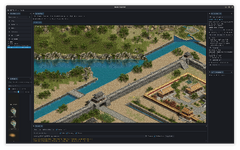
I have been working on a shared library that takes any Mir / WoOOL file and converts it to another format, however I feel native support would be better in the long run.
My tools and libraries are written in C++, but expose C API exports so they can be used via P/Invoke in C# projects (or the functionality could be ported to native C# if someone wanted to).
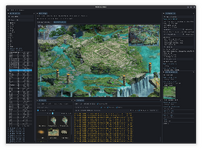
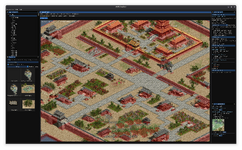
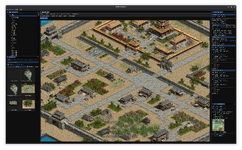
The library viewer and map editor are just snippest as I wanted a clean way of viewing and editing WoOOL stuff without a bunch of code:
if mir do this, if woool do that.
I will clean up the code and fix some issues and release that soon.
Are you supporting WPF libs or is it just SGL? i don't think its reading from wpf at the moment which might be the reason for the crash, remaster is only using wpf. The wpf are the same as normal woool.
Only map versions 11 and 12 i have problems with at the moment, could be like i said above that wpf not reading properly.
Really appreciate your great work and sharing! @Tikky , but I found the latest 0316version will crash once reading v2 0.nmp, file attached. OS: Win10 21H2
I gave it a spin and it will need time to polish details to make it efficient map editor - it will need keyboard shortcuts like those I made for Crystal map editor (F keys to hide/show layers and many such like). I suppose for now, you have more important fixes to do, besides it requires doing actual map editing project to make good intuitive shortcut choices.
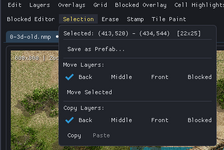
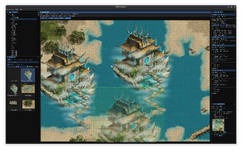
I tried to make prefab of just the bridge, switching off view of those other layers besides back layer seems to have worked (it is a tedious mouse work repeatedly opening menu to disable view of those other layers and I don't know what works - either switching off those Move and or Copy selection or switching off layer views in context menu.
I don't really know what am I doing here
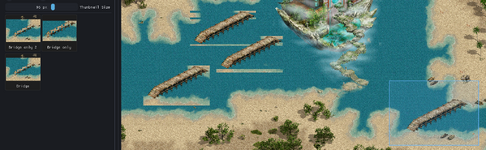
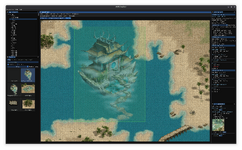
The sand and the bridge are not on the same back layer but it 'catches' those sand tiles anyway. Stamping the prefab on map suffers from the same back layer 'ills' as in Crystal editor - depending on mouse position when you stamp, it includes only partial ground strips unless the mouse is on the 'right' tile when stamped as you see in this screenshot.
Only the leftmost bridge stamp paints the ground tiles correctly. I don't know yet if there is a mouse coordinate readout since if that is like in Crystal editor, you need to click even xy tile coordinate when stamping to place those sand tiles correctly. In Crystal editor I made little info panel that follows mouse cursor and displays current tile coordinates, so you know where to stamp.
But as I said, these things are best left for later, after more important fixes are done, like those you have just done in the post above.
Amazing how some map layouts and even technical map details are the same in Woool as in Mir. I don't have any idea of the history of these two games, how related they are, but related they are for sure.
How hum, middle mouse button... I have a three button mouse somewhere from the nineties but I think it has some weird connector, I think DB9 or was it called serial port or something
Really appreciate your great work and sharing! @Tikky , but I found the latest 0316version will crash once reading v2 0.nmp, file attached. OS: Win10 21H2
I gave it a spin and it will need time to polish details to make it efficient map editor - it will need keyboard shortcuts like those I made for Crystal map editor (F keys to hide/show layers and many such like). I suppose for now, you have more important fixes to do, besides it requires doing actual map editing project to make good intuitive shortcut choices.
I tried to make prefab of just the bridge, switching off view of those other layers besides back layer seems to have worked (it is a tedious mouse work repeatedly opening menu to disable view of those other layers and I don't know what works - either switching off those Move and or Copy selection or switching off layer views in context menu). I don't really know what am I doing here
The sand and the bridge are not on the same back layer but it 'catches' those sand tiles anyway. Stamping the prefab on map suffers from the same back layer 'ills' as in Crystal editor - depending on mouse position when you stamp, it includes only partial ground strips unless the mouse is on the 'right' tile when stamped as you see in this screenshot.
Only the leftmost bridge stamp paints the ground tiles correctly. I don't know yet if there is a mouse coordinate readout since if that is like in Crystal editor, you need to click even xy tile coordinate when stamping to place those sand tiles correctly. In Crystal editor I made little info panel that follows mouse cursor and displays current tile coordinates, so you know where to stamp.
But as I said, these things are best left for later, after more important fixes are done, like those you have just done in the post above.
Amazing how some map layouts and even technical map details are the same in Woool as in Mir. I don't have any idea of the history of these two games, how related they are, but related they are for sure.
How hum, middle mouse button... I have a three button mouse somewhere from the nineties but I think it has some weird connector, I think DB9 or was it called serial port or something
Appreaciate the feed back, I will see what I can do, however im not a UI/UX person :P
If you lack a middle mouse button, the same features are available in the menu at the top of the map area =]
Likely the editor won't be used for heavy map editing but if it should be, then some fine adjustments would be nice for smoother workflow. I don't know if I might be able to help with it, I only dabble with C# plus don't know if you plan to release the code (probably C++ ?)
But I only had a short look and don't know my way around it yet so take my comments with a grain, nay, a load of salt LOL.
Maybe one thing you might want to change - maps open with grid overlay showing and if you uncheck it (in menu Overlays - Show Grid), the next map you open again has grid overlay. Grid should be showing only when you select it on purpose, not be default.
Also the minimap format, instead of saving in png, could it be jpg? Maybe add it as an option in the Minimap making panel for those who are not after using the images as minimaps but just as map image. Map 500x500 tiles is 67MB png vs 12MB as jpg and visually I don't see a quality difference.
I am amazed how smoothly maps load, all those options in minimap making panel etc., damn nice job
-----------------------------------------------
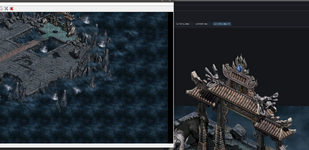
While making minimaps from some maps I found on my PC, I noticed that if some map elements (objects) overlap the map floor tiles area, they are cut off in the minimap. Not sure if you even might want to fix that, it probably might work ok when the image is used as it was meant to, as a minimap....
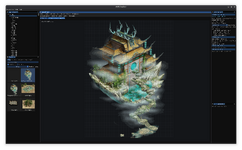
The gate top part sticks out past the map area, what is shown in the editor against black background is not imaged in the minimap as seen on the left.
This site uses cookies to help personalise content, tailor your experience and to keep you logged in if you register.
By continuing to use this site, you are consenting to our use of cookies.



 Screenshot From 2026-03-13 12-37-58.png1.6 MB · Views: 182