- May 19, 2020
- 20
- 43
- 25
Hello,
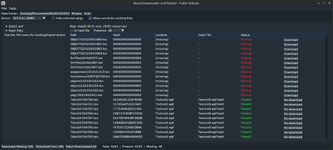
I’m releasing WoOOL Downloader and Patcher, a desktop tool for scanning a WoOOL data folder, checking what resources a map needs, downloading missing files, and patching them back into the correct archives.
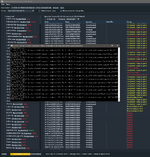
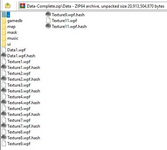
The app is designed to make map and resource maintenance much easier. It can scan your game data folder, list maps found inside .wpf archives, open standalone .nmp files or .wpf.hash sidecars, show a dependency table with missing files, download what is needed, and patch completed downloads back into the correct target archives. It also supports batch workflows, optional disk caching, configurable download settings, and overwrite handling for existing files.
This public release includes two binaries:
- woool-downloader-patcher: the main app
- map-patcher: the same UI in a more map-focused entrypoint without automatic startup scanning
How To Use It
- Start the companion local proxy/service used by the public build.
- Launch woool-downloader-patcher.
- Set your WoOOL Data Folder and click Scan.
- Select a map from the left panel, or open a standalone .nmp / .wpf.hash file from the File menu.
- Review the dependency table to see which resources are already present and which are missing.
- Download the missing resources.
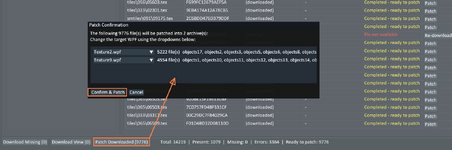
- Patch the completed downloads back into the suggested .wpf archives.
Main Features
- Scan WoOOL data folders for .wpf archives and related files
- Browse maps found inside archives
- Open standalone .nmp and .wpf.hash files
- View dependency, hash, location, and status information
- Download missing resources from the public service setup
- Patch downloaded files back into the correct archive
- Import maps into archives
- Batch-download missing resources for multiple maps
- Optional disk cache and configurable workers/timeouts
- Optional overwrite support for existing files
We find a lot of maps have missing data which we just simply cannot get as its not available on their servers... most of the time that is fine and its data which does not effect the map. There is nothing we can do about that. In this release we are acting as a proxy so things are downloaded to us, if we have it we will give it you, if we do not have it and its not available on their services then you will see an error (its not consistent)
This is currently running on my NAS... because of this the ip address is routed via Protons servers which may change at any time. To see the current IP and port please go to our discord. The service will be moved off of my NAS at some point tonight as it is not currently very stable and is quite low powered so is struggling. Also my upload speed is absolute dog shite...
I will provide minor bits of support but until tomorrow I cannot guarantee good up time.
Known bugs:
The button to do a single file patch does not do anything, just use patch downloaded at the bottom
Errors between file not available and could not connect to server are not consistent and don't line up with what they actually mean.