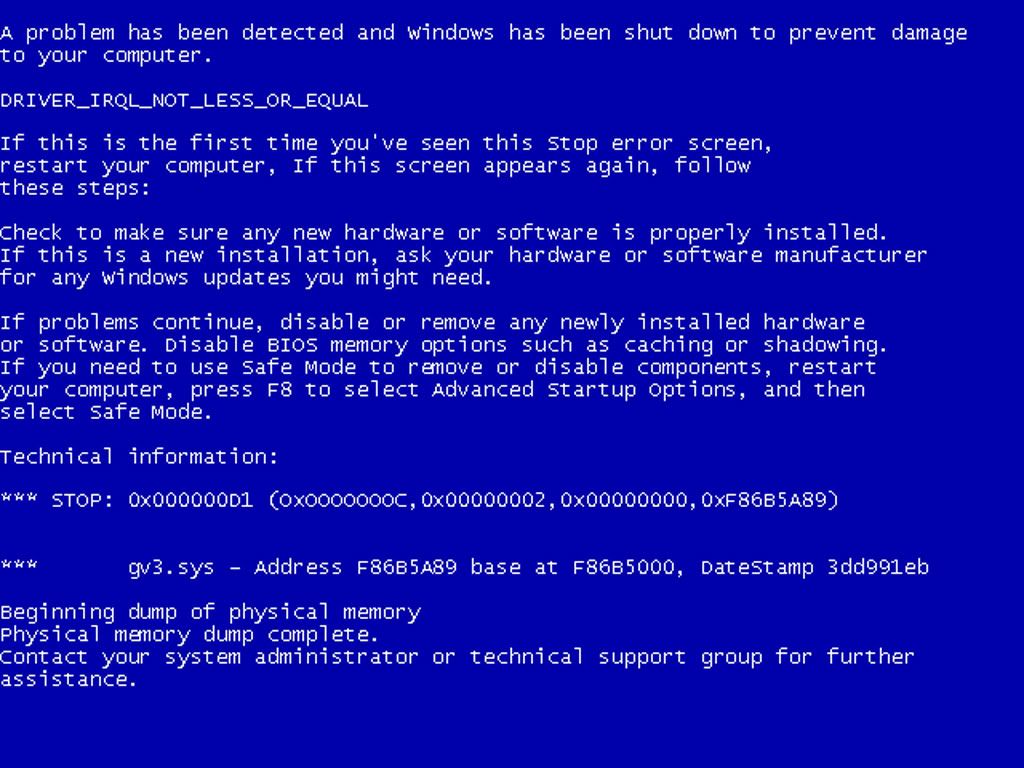
blue screen of death

Mu online season 21 - grand opening

Xanan

LOMCN Veteran
Veteran
Loyal Member
Jan 5, 2006
1,203
10
124
My computer repeatedly keeps experiencing what known as "the blue screen of death".

which basically means, it finds an error that causes it to restart.

This is happening every 30minutes or so, sometimes more. As you can imagine its rather inconvinient.

Has anyone else had this before? Any tips of how to fix it?
 

Xanan

LOMCN Veteran
Veteran
Loyal Member
Jan 5, 2006
1,203
10
124
Ive reformatted 3 times now, ive been reading up on it.

The problem is that you cant screenshot unless i took a photo with a camera. Due to the fact your computer restarts liturally after it happens, ive been reading up on it though.

Picture found on google
3.jpg
 

JealY

LOMCN VIP
VIP
Nov 28, 2004
5,357
55
335
England
The problem is that you cant screenshot unless i took a photo with a camera. Due to the fact your computer restarts liturally after it happens, ive been reading up on it though.

Sarcasm school, here you come!

:D

:middle:
 

Far

tinmymouthpl0x
Staff member
Administrator
May 19, 2003
20,683
34
3,289
520
take temp logs for a while.

well ventilated pc? wheres it kept? doing it on anything in particular?

bsod is usually a way of saying your pc is hot so it restarts to save itself. not usually a software issue unless fails in a certain place everytime (such as trying to load too much memory and just fails)

make sure all your components are firmly in.
 

Xanan

LOMCN Veteran
Veteran
Loyal Member
Jan 5, 2006
1,203
10
124
im gunna get down the computer shop and sort out some new fans.

the computers left on alot as i download quite a bit.

cheers
 

mapadale

Guest
Is everyone that stupid that they don't see the error code.

When you try to shut down your computer, you may receive a STOP error message on a blue screen that is similar to the following: STOP 0x000000D1, (0x0000002b, 0x00000002, 0x00000000, 0xEEEE1b01) IRQL_NOT_LESS_OR_EQUAL Kbdclass.sys.


After you receive this error message, the computer restarts. Back to the top

CAUSEThis behavior may occur if you use a Logitech mouse and the version of the Logit...


This behavior may occur if you use a Logitech mouse and the version of the Logitech MouseWare program that is installed on the computer is outdated. This behavior is known to occur with Logitech MouseWare versions 9.10 and 9.24. Back to the top

RESOLUTIONTo resolve this behavior, remove the Logitech MouseWare program from the compute...


To resolve this behavior, remove the Logitech MouseWare program from the computer and then update to the latest version of Logitech MouseWare.

For more information about how to remove Logitech MouseWare from the computer, see the program documentation or contact Logitech. For more information about how to obtain and install the latest version of Logitech MouseWare, contact Logitech at the following Logitech Web site:http://www.logitech.com (http://www.logitech.com)
Back to the top

MORE INFORMATIONFor additional information about how to troubleshoot another documented STOP er...


For additional information about how to troubleshoot another documented STOP error message that occurs in Kbdclass.sys, click the following article number to view the article in the Microsoft Knowledge Base: 313050 (http://support.microsoft.com/kb/313050/ ) Stop: 0x7E error occurs in Kbdclass.sys when you try to shut down
Microsoft provides third-party contact information to help you find technical support. This contact information may change without notice. Microsoft does not guarantee the accuracy of this third-party contact information.
The third-party products that are discussed in this article are manufactured by companies that are independent of Microsoft. Microsoft makes no warranty, implied or otherwise, regarding the performance or reliability of these products.
Back to the top

APPLIES TO


  • Microsoft Windows XP Professional
  • Microsoft Windows XP Home Edition
  • Microsoft Windows 2000 Server
  • Microsoft Windows 2000 Advanced Server
  • Microsoft Windows 2000 Professional Edition

Back to the top
Keywords:

KB810980
Back to the top

@Farphit

Don't give advice on somthing if you don't know the answer, as you clearly know nothing about software error reporting.

BSOD - This is at software level for all MS OS - It reports error from failed binary coding withing the OS/Hardware, if when the OS runs scripts and one script fails for what ever reason you are presented with a BSOD.

Yes BSOD are for both Software and Hardware, thoguh you will 99% of the time it is reporting software errors within windows and not hardware errors. You should always use http://support.microsoft.com and enter the 0x000000D1 error at the base of the code to get your fault.
 
Last edited:

mapadale

Guest
That's not his BSOD - That's a
It's called showing these so called tech heads on here that they are going the wrong way around what they are trying to find out.

hence - http://support.microsoft.com - 0X000000D1 <- is a base error code, which is the first part of the error.

Hence the quote

So Jealy in future read correctly num wits.
 

Far

tinmymouthpl0x
Staff member
Administrator
May 19, 2003
20,683
34
3,289
520
if that was his BSOD, and not just a random picture found on google, then that might have been useful. but since it was just a random image, and nothing to do with the reason why his pc restarts, when i really dont know how you can say its a driver fault.

yes maybe looking at the error would have been a better clue to whats wrong, but im simply trying to be abit helpful.
 

Skyline

LOMCN Admin
Staff member
Administrator
Mar 26, 2003
7,190
607
360
Sheffield
Ive had it twice.

First time I had just done a fresh install of XP. Managed to do a WIndows update and it fixed it.

Second time was with a new built PC, changed RAM... still happend, Changed HDD and fixed it.

Need to write the code down that it gives you, unless the screen flashes off too quickly.
 

Kaori

LOMCN MiR3 Queen!
VIP
Jun 3, 2004
3,584
38
265
Canada
there should be an option to turn off "auto restart" so it will stay at the blue screen.
 

Liandrin2

Golden Oldie
Golden Oldie
Loyal Member
Jan 14, 2004
890
6
105
If your on xp its :

Right click my computer, select properties. Look around for "startup and recovery". In the settings find "System Failure" and uncheck the auto restart.

Done it too many times ;p

No idea if your on vista though.
 

mapadale

Guest
if that was his BSOD, and not just a random picture found on google, then that might have been useful. but since it was just a random image, and nothing to do with the reason why his pc restarts, when i really dont know how you can say its a driver fault.

yes maybe looking at the error would have been a better clue to whats wrong, but im simply trying to be abit helpful.
but if people actually understood what a BSOD is then they would know that this is software reporting level for MS OS only and nothing to do with hardware, though it does report errors with hardware but only at a software level.

Hardware faults are reconised by ether Binary error reporting and post beep error (which also uses binary coding). Which anyone who actually works with hardware and software would know and not just someone who thinks they know it cause they can build a pc with good specs.
 

Skyline

LOMCN Admin
Staff member
Administrator
Mar 26, 2003
7,190
607
360
Sheffield
My PC gives me 3 beeps when it starts up.

Start up goes too fast, but I cant see any errors, just says initilizing etc.

Gives 1 beep... which is normal as it always has done. then a short pause, and 3 beeps after each other.

Any ideas whats up with it?

Sorry for hi-jacking the thread, but just saw Mapa mention beeps!
 

mapadale

Guest
My PC gives me 3 beeps when it starts up.

Start up goes too fast, but I cant see any errors, just says initilizing etc.

Gives 1 beep... which is normal as it always has done. then a short pause, and 3 beeps after each other.

Any ideas whats up with it?

Sorry for hi-jacking the thread, but just saw Mapa mention beeps!
What BIOS version you got, is it phoenix?

TRY ME
 

lordatrox

Dedicated Member
Dedicated Member
Aug 28, 2008
164
0
42
from what I can remember in my years as a techie the triple beep syndrome generally means something is wrong with your system memory.

Edit: check here for a quick guide on system beeps for most bios' around http://www.pchell.com/hardware/beepcodes.shtml -cos am nice and it only takes 2 mins to google info on the interwebnet