[2.3] Help with ingame screen size and f-keys

Play Now

Miriganu

Dedicated Member
Dedicated Member
May 9, 2013
116
2
44
USA, California
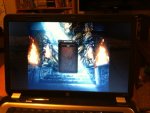
Hey everyone. I have some photos that will better explain what is going on, but basically when i press say f1 to use heal for instance, my f1 function on my laptop brings up a Help and Support window. My f2 key dims the screen brightness and my f3 brightness it, and so forth with the rest of the f-keys. Is there a way to turn those keys off?

My other problem is that the game isn't playing in full screen. My desktop isn't int he background, but i have about 2 inches of black space on the right and left of my screen. If the photos i uploaded worked, you'll see what i mean. Any thoughts?
Thanks!

 

Attachments

  • photo(1).JPG
    photo(1).JPG
    75.4 KB · Views: 31
  • photo.JPG
    photo.JPG
    84.3 KB · Views: 31

Voya

Golden Oldie
Golden Oldie
Mar 15, 2008
979
62
115
USA
My only thoughts on this is to somehow disable the shortcuts for the function keys.
 
Upvote 0

Miriganu

Dedicated Member
Dedicated Member
May 9, 2013
116
2
44
USA, California
i was able to disable the function keys by going into the bios and turning them off. I feel like i should have to do that. ive played many private servers over the years and have never had to do that. Its a new one to me.
Stil not sure how to fix the screen size though...
 
Upvote 0

Voya

Golden Oldie
Golden Oldie
Mar 15, 2008
979
62
115
USA
i was able to disable the function keys by going into the bios and turning them off. I feel like i should have to do that. ive played many private servers over the years and have never had to do that. Its a new one to me.
Stil not sure how to fix the screen size though...

Have you tried to press i think it was Shift + F or something weird like that?
if not that have you tried to change the Resolution of the screen itself?
 
Upvote 0

mighty3

LOMCN Veteran
Veteran
Oct 2, 2008
593
11
105
grantham
if any think like that happens again it all to do with descaleing it does this even more with windows 8 simple to sovel by trununing it off by the fn +a f number for windows 8 it fn+f7

as for the short cuts just change them to some think you dont use or delete them soon can put them bk on if need
 
Last edited:
Upvote 0