Important Patcher Update V2.0.3 (Please Read).

Samuel

Mir Chronicles Dev
VIP
Feb 8, 2011
2,614
117
280
Hey all,

Apologies it has taken this long to sort the current patcher issue (redownloading audio.pak, minimap.pak and sound.lst over and over because they became corrupt on our last upload), however, we have hopefully fixed the underlying issue(s) (thanks to Jamie for his support with this).

Please download the latest version of the patcher from here. - This will hopefully be the last time you need to manually update your patchers

Fixes/Changes as of V2.0.3:
- Patcher is now capable of patching itself (might be some issues with xp users, would really like feedback if you experience any issues).
- Patcher now downloads a physical zip (TempFile.gz), extracts it and finally cleans up after itself (instead of attempting to do this all in memory).
- Removed gate indicators as they were showing false positives.
- Removed user count until an underlying issue has been fixed.
- Decreased height (was to tall on my rubbish laptop resolution :P).
- Random GUI loading (different images will load).

We have run a number of tests against the latest build of the patcher (including against different versions of windows (xp, 7 and 8)), however, there have been a number of changes, so, we recommend to take care when running it (potentially back up your current first, although I don't think this is necessary, it might be worth doing until we confirm there are no hiccups).

Please provide us with any feedback/issue reports.

Sam
 

Jamie

LOMCN Developer
Developer
Mar 29, 2003
4,862
418
350
United Kingdom
I would recommend a small change For Faster transfers on smaller files, (I don't believe this has a negative effect on large files).

Change PatchClient.ini to

Code:
Host=http://162.243.83.44/NewerPatcher/

Old Value

Code:
Host=ftp://162.243.83.44/NewerPatcher/
 

Clintus2

Dedicated Member
Dedicated Member
Jan 31, 2014
394
4
45
currently downloading the 3 files, hopefully for the last time
 

simon01

Dedicated Member
Dedicated Member
Mar 21, 2014
48
1
34
Down loaded it and tested it seem fine and working ok for me thx Sam.
 

Nizzles

Loyal Member
Loyal Member
Mar 28, 2014
192
1
44
Map for numa at last! My god that place was shite without a map. Cheers :)
 

Vulcan

Dedicated Member
Dedicated Member
Mar 20, 2014
46
0
33
patcher downloaded fine, mouse wheel functions no longer working tho, ie, scrolling and auto run
 

Tai

HEAD CAPTAIN
Staff member
Administrator
May 11, 2003
14,769
3
3,342
495
United Kingdom
Code:
See the end of this message for details on invoking just-in-time (JIT) debugging instead of this dialog box.


************** Exception Text **************
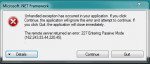
System.Net.WebException: The remote server returned an error: 227 Entering Passive Mode (162,243,83,44,86,55).
. ---> System.Net.Sockets.SocketException: A connection attempt failed because the connected party did not properly respond after a period of time, or established connection failed because connected host has failed to respond 162.243.83.44:22071
   at System.Net.Sockets.Socket.DoConnect(EndPoint endPointSnapshot, SocketAddress socketAddress)
   at System.Net.Sockets.Socket.Connect(EndPoint remoteEP)
   at System.Net.FtpControlStream.QueueOrCreateDataConection(PipelineEntry entry, ResponseDescription response, Boolean timeout, Stream& stream, Boolean& isSocketReady)
   at System.Net.FtpControlStream.PipelineCallback(PipelineEntry entry, ResponseDescription response, Boolean timeout, Stream& stream)
   at System.Net.CommandStream.PostReadCommandProcessing(Stream& stream)
   at System.Net.CommandStream.PostSendCommandProcessing(Stream& stream)
   at System.Net.CommandStream.ContinueCommandPipeline()
   at System.Net.CommandStream.SubmitRequest(WebRequest request, Boolean async, Boolean readInitalResponseOnConnect)
   at System.Net.FtpWebRequest.TimedSubmitRequestHelper(Boolean async)
   at System.Net.FtpWebRequest.SubmitRequest(Boolean async)
   --- End of inner exception stack trace ---
   at System.Net.WebClient.DownloadDataInternal(Uri address, WebRequest& request)
   at System.Net.WebClient.DownloadString(Uri address)
   at System.Net.WebClient.DownloadString(String address)
   at ClientPatcher.CMain.UpdateSelf()
   at ClientPatcher.CMain.CMain_Load(Object sender, EventArgs e)
   at System.Windows.Forms.Form.OnLoad(EventArgs e)
   at System.Windows.Forms.Form.OnCreateControl()
   at System.Windows.Forms.Control.CreateControl(Boolean fIgnoreVisible)
   at System.Windows.Forms.Control.CreateControl()
   at System.Windows.Forms.Control.WmShowWindow(Message& m)
   at System.Windows.Forms.Control.WndProc(Message& m)
   at System.Windows.Forms.ScrollableControl.WndProc(Message& m)
   at System.Windows.Forms.ContainerControl.WndProc(Message& m)
   at System.Windows.Forms.Form.WmShowWindow(Message& m)
   at System.Windows.Forms.Form.WndProc(Message& m)
   at System.Windows.Forms.Control.ControlNativeWindow.OnMessage(Message& m)
   at System.Windows.Forms.Control.ControlNativeWindow.WndProc(Message& m)
   at System.Windows.Forms.NativeWindow.Callback(IntPtr hWnd, Int32 msg, IntPtr wparam, IntPtr lparam)


************** Loaded Assemblies **************
mscorlib
    Assembly Version: 4.0.0.0
    Win32 Version: 4.0.30319.18444 built by: FX451RTMGDR
    CodeBase: file:///C:/Windows/Microsoft.NET/Framework/v4.0.30319/mscorlib.dll
----------------------------------------
ClientPatcher
    Assembly Version: 2.0.3.0
    Win32 Version: 2.0.3.0
    CodeBase: file:///E:/Pers/Chron/ChroniclesPatcher.exe
----------------------------------------
System.Windows.Forms
    Assembly Version: 4.0.0.0
    Win32 Version: 4.0.30319.18408 built by: FX451RTMGREL
    CodeBase: file:///C:/Windows/Microsoft.Net/assembly/GAC_MSIL/System.Windows.Forms/v4.0_4.0.0.0__b77a5c561934e089/System.Windows.Forms.dll
----------------------------------------
System.Drawing
    Assembly Version: 4.0.0.0
    Win32 Version: 4.0.30319.18408 built by: FX451RTMGREL
    CodeBase: file:///C:/Windows/Microsoft.Net/assembly/GAC_MSIL/System.Drawing/v4.0_4.0.0.0__b03f5f7f11d50a3a/System.Drawing.dll
----------------------------------------
System
    Assembly Version: 4.0.0.0
    Win32 Version: 4.0.30319.18408 built by: FX451RTMGREL
    CodeBase: file:///C:/Windows/Microsoft.Net/assembly/GAC_MSIL/System/v4.0_4.0.0.0__b77a5c561934e089/System.dll
----------------------------------------
System.Configuration
    Assembly Version: 4.0.0.0
    Win32 Version: 4.0.30319.18408 built by: FX451RTMGREL
    CodeBase: file:///C:/Windows/Microsoft.Net/assembly/GAC_MSIL/System.Configuration/v4.0_4.0.0.0__b03f5f7f11d50a3a/System.Configuration.dll
----------------------------------------
System.Xml
    Assembly Version: 4.0.0.0
    Win32 Version: 4.0.30319.18408 built by: FX451RTMGREL
    CodeBase: file:///C:/Windows/Microsoft.Net/assembly/GAC_MSIL/System.Xml/v4.0_4.0.0.0__b77a5c561934e089/System.Xml.dll
----------------------------------------


************** JIT Debugging **************
To enable just-in-time (JIT) debugging, the .config file for this
application or computer (machine.config) must have the
jitDebugging value set in the system.windows.forms section.
The application must also be compiled with debugging
enabled.


For example:


<configuration>
    <system.windows.forms jitDebugging="true" />
</configuration>


When JIT debugging is enabled, any unhandled exception
will be sent to the JIT debugger registered on the computer
rather than be handled by this dialog box.

Code:
[AutoPatcher]
Host=ftp://162.243.83.44/NewerPatcher/
Username=
Password=
UpdateUri=ftp://162.243.83.44/UpdatePatcher/
 

Jamie

LOMCN Developer
Developer
Mar 29, 2003
4,862
418
350
United Kingdom
Ok interesting try, let me know what you get.

Code:
[AutoPatcher]
Host=Http://162.243.83.44/NewerPatcher/
Username=
Password=
 

Babyhack

Devilsoul Owner
VIP
Feb 4, 2004
5,343
28
285
Dublin, Ireland
Just out of interest related to this

Is the FTP port closed and this is the reason that ftp did not work
are you able to connect to ftp normally.

Just wondering is all, interested to know what may have been to cause

BH
 

Jamie

LOMCN Developer
Developer
Mar 29, 2003
4,862
418
350
United Kingdom
Just out of interest related to this

Is the FTP port closed and this is the reason that ftp did not work
are you able to connect to ftp normally.

Just wondering is all, interested to know what may have been to cause

BH

If im honest I think the problem was trying to read the Updater Patcher, removing UpdateUri="..." from config is a temporary fix but it won't be able to selfupdate (from what I can tell).
 

Samuel

Mir Chronicles Dev
VIP
Feb 8, 2011
2,614
117
280
I imagine Tai's firewall doesn't allow outgoing connections via ftp by default (forget what the port is now), however, port 80 is usually allowed by default.

Sam