WoOOL - DaP (Downloader and Patcher)

R0ck

Loyal Member
Loyal Member
May 19, 2020
20
43
25
1774107490280.png

Hello,

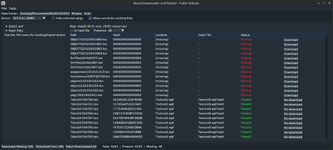
I’m releasing WoOOL Downloader and Patcher, a desktop tool for scanning a WoOOL data folder, checking what resources a map needs, downloading missing files, and patching them back into the correct archives.

The app is designed to make map and resource maintenance much easier. It can scan your game data folder, list maps found inside .wpf archives, open standalone .nmp files or .wpf.hash sidecars, show a dependency table with missing files, download what is needed, and patch completed downloads back into the correct target archives. It also supports batch workflows, optional disk caching, configurable download settings, and overwrite handling for existing files.

This public release includes two binaries:
  • woool-downloader-patcher: the main app
  • map-patcher: the same UI in a more map-focused entrypoint without automatic startup scanning

How To Use It​

  1. Start the companion local proxy/service used by the public build.
  2. Launch woool-downloader-patcher.
  3. Set your WoOOL Data Folder and click Scan.
  4. Select a map from the left panel, or open a standalone .nmp / .wpf.hash file from the File menu.
  5. Review the dependency table to see which resources are already present and which are missing.
  6. Download the missing resources.
  7. Patch the completed downloads back into the suggested .wpf archives.

Main Features​

  • Scan WoOOL data folders for .wpf archives and related files
  • Browse maps found inside archives
  • Open standalone .nmp and .wpf.hash files
  • View dependency, hash, location, and status information
  • Download missing resources from the public service setup
  • Patch downloaded files back into the correct archive
  • Import maps into archives
  • Batch-download missing resources for multiple maps
  • Optional disk cache and configurable workers/timeouts
  • Optional overwrite support for existing files
Side notes:
We find a lot of maps have missing data which we just simply cannot get as its not available on their servers... most of the time that is fine and its data which does not effect the map. There is nothing we can do about that. In this release we are acting as a proxy so things are downloaded to us, if we have it we will give it you, if we do not have it and its not available on their services then you will see an error (its not consistent)

This is currently running on my NAS... because of this the ip address is routed via Protons servers which may change at any time. To see the current IP and port please go to our discord. The service will be moved off of my NAS at some point tonight as it is not currently very stable and is quite low powered so is struggling. Also my upload speed is absolute dog shite...

I will provide minor bits of support but until tomorrow I cannot guarantee good up time.


Known bugs:
The button to do a single file patch does not do anything, just use patch downloaded at the bottom
Errors between file not available and could not connect to server are not consistent and don't line up with what they actually mean.
 

mir2pion

TL;DR
Veteran
Feb 21, 2013
3,591
2
679
265
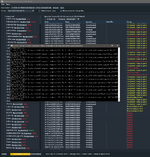
I selected the first three maps in 'Batch Download Missing' and its downloading nicely, I checkmarked 'Allow overwrite existing files' as you have it in the screenshot above here because it might want to start patching after download automatically? Good I didn't select them all, it seems to be quite an intensive job.

I wonder if it might be better for your NAS download if you just updated your local data and put it up for download on the proton site like you did with that 25GB data initially? Then pple wouldn't load your NAS to update so many maps and only check if they find some map incomplete?

I was puzzled by that high map count that I didn't see in my downloaded files but you say they are hidden in wpf archives in the data
list maps found inside .wpf archives
:geek: Silly question, how are those maps accessed in the map editor then if you wanted to look at them?

1774140223875.png
Ooops, I forgot I have map editor opened and when I went back to it and wanted to open its preferences, it closed your program in the middle of downloading... :whistle: now when I selected the same job on the first three maps, it is going from starting point, not resuming.
 

Tikky

Tikky
VIP
Jun 30, 2011
213
114
110
Gone missing
I selected the first three maps in 'Batch Download Missing' and its downloading nicely, I checkmarked 'Allow overwrite existing files' as you have it in the screenshot above here because it might want to start patching after download automatically? Good I didn't select them all, it seems to be quite an intensive job.

I wonder if it might be better for your NAS download if you just updated your local data and put it up for download on the proton site like you did with that 25GB data initially? Then pple wouldn't load your NAS to update so many maps and only check if they find some map incomplete?

I was puzzled by that high map count that I didn't see in my downloaded files but you say they are hidden in wpf archives in the data

:geek: Silly question, how are those maps accessed in the map editor then if you wanted to look at them?

View attachment 39251
Ooops, I forgot I have map editor opened and when I went back to it and wanted to open its preferences, it closed your program in the middle of downloading... :whistle: now when I selected the same job on the first three maps, it is going from starting point, not resuming.
In the map editor, on the left you can expand WPF files like folders to view their content. in Data1.wpf find the 'map' folder, then double click a map in there to open it.

In ContentEditor you can do the same, expand a WPF to get to the files, and in the content editor you can right click a nmp file and then click 'Open in mapeditor' (providing the map editor is running)
 

R0ck

Loyal Member
Loyal Member
May 19, 2020
20
43
25
wonder if it might be better for your NAS download if you just updated your local data and put it up for download on the proton site like you did with that 25GB data initially? Then pple wouldn't load your NAS to update so many maps and only check if they find some map incomplete?
We have already done that, with the latest client (in data-complete). Also the proxy already has the files in its cache (so I didn't hammer their stuff initially).

There is like 3 new maps since December 2025 which looking at my monitoring someone has downloaded one of them.
1774141873721.png

I still haven't moved it onto my proxmox services as i have been busy today.
 
  • Like
Reactions: mir2pion

mir2pion

TL;DR
Veteran
Feb 21, 2013
3,591
2
679
265
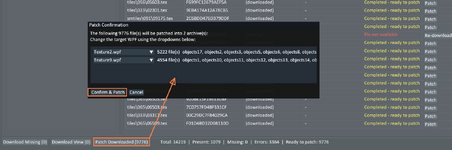
In case others can't figure out how to patch downloaded files, I won't be changing targets, I trust it knows what to do :cool:
1774143772845.png
 
  • Love
Reactions: R0ck

R0ck

Loyal Member
Loyal Member
May 19, 2020
20
43
25
In case others can't figure out how to patch downloaded files, I won't be changing targets, I trust it knows what to do :cool:
View attachment 39253
Yeah thats my bad, there is a bug where the individual patcher just does nothing... I could not be bothered to fix it as I was itching to move on. I did make it smart though to decide which .wpf files it should go to.

Known bugs:
The button to do a single file patch does not do anything, just use patch downloaded at the bottom
Errors between file not available and could not connect to server are not consistent and don't line up with what they actually mean.
 

mir2pion

TL;DR
Veteran
Feb 21, 2013
3,591
2
679
265
We have already done that, with the latest client (in data-complete).

Ah, OK, I opened your downloader patcher program to Data 2.9.6.6 from the first download and many maps need patching, I thought I opened the 'data-complete' 2.9.10.32, I expect then maps in this v10will not need updating.

I am still confused, why are there three Data folders, should I keep all three of them? One Data version 2.9.6.6 and two (Data & Data-Complete) version 2.9.10.32

That's like Data from three different clients? And maps in each use map resources from their Data folder?
 

Tikky

Tikky
VIP
Jun 30, 2011
213
114
110
Gone missing
1774206362754.png
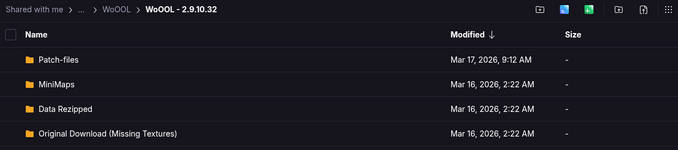
Patch-files are the data missing from 2.9.10.32 that is got though the cache proxy. So ignore this
MIniMaps - a folder for holding minimaps (png varient). So ignore this
Data Rezipped is just the data folder from the clients.
- Data.zip = original data folder that is not complete. So ignore this.

- Data-Complete.zip = the complete data... Download this one
Original Download (Missing Textures) = the raw files we started with, just with corrected file ext and names. So ignore this.

Only use the downloader tool for future update that havent been released yet and do on top of the 2.9.10.32 client
 
  • Like
Reactions: mir2pion

mir2pion

TL;DR
Veteran
Feb 21, 2013
3,591
2
679
265
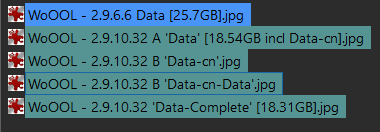
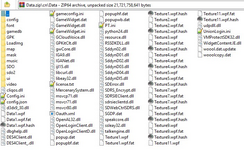
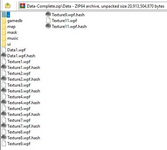
To make a sense of the files, I made a picture summary of the @hectospark proton uploads.

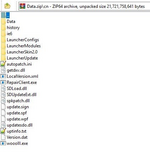
The blue 2.9.6.6 is the image of unzipped files, the 2.9.10.32 are images of opened zip archives. The 2.9.10.32 A & B are from the same archive which contains Data & cn folders. The cn folder on top of it contains its own Data folder shown in its own image.

So the first three images 2.9..10.32 are from the 18.54GB Data.zip, the last, 4th image 2.9.10.32 is from the 18.31GB Data-Complete.zip

1774201717373.png

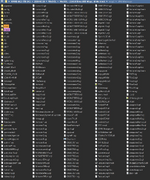
2.9.6.6 - 25.7GB - Data
map2 is my addition of 46 maps I had on my drive for some years, download link for them is in one of my posts. They were missing here but likely they are among the 2.9.10.32 maps.
1774202606849.png
I am currently updating this one using the downloader and patcher tool and might upload it when done. Compared to the other data files, this one looks most like mir2 data, with .sgl taking place of .lib


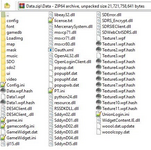
WoOOL - 2.9.10.32 A 'Data.zip-Data' [18.54GB size includes Data-cn in next image]
1774202748439.png


WoOOL - 2.9.10.32 B 'Data-cn'
1774203707151.png
This looks to be the whole WoOOL Chinese client with its own Data as seen in the next image.

WoOOL - 2.9.10.32 B 'Data-cn-Data'
1774203791668.png

WoOOL - 2.9.10.32 'Data-Complete' [18.31GB]
1774203828001.png
! @Tikky from the above post - Data-Complete.zip = the complete data... Download this one (and ignore all the rest). !

-----------------------------------------------------------------------
Apart from that first 25.7GB file, all the other ones from the two 18GB downloads have different structure, sgl vs wpf

It reminds me of mir3d various servers developed by different Chinese QQ groups with some servers using txt files while other ones used cvs instead. Mir3d client apparently also can use upk archives (which are normally packed into pak archives) directly. Probably the two Woool styles, the sgl and wpf are just a result of different groups developing them.
Post automatically merged:

Only use the downloader tool for future update that havent been released yet and do on top of the 2.9.10.32 client

Thanks so much for clearing that up, I guess I'll leave this post showing files content here which I just made before seeing yours.
 
Last edited:
  • Like
Reactions: Tikky