Amature here :(

Play Now

Kursk

Dedicated Member
Dedicated Member
Jul 24, 2003
28
0
78
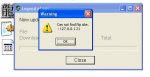
When I go to start mir it say's ''cannot find ftp site : 127.0.0.1.21"

I have followed the guide on ferny's which everybody else has said they have encountered no problems with, and have followed them exactly to my knowledge.

Does this matter?

When I click the icon the second time I get in but I only get connection closed :confused:
 

Miles

LOMCN VIP
VIP
Mar 27, 2003
1,195
0
213
Maby because the ip is meant to be 127.0.0.1 if your only connection to it from your pc and there is no 21 in it atall try changing it to the correct ip.

/Miles
 

Kursk

Dedicated Member
Dedicated Member
Jul 24, 2003
28
0
78
:confused:

there are no 21's on the ip's in my mir folder

could it because of port=21?

and is this the reason for connection closed?
 

Miles

LOMCN VIP
VIP
Mar 27, 2003
1,195
0
213
Make sure you have set up bde admin and that all of your ip's in the ini's are set to 127.0.0.1 also a screenshot of the error might help people solve the problem.

/Miles
 

Kursk

Dedicated Member
Dedicated Member
Jul 24, 2003
28
0
78
here sreenshot, then on second time mir starts and I get connection closed.

could this be due to the thisngs in the serverfiles

i.e

in the logdata.ini

[setup]
basedir=C:\mirserver\gamelog\LogDataSrv\Logbase\
 

Attachments

  • error1.jpg
    error1.jpg
    17.5 KB · Views: 44

Wittin

Ex-Δdministrator
VIP
May 7, 2003
1,341
1
244
295
Firstly, i do not even use the auto patch;).
Secondly, the IP adress you need is : 127.0.0.1, i have no idea where the .21 came from, i dont believe it has anything to do with the ports either. Try setting all IP addresses to 127.0.0.1

-Wittin
 

Kursk

Dedicated Member
Dedicated Member
Jul 24, 2003
28
0
78
kk - Deleted patch and patch.dat :p

get into mir straight away now but I still get connection closed :(

all IP's in the mir folder r correct
 

Kursk

Dedicated Member
Dedicated Member
Jul 24, 2003
28
0
78
it tells you too change too c:\mirserver\mud2 etc in guide

when I exracted my files ended up in C:\mirserver\serverfiles.rar\

so where it says I should change all these d:\korea\mud2 etc to c:\mirserver\mud2 etc should I have

c:\mirserver\serverfiles.rar\mud2 etc?

hope tis makes a little sense :P
 

Soljah

Guest
Wittin said:
Firstly, i do not even use the auto patch;).
Secondly, the IP adress you need is : 127.0.0.1, i have no idea where the .21 came from, i dont believe it has anything to do with the ports either. Try setting all IP addresses to 127.0.0.1

-Wittin

i get it but it still works 100%.