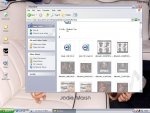
When i go to my music folder or any otha folder it always has these stupid see thorugh items how do ig et rid of them i know its a simple fix but i cannot find it.
Those are supposed to be hidden icons, open a windows explorer window, press the tools tab on top, press "Folder options", then press the "View" tab, then find "Do not show hidden files and folders" and tick the circle on the left from it.
This site uses cookies to help personalise content, tailor your experience and to keep you logged in if you register.
By continuing to use this site, you are consenting to our use of cookies.





 .
.