


- May 7, 2003
- 1,341
- 1
- 244
- 295

Hi!
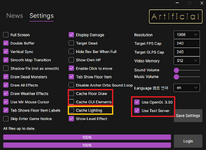
I know some older PCs, and Dual GPU PCs have some compatibility issues with the new graphics engine. First and foremost make sure to update your graphics card drivers, especially if you are using an Intel Integrated type graphics chip (most laptops). If this does not work in the majority of cases this can be overcome by some client side tweaks we've included in the launcher settings. I'd try with these settings to begin with (try both with and without the cache lighting to see whether it helps):
Also you may need to restart the launcher after enabling 'Use Test Server' to reveal the 'Use OpenGL 3.30' setting.
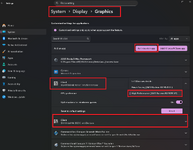
There are some additional tweaks which might need to be made in windows if you are on a Dual Graphics setup (Integrated and discreet):
Hopefully these should get you in game.
In the meantime do you mind messaging me with your PC hardware specs (GPU, CPU and Operating system?). That would be very handy to know!
Also trying in Windowed Mode at least in testing as Jambo said is highly advised
I know some older PCs, and Dual GPU PCs have some compatibility issues with the new graphics engine. First and foremost make sure to update your graphics card drivers, especially if you are using an Intel Integrated type graphics chip (most laptops). If this does not work in the majority of cases this can be overcome by some client side tweaks we've included in the launcher settings. I'd try with these settings to begin with (try both with and without the cache lighting to see whether it helps):
Also you may need to restart the launcher after enabling 'Use Test Server' to reveal the 'Use OpenGL 3.30' setting.
There are some additional tweaks which might need to be made in windows if you are on a Dual Graphics setup (Integrated and discreet):
Hopefully these should get you in game.
In the meantime do you mind messaging me with your PC hardware specs (GPU, CPU and Operating system?). That would be very handy to know!
Also trying in Windowed Mode at least in testing as Jambo said is highly advised

