[CD3.55] Because it does not work?

Mu online season 21 - grand opening

Mart393

Dedicated Member
Dedicated Member
Dec 15, 2011
167
14
45
Wear all day trying to install the server on my desktop computer.
I managed to run the server perfectly, all ip: 127.0.0.1
Also I have open ports.


Anyway, I am now trying to put the public server, and when I start my thoughts about everything right, I do not get any error, but when I start the client tells me that the server is offline.


I created a loopback adapter, but still not working.


Anyone have any idea what could be happening?


Thank you very much in advance!

----------------------------------------------------------

Llevo todo el dia tratando de montar el servidor en mi ordenador de sobremesa.
He conseguido hacer funcionar el servidor a la perfeccion, todas las ip en: 127.0.0.1
Tambien tengo los puertos abiertos.

El caso es que ahora estoy tratando de poner el servidor publico, y cuando lo inicio parace ir todo bien, no me sale ningun error, pero cuando inicio el cliente, me dice que el servidor esta offline.

He creado un adaptador de bucle invertido, pero sigue sin funcionar.

Alguien tiene alguna idea de que puede estar pasando?

Muchas gracias de antemano!
 

Mart393

Dedicated Member
Dedicated Member
Dec 15, 2011
167
14
45
thanks for replying, here I put the ip I use:


SQL

TBL_PUBIPS
127.0.0.1 localhost MIR3

TBL_SELECTGATEIPS
Sting 95.19.xx.xx 7100 MIR3

CLIENT
mud3\CruelDragon3G.INI
Ip: 192.168.1.xx

mud3\mir3server\HolleyDBSvr\HolleyDBSvr.exe
IP Set in here - 127.0.0.1

mud3\mir3server\HolleyDBSvr\!serverinfo.txt
127.0.0.1,95.19.xx.xx:7200

Mud3\mir3server\GameGate\SelGate\Config.ini
ServerAddr=127.0.0.1
ServerPort=5100
GateAddr=127.0.0.1
GatePort=7100

C:\Mud3\mir3server\GameGate\RunGate\Config.ini
ServerAddr=127.0.0.1
ServerPort=5010
GateAddr=0.0.0.0
GatePort=7200

C:\Mud3\mir3server\?????\RegServer.exe
LocalIP=192.168.1.xx
RegPort=7010
SQLIP=127.0.0.1
Username=**********
Password=**********
MapName=0
Map_X=160
Map_Y=230
LoginPort=7000
LoginSrvPort=5500
LoginSrvIP=127.0.0.1

C:\Mud3\Setup\!runaddr.txt
127.0.0.1

C:\Mud3\Setup\!servertable.txt
0 127.0.0.1 7200

C:\Mud3\Setup\!Setup.txt
Game IP - 127.0.0.1
Hero IP - 127.0.0.1
DBAddress - 127.0.0.1
MsgAddress - 127.0.0.1
IDSAddress - 127.0.0.1
LogAddress - 127.0.0.1


where is the error?
a friend of mine try to connect from your home server will appear Offline

I am running the server from VirtualBox: Windows XP
 
Last edited:
Upvote 0

LightningStar

LOMCN Veteran
Veteran
Loyal Member
May 28, 2007
408
7
45
Essex, UK
thanks for replying, here I put the ip I use:


SQL

TBL_PUBIPS
127.0.0.1 localhost MIR3

TBL_SELECTGATEIPS
Sting 95.19.xx.xx 7100 MIR3

CLIENT
mud3\CruelDragon3G.INI
Ip: 192.168.1.xx

mud3\mir3server\HolleyDBSvr\HolleyDBSvr.exe
IP Set in here - 127.0.0.1

mud3\mir3server\HolleyDBSvr\!serverinfo.txt
127.0.0.1,95.19.xx.xx:7200

Mud3\mir3server\GameGate\SelGate\Config.ini
ServerAddr=127.0.0.1
ServerPort=5100
GateAddr=127.0.0.1
GatePort=7100

C:\Mud3\mir3server\GameGate\RunGate\Config.ini
ServerAddr=127.0.0.1
ServerPort=5010
GateAddr=0.0.0.0
GatePort=7200

C:\Mud3\mir3server\?????\RegServer.exe
LocalIP=192.168.1.xx
RegPort=7010
SQLIP=127.0.0.1
Username=**********
Password=**********
MapName=0
Map_X=160
Map_Y=230
LoginPort=7000
LoginSrvPort=5500
LoginSrvIP=127.0.0.1

C:\Mud3\Setup\!runaddr.txt
127.0.0.1

C:\Mud3\Setup\!servertable.txt
0 127.0.0.1 7200

C:\Mud3\Setup\!Setup.txt
Game IP - 127.0.0.1
Hero IP - 127.0.0.1
DBAddress - 127.0.0.1
MsgAddress - 127.0.0.1
IDSAddress - 127.0.0.1
LogAddress - 127.0.0.1


where is the error?
a friend of mine try to connect from your home server will appear Offline

I am running the server from VirtualBox: Windows XP

Username in Reg Server has to be 'sa'
Ip in TBL_PUBIPS have to be
127.0.0.1
127.0.0.1
127.0.0.1
92.12.xx.xx ( your net IP)

Server name has to match everywhere in the files.

Crueldragon IP has to be 127.0.0.1
Username is sa
Pass has to be the pass you created when setting up SQL.
 
Last edited:
Upvote 0

LightningStar

LOMCN Veteran
Veteran
Loyal Member
May 28, 2007
408
7
45
Essex, UK
Did you indeed set up a loopback adaptor?
If so then you wouldn't be using 127.0.0.1

I connected to him via teamviewer, Everything is ok barr his regserver, it wont run on his 192.168 ip. i did the ipconfig in cmd and obtain the ip but stil dont wanna know and I changed the pass to the required one.
 
Upvote 0

Mart393

Dedicated Member
Dedicated Member
Dec 15, 2011
167
14
45
Ey guys!

I think I've solved the problem. It was a problem in the network settings virtualbox. Now RegServer already connected and when I try to connect to the connection of the client IP appears in logingate :)


The problem happens now is that when I go to the client, I get the following error message:


"The Connection failed, do you want to reconnect?"

If I click on "Yes" nothing happens, and if I click to "NO" the client is closed ...


It is assumed that the IP are all correct, then this is a must ...


Sorry for many mistakes. Truly I am grateful for your help.
 
Upvote 0

Mart393

Dedicated Member
Dedicated Member
Dec 15, 2011
167
14
45
SQL

TBL_SERVERINFO
HOLLEY 1 2800 MIR3


TBL_SELECTGATEIPS

HOLLEY external ip 7100 MIR3


TBL_PUBIPS
127.0.0.1 LoginGW MIR3
127.0.0.1 SET1 DB Conn MIR3
127.0.0.1 SET1 GameSrv1 MIR3
external ip LoginServer MIR3


SERVER

CruelDragon3G.INI
127.0.0.1

!runaddr.txt
127.0.0.1

!servertable.txt
0 127.0.0.1 7200

Setup.exe
all 127.0.0.1

Rungate
ServerAddr=127.0.0.1
ServerPort=5010
GateAddr=0.0.0.0

Selgate
ServerAddr=127.0.0.1
ServerPort=5100
GateAddr=0.0.0.0

HolleyDBSvr
!serverinfo.txt
127.0.0.1,externalip:7200
HolleyDBSvrEiIP.txt
127.0.0.1
DBSvr.exe
127.0.0.1

logingate
MirLogin.ini

addr=127.0.0.1
remoteport=5500
localport=7000

HL_RegServer.ini
LocalIP=192.168.x.xx
RegPort=7010
SQLIP=127.0.0.1
Username=sa
Password=sa
MapName=0
Map_X=160
Map_Y=230
LoginPort=7000
LoginSrvPort=5500
LoginSrvIP=127.0.0.1

And ports open: 7000 to 7300 TCP & UDP

---------- Post Merged at 11:04 AM ---------- Previous Post was at 04:25 AM ----------

Sorry doble post

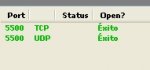
I'm using kaorimir checker and I'm seeing does not work when reading ports...

---------- SQL Checking Start ----------
---------- Account Database (ODBC) ----------
Account ODBC is connected successfully.
TBL_ACCOUNT has 1 rows.
---------- Game Database (ODBC) ----------
Game ODBC is connected successfully.
TBL_CHARACTER has 0 rows.
---------- Manage Database (ODBC) ----------
Manage ODBC is connected successfully.
---------- Base Data Database (Direct) ----------
Base Data Database is connected successfully.
HL_Stditems table is healthy.
---------- Game Database (Direct) ----------
Game Database is connected successfully.
TBL_ABILITY has 0 rows.
---------- Hero Database (Direct) ----------
Hero Database is connected successfully.
rareitemsdata has 192 rows.
---------- SQL Checking Done ----------


---------- Port Checking Start ----------
Localhost Address is 192.168.x.xxx
Unable to get Net address.


but I do not understand because I have opened the ports, and configured obdc ...
 
Last edited:
Upvote 0

LightningStar

LOMCN Veteran
Veteran
Loyal Member
May 28, 2007
408
7
45
Essex, UK
SQL

TBL_SERVERINFO
HOLLEY 1 2800 MIR3


TBL_SELECTGATEIPS

HOLLEY external ip 7100 MIR3


TBL_PUBIPS
127.0.0.1 LoginGW MIR3
127.0.0.1 SET1 DB Conn MIR3
127.0.0.1 SET1 GameSrv1 MIR3
external ip LoginServer MIR3


SERVER

CruelDragon3G.INI
127.0.0.1

!runaddr.txt
127.0.0.1

!servertable.txt
0 127.0.0.1 7200

Setup.exe
all 127.0.0.1

Rungate
ServerAddr=127.0.0.1
ServerPort=5010
GateAddr=0.0.0.0

Selgate
ServerAddr=127.0.0.1
ServerPort=5100
GateAddr=0.0.0.0

HolleyDBSvr
!serverinfo.txt
127.0.0.1,externalip:7200
HolleyDBSvrEiIP.txt
127.0.0.1
DBSvr.exe
127.0.0.1

logingate
MirLogin.ini

addr=127.0.0.1
remoteport=5500
localport=7000

HL_RegServer.ini
LocalIP=192.168.x.xx
RegPort=7010
SQLIP=127.0.0.1
Username=sa
Password=sa
MapName=0
Map_X=160
Map_Y=230
LoginPort=7000
LoginSrvPort=5500
LoginSrvIP=127.0.0.1

And ports open: 7000 to 7300 TCP & UDP

---------- Post Merged at 11:04 AM ---------- Previous Post was at 04:25 AM ----------

Sorry doble post

I'm using kaorimir checker and I'm seeing does not work when reading ports...

---------- SQL Checking Start ----------
---------- Account Database (ODBC) ----------
Account ODBC is connected successfully.
TBL_ACCOUNT has 1 rows.
---------- Game Database (ODBC) ----------
Game ODBC is connected successfully.
TBL_CHARACTER has 0 rows.
---------- Manage Database (ODBC) ----------
Manage ODBC is connected successfully.
---------- Base Data Database (Direct) ----------
Base Data Database is connected successfully.
HL_Stditems table is healthy.
---------- Game Database (Direct) ----------
Game Database is connected successfully.
TBL_ABILITY has 0 rows.
---------- Hero Database (Direct) ----------
Hero Database is connected successfully.
rareitemsdata has 192 rows.
---------- SQL Checking Done ----------


---------- Port Checking Start ----------
Localhost Address is 192.168.x.xxx
Unable to get Net address.


but I do not understand because I have opened the ports, and configured obdc ...

open port 5500 - this us the login server port.
 
Upvote 0

chimera

LOMCN VIP
VIP
Jul 30, 2003
1,054
23
215
UK
If you set up a loopback adaptor then you need to either use it or delete it.

I confess I have never used a Virtual Box so know nothing about them.

Where is your port opening directed to, which IP address?
 
Upvote 0

Mart393

Dedicated Member
Dedicated Member
Dec 15, 2011
167
14
45
p2.jpg

a friend of mine try to connect from home and also you get the message to reconnect ...
 
Upvote 0

chimera

LOMCN VIP
VIP
Jul 30, 2003
1,054
23
215
UK
So your server is permanently set to localIP 192.168.1.131 I assume.

SQL

TBL_PUBIPS
192.168.1.131
192.168.1.131
192.168.1.131
NETIP


TBL_SELECTGATEIPS
Servername NETIP 7100 MIR3

mud3\mir3server\HolleyDBSvr\HolleyDBSvr.exe
IP Set in here - 192.168.1.131

mud3\mir3server\HolleyDBSvr\!serverinfo.txt
192.168.1.131, NETIP:7200

Mud3\mir3server\GameGate\SelGate\Config.ini
ServerAddr=192.168.1.131
ServerPort=5100
GateAddr=192.168.1.131
GatePort=7100

C:\Mud3\mir3server\GameGate\RunGate\Config.ini
ServerAddr=192.168.1.131
ServerPort=5010
GateAddr=0.0.0.0
GatePort=7200

C:\Mud3\mir3server\?????\RegServer.exe
LocalIP=192.168.1.??? <-----loopback IP address
RegPort=7010
SQLIP=192.168.1.131
Username=**********
Password=**********
MapName=0
Map_X=160
Map_Y=230
LoginPort=7000
LoginSrvPort=5500
LoginSrvIP=192.168.1.131

C:\Mud3\Setup\!runaddr.txt
192.168.1.131

C:\Mud3\Setup\!servertable.txt
0 192.168.1.131 7200

C:\Mud3\Setup\!Setup.ttxt
Game IP - 192.168.1.131
DBAddress - 192.168.1.131
MsgAddress -192.168.1.131
IDSAddress - 192.168.1.131
LogAddress -192.168.1.131

Try this.
 
Upvote 0

Mart393

Dedicated Member
Dedicated Member
Dec 15, 2011
167
14
45
I've been testing what you say creating the loopback IP address, and doing it the way you mention only do I get the server running locally and still happens to me the same error reconnecting.


My friend from home can not connect, it says that the server is offline.


Sorry :(
 
Upvote 0

Mart393

Dedicated Member
Dedicated Member
Dec 15, 2011
167
14
45
Must be something to do with VB then :/

I also begin to suspect that the culprit should be virtualbox ...


Today I took all day on trying and I have not got.
Tomorrow proves to mount the server on an old laptop that I have with windows 2000.


Already have will comment if it works.


Thank you so much for all your help.
 
Upvote 0

chimera

LOMCN VIP
VIP
Jul 30, 2003
1,054
23
215
UK
Just read a bit about VB and, I may be way off base here, if it hosts other operating systems isn't it another layer in a system that has to be got through to host a server so don't you have to allow a servers external connection through it in some way?
 
Upvote 0