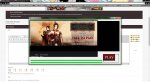
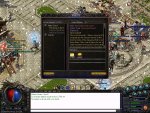
Display of patcher and quests has always been weird
- Thread starter Bynx
- Start date

You are using an out of date browser. It may not display this or other websites correctly.
You should upgrade or use an alternative browser.
You should upgrade or use an alternative browser.

- Dec 5, 2014
- 42
- 1
- 35
what resolution are you playing at? could be stuff is squashed if you are at the lower res.
im running my desktop at 1920 1080









- Dec 5, 2014
- 42
- 1
- 35
yup i did, changing that solved the patcher issue but not the ingame one, got ingame display set to 1024 768looks like a font issue to me.
Someone had a similar issue on c#. Is your desktop set to display fonts at 125%?
- Aug 12, 2010
- 1,939
- 7
- 124
That might just be the way it is ingame then. Tbh I haven't noticed it. The only thing I look for on them quests is what to kill and where to kill them.yup i did, changing that solved the patcher issue but not the ingame one, got ingame display set to 1024 768

That might just be the way it is ingame then. Tbh I haven't noticed it. The only thing I look for on them quests is what to kill and where to kill them.
That is not how it looks ingame
Go into the mir.exe and change the font in there (I think you can change the font, I am not at a system)
Change the display of the game also and see it that fixes it
Have you restarted your system after you changed the desktop font size
BH
- Dec 5, 2014
- 42
- 1
- 35
That is not how it looks ingame
Go into the mir.exe and change the font in there (I think you can change the font, I am not at a system)
Change the display of the game also and see it that fixes it
Have you restarted your system after you changed the desktop font size
BH
i had a little look around but dont know what you mean o0
i had a little look around but dont know what you mean o0
Sorry the mir.ini file
BH
- Dec 5, 2014
- 42
- 1
- 35