
help to get game working please :-)
- Thread starter vixxpixie
- Start date

You are using an out of date browser. It may not display this or other websites correctly.
You should upgrade or use an alternative browser.
You should upgrade or use an alternative browser.

- Apr 14, 2014
- 196
- 0
- 43
yes i have read through the trouble shooting centre, i cant seem to find anything relating to my problem
---------- Post Merged at 10:33 AM ---------- Previous Post was at 10:14 AM ----------
am uninstalling and reinstalling
Just a quick suggestion from the top of my head..
Make sure you are running as administrator
Make an exception in your AV software if you need to for mir.
Make sure you've got the latest .net framework
In my limited experience, a lot of problems have been solved by ensuring those 3 things are done.
hope it gets sorted for you
- Feb 26, 2015
- 8
- 0
- 12
anti virus is of when i download it, windows is all up to date so and i foloowed the link in the trouble shooting section for latest .net.framework. so yep all three of them things are dun. i have tried screen shotting the problem but there isnt anything to screen shoot. it all downloads fine with no problems just after installation when i click play i get a minimized screen that i cant open on my start bar but yet i can hear the music for the loggin screen.
same thing happenes weather i run as admin or not. me and my partner have tried everything we thinks. it no works for me ><
same thing happenes weather i run as admin or not. me and my partner have tried everything we thinks. it no works for me ><

I have had this issue before in the past I cant even remember exactly what I did to sort it, however when theres nothing showing and you can hear the music try press Alt + Enter to bring it into windowed mode see if that works, im sure I messed around with my resolution too.
Also have a look in your mir2.ini becuase iv also had the issue where after downloading it has remained blank and gave me the same problem. Copy and paste this into it:
[Basic Settings]
SwitchPoisonOrder=0
DropItemsShow=1
ShowRevBar=1
[Chat Settings]
SystemFColour=255
SystemBColour=56
ShoutFColour=0
ShoutBColour=151
HintFColour=219
HintBColour=255
GuildFColour=219
GuildBColour=255
GroupFColour=64
GroupBColour=255
[Options]
FullScreen=1
InterfaceType=1
ScreenMode=2
BitDepth=1
MP3Volume=0
SoundVolume=24
BGSound=0
Sound=0
Also have a look in your mir2.ini becuase iv also had the issue where after downloading it has remained blank and gave me the same problem. Copy and paste this into it:
[Basic Settings]
SwitchPoisonOrder=0
DropItemsShow=1
ShowRevBar=1
[Chat Settings]
SystemFColour=255
SystemBColour=56
ShoutFColour=0
ShoutBColour=151
HintFColour=219
HintBColour=255
GuildFColour=219
GuildBColour=255
GroupFColour=64
GroupBColour=255
[Options]
FullScreen=1
InterfaceType=1
ScreenMode=2
BitDepth=1
MP3Volume=0
SoundVolume=24
BGSound=0
Sound=0

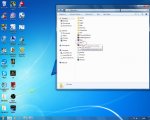
Change Fullscreen to a Zero, it will then start in windows mode. I get black screen on full screen mode.
Open the folder with the .Exe file and open the file shown in the picture,and change it to zero as said above.

- Dec 6, 2013
- 1,470
- 19
- 100
Open the folder with the .Exe file and open the file shown in the picture,and change it to zero as said above.
View attachment 15910
2 chronicles folders... cheats!
---------- Post Merged at 02:45 PM ---------- Previous Post was at 02:20 PM ----------
Ill be the judge of that =)Aka milfmage
found mir.ini
Aka milfmage
Glad you got it resolved.
2 chronicles folders... cheats!
---------- Post Merged at 02:45 PM ---------- Previous Post was at 02:20 PM ----------
Yeah always had a backup folder. You never know when the patcher gonna wipe the whole folder again.