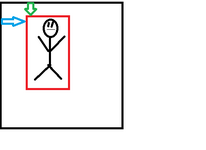
Image Changes Query (Placement recalculation)

Mu online season 21 - grand opening

LightBringer

Mir Evolved GM
Veteran
Evolved
Game Master
Feb 13, 2014
3,911
1
1,829
260
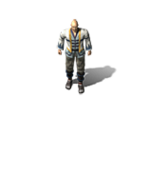
Some frame sets I have, have a edged "Transparent" border
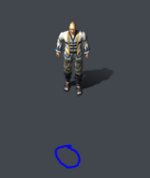
1679166760516.png
The issue being is if you hover underneath where this border is, it highlights and targets the player (so you can have your mouse where circled)

I can sort the image out via auto cropping, but is there an easy (or at least a way) of figuring out the new placement locations for the player

For example pre crop X= -40 | Y = -60
Is there an easy way to figure out how much the crop moves it up and left?
 

Attachments

  • 00033.PNG
    00033.PNG
    11.8 KB · Views: 5
Solution
Well, for anyone wondering.

amazingphotoshopskills2.png

Old Image
New Image
CroppedXPixelDistance
CroppedYPixelDistance


oldX + CroppedXPixelDistance, oldY + CroppedYPixelDistance

Please excuse my amazing photoshop skills.

FloppyQ

Loyal Member
Loyal Member
May 12, 2020
123
2
61
40
Well, for anyone wondering.

amazingphotoshopskills2.png

Old Image
New Image
CroppedXPixelDistance
CroppedYPixelDistance


oldX + CroppedXPixelDistance, oldY + CroppedYPixelDistance

Please excuse my amazing photoshop skills.
 
Upvote 0
Solution

Lose

Banned
Banned
Aug 13, 2020
387
2
235
45
Some frame sets I have, have a edged "Transparent" border
View attachment 31099
The issue being is if you hover underneath where this border is, it highlights and targets the player (so you can have your mouse where circled)

I can sort the image out via auto cropping, but is there an easy (or at least a way) of figuring out the new placement locations for the player

For example pre crop X= -40 | Y = -60
Is there an easy way to figure out how much the crop moves it up and left?
Use that macro I sent you for monsters.

That's the same issue and will fix this.
 
Upvote 0