- Mar 8, 2005
- 594
- 307
- 290
I'm at it again, working on things I can't thoroughly test myself so figured I'd post a help request here in case anyone is 1) interested and 2) have the hardware to help with testing.
I'm in the process of mapping out controller support for mir3 and I'm using this off the back of the existing SlimDX library, I'm hoping to be able to get it working on the following:
- Xbox Series Controller (via PC)
- Asus RoG Ally / Ally X Integrated Controller + Connected controller (though I suspect this will work if the standard controller works)
- Steam Deck Integrated Controller + Connected controller (though I suspect this will work if the standard controller works)
- Generic PC Contoller
- PS5 Controller?
- Xbox One Controller?
For shits and giggles, I also thought it would be funny to try a guitar controller and dance mat controller too because why not?
I'm able to test the Xbox series controller and RoG Ally locally but would appreciate some help if others have some of the other devices.
 Notes:
 Skills correctly auto-target enemies in a cone-based targeting system based on direction and adhering to range limitations.
Skill usage stops movement before casting.
I'm in the process of mapping out controller support for mir3 and I'm using this off the back of the existing SlimDX library, I'm hoping to be able to get it working on the following:
- Xbox Series Controller (via PC)
- Asus RoG Ally / Ally X Integrated Controller + Connected controller (though I suspect this will work if the standard controller works)
- Steam Deck Integrated Controller + Connected controller (though I suspect this will work if the standard controller works)
- Generic PC Contoller
- PS5 Controller?
- Xbox One Controller?
For shits and giggles, I also thought it would be funny to try a guitar controller and dance mat controller too because why not?
I'm able to test the Xbox series controller and RoG Ally locally but would appreciate some help if others have some of the other devices.
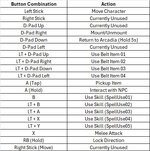
Currently Implemented Controller Mappings
 Movement & Direction
- Left Stick → Movement
- Walks when lightly pushed.
- Runs when pushed further.
- Right Bumper (RB) → Direction Lock
- Hold RB to change direction without moving.
 Combat & Skills
- X → Melee Attack
- B → Use Spell 1
- LT + B → Use Spell 2
- LT + A → Use Spell 3
- LT + X → Use Spell 4
- LT + Y → Use Spell 5
Notes: Skills correctly auto-target enemies in a cone-based targeting system based on direction and adhering to range limitations. Skill usage stops movement before casting. Utility Actions
- D-Pad Right → Mount/Unmount
- Press to toggle mount/unmount.
- D-Pad Down → Return to Arcadia
- Hold for 5 seconds to teleport back.
- Chat message warns about hold duration.
- LT + D-Pad Up → Use Belt Item 01
- LT + D-Pad Right → Use Belt Item 02
- LT + D-Pad Down → Use Belt Item 03
- LT + D-Pad Left → Use Belt Item 04
Some Preview Videos of Progress:
Last edited: