
Help many crystal maps destroyed
- Thread starter ervinzed
- Start date

You are using an out of date browser. It may not display this or other websites correctly.
You should upgrade or use an alternative browser.
You should upgrade or use an alternative browser.

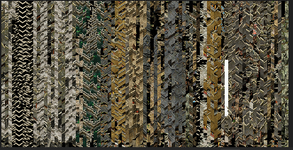











That map’s been bit shifted, seen it on a few different servers in correlation with tile lib shifting.
Map is a lost cause
Or
Your tile data is pulled from said shifted client.
Map is a lost cause
Or
Your tile data is pulled from said shifted client.
Upvote
0

- Feb 21, 2013
- 3,595
- 2
- 681
- 265
Not enough details to tell where the problem is but this looks to be a different problem from just libs unmatched with maps.
Reminds me of one map that had left half corrupted with right half being completely OK. It was a temple map and that corrupted half used the same lib tiles that the right half used - typical for caves, temple maps since they use the same walls and everything over the whole map, even multiple map floors. Nothing was wrong with the library in question and it must have been the map file itself that somehow was corrupted.
I think I have showed this map here some time in the past. The division between the two halves is along a nice clean vertical line cut when you examine the map at full size.
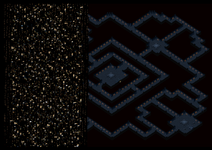
This is full size detail of the division.
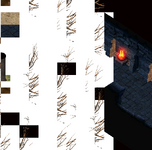
I don't remember if I checked at the time if these outdoor tiles with trees were from some other library, maybe the same library had those outdoor areas in it...
I took it as a challenge and rebuilt that left half as a sort of exercise when I worked on the map editor code. It was an opportunity for a real test of the editor, to see what improvements are needed when you really build maps. This was a simple job, or at least it looked like being one at first
Bunch of map editor improvements came from this job, including the slanting grid overlay that was needed for wall alignment across passageways.
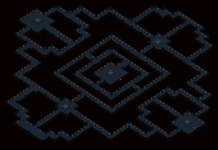
I can't see what the problem might have been with the map except the corruption of the map file itself. All I did was delete the corrupted mess and extend - keep extending walls into that previously corrupted area.
If the whole map was corrupted in this fashion, I would suspect some 'protection' was in place that scrambled the map in unauthorized use but that didn't seem to be the case here, or was it?
Reminds me of one map that had left half corrupted with right half being completely OK. It was a temple map and that corrupted half used the same lib tiles that the right half used - typical for caves, temple maps since they use the same walls and everything over the whole map, even multiple map floors. Nothing was wrong with the library in question and it must have been the map file itself that somehow was corrupted.
I think I have showed this map here some time in the past. The division between the two halves is along a nice clean vertical line cut when you examine the map at full size.
This is full size detail of the division.
I don't remember if I checked at the time if these outdoor tiles with trees were from some other library, maybe the same library had those outdoor areas in it...
I took it as a challenge and rebuilt that left half as a sort of exercise when I worked on the map editor code. It was an opportunity for a real test of the editor, to see what improvements are needed when you really build maps. This was a simple job, or at least it looked like being one at first
Bunch of map editor improvements came from this job, including the slanting grid overlay that was needed for wall alignment across passageways.
I can't see what the problem might have been with the map except the corruption of the map file itself. All I did was delete the corrupted mess and extend - keep extending walls into that previously corrupted area.
If the whole map was corrupted in this fashion, I would suspect some 'protection' was in place that scrambled the map in unauthorized use but that didn't seem to be the case here, or was it?
Last edited:
Upvote
0

- Aug 27, 2006
- 355
- 20
- 45
best bet is to figure it out urself dude no offenceNot enough details to tell where the problem is but this looks to be a different problem from just libs unmatched with maps.
Reminds me of one map that had left half corrupted with right half being completely OK. It was a temple map and that corrupted half used the same lib tiles that the right half used - typical for caves, temple maps since they use the same walls and everything over the whole map, even multiple map floors. Nothing was wrong with the library in question and it must have been the map file itself that somehow was corrupted.
I think I have showed this map here some time in the past. The division between the two halves is along a nice clean vertical line cut when you examine the map at full size.
View attachment 38041
This is full size detail of the division.
View attachment 38044
I don't remember if I checked at the time if these outdoor tiles with trees were from some other library, maybe the same library had those outdoor areas in it...
I took it as a challenge and rebuilt that left half as a sort of exercise when I worked on the map editor code. It was an opportunity for a real test of the editor, to see what improvements are needed when you really build maps. This was a simple job, or at least it looked like being one at first
Bunch of map editor improvements came from this job, including the slanting grid overlay that was needed for wall alignment across passageway
I can't see what the problem might have been with the map except the corruption of the map file itself. All I did was delete the corrupted mess and extend - keep extending walls into that previously corrupted area.
If the whole map was corrupted in this fashion, I would suspect some 'protection' was in place that scrambled the map in unauthorized use but that didn't seem to be the case here, or was it?
Upvote
1


Opening up most of the maps in the open available files have an assortment of tiles flashing mindlessly on the left hand side, and there are an absoloute tonne of dead walk spots and also many many maps that a GM would have to make “no rt” or players would rt on top of caves and behind the walls etc
It’s a mountain of a task to sort them all 1 by 1 that’s for sure
You are much better off becoming familiar with the map editor and fiddle yourself with which maps u want to use, once you no how it’s very easy, but there’s no denying it takes a long time to check everything on a map is correct, u have to enjoy it to make it worthwhile, im not sure many would have the patience
It’s a mountain of a task to sort them all 1 by 1 that’s for sure
Post automatically merged:
You are much better off becoming familiar with the map editor and fiddle yourself with which maps u want to use, once you no how it’s very easy, but there’s no denying it takes a long time to check everything on a map is correct, u have to enjoy it to make it worthwhile, im not sure many would have the patience
Upvote
0
- Feb 21, 2013
- 3,595
- 2
- 681
- 265
an assortment of tiles flashing mindlessly on the left hand side
That doesn't show or have any effect in game. It is some glitch not easy to fix or even not reasonably fixable and so not worthwhile to spend time on it. I remember when I was quite new to editing maps that I patiently deleted those animated margin tiles on one map only to have them return next time the map was opened in the map editor.
I believe it can be fixed by copying the map onto a new map canvas but why bother. That glitch in the margin is likely a heritage of the original Wemade maps that were converted to Crystal format 'type 100' maps (only those classic maps from the original official client suffer from it).
Otherwise the classic maps are quite decent, I only recall one traditional spot in BW btw armor and pot shop where some no-walk tiles were spilled requiring navigating around. RT into those no-walk regions was rare enough to make it entertaining rather than bothersome.
Yes, when it comes to editing maps beyond just some tweaking requires dedication but on the other hand, it can be as good or even better than playing the game. I think the same could be said for setting up a server generally, which if it wasn't rewarding in itself, probably nobody would do it.
Post automatically merged:
BTW I just checked and that corruption on the map I posted above shows tiles from random libs, some even from WemadeMir3 libs (the good right half of the map are ShandaMir2 tiles).
The arrow point to where the tile is supposed to be but it is a blank spot. That negative tile index looks to be a fiction which is why the spot is blank.
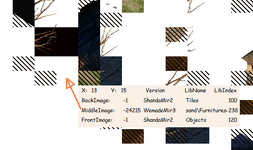
Also it is not a static phenomenon (or how to put it), same as that animated left hand margin I just commented on, just not as hyper animated. Many of the tiles are replaced by other ones on the fly and if you watch it long enough, I think all of them eventually get replaced by some other tiles. In effect it is a tile animation but not by tiles in a sequence (as when you set up animation), it is a random tile pick.
I believe now, it is related to that margin tile strip glitch which in this case somehow spread over the whole half of the map. But unlike that margin strip mess that returns even when you delete it, the map reconstruction I did still holds and is on the original map canvas, I didn't transfer the good half to a new one.
Last edited:
Upvote
0
That depends on the person, personally I find it satisfying to do it and have a complete map, free of this, dead spots sorted, back spots done everywhere so you can set a map to be able to random teleport safely, lights added to all the flames, but I have an ocd tendency….leaving the glitchy tiles to the left would bug meThat doesn't show or have any effect in game. It is some glitch not easy to fix or even not reasonably fixable and so not worthwhile to spend time on it. I remember when I was quite new to editing maps that I patiently deleted those animated margin tiles on one map only to have them return next time the map was opened in the map editor.
I believe it can be fixed by copying the map onto a new map canvas but why bother. That glitch in the margin is likely a heritage of the original Wemade maps that were converted to Crystal format 'type 100' maps (only those classic maps from the original official client suffer from it).
Post automatically merged:
At the moment I’m going through the new wooma temple, bdd, pt maps and re aligning walls and torch housings to make the flames align, make the experience in game so much more satisfying to have a working “dark” map with flames lighting up the corridors correctly
Post automatically merged:
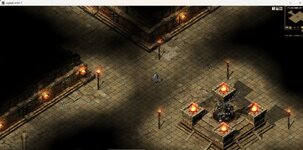
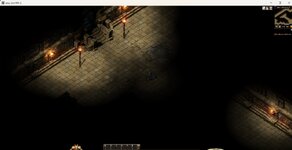
Last edited by a moderator:
Upvote
0
- Jul 16, 2004
- 3,688
- 849
- 345


there was issue in code that caused this, basically the object count was too low...That depends on the person, personally I find it satisfying to do it and have a complete map, free of this, dead spots sorted, back spots done everywhere so you can set a map to be able to random teleport safely, lights added to all the flames, but I have an ocd tendency….leaving the glitchy tiles to the left would bug me
Post automatically merged:
At the moment I’m going through the new wooma temple, bdd, pt maps and re aligning walls and torch housings to make the flames align, make the experience in game so much more satisfying to have a working “dark” map with flames lighting up the corridors correctly
Post automatically merged:
View attachment 38047 View attachment 38048
remove the check for >= 10 and they'll work.
cant remember where but I had this fixed a while back when extending my light colours
Upvote
0

- May 19, 2003
- 20,708
- 35
- 3,349
- 520
Think you probably mean the light value clamp - which is fixed between 0 and 10 currently. I'm guessing some shanda maps have higher lighting / different system as they're colouredthere was issue in code that caused this, basically the object count was too low...
remove the check for >= 10 and they'll work.
cant remember where but I had this fixed a while back when extending my light colours
Upvote
0
- Jul 16, 2004
- 3,688
- 849
- 345
Yes this,Think you probably mean the light value clamp - which is fixed between 0 and 10 currently. I'm guessing some shanda maps have higher lighting / different system as they're coloured
Upvote
0
- Feb 21, 2013
- 3,595
- 2
- 681
- 265
re aligning walls and torch housings to make the flames align
Alignment is not easy to achieve. I used to fool around with placing a piece of paper on monitor display but that wasn't helping much and also didn't help that I have touch display
Some floor tiles help with alignment, like those you show here, but when the floor can't be used as a guide, most maps are a mess. It doesn't help that perspective on mir maps is very deceiving, for example if you place those platforms visually right, a test in game reveals they are offset from the intended centerline of the passageway leading up to it. Same goes for placing light posts in square formation.
I always found it kind of annoying when say a town gate doesn't align with the street center or with a bridge etc.
Upvote
0
- Jul 16, 2004
- 3,688
- 849
- 345
Alignment is not easy to achieve. I used to fool around with placing a piece of paper on monitor display but that wasn't helping much and also didn't help that I have touch display
Some floor tiles help with alignment, like those you show here, but when the floor can't be used as a guide, most maps are a mess. It doesn't help that perspective on mir maps is very deceiving, for example if you place those platforms visually right, a test in game reveals they are offset from the intended centerline of the passageway leading up to it. Same goes for placing light posts in square formation.
I always found it kind of annoying when say a town gate doesn't align with the street center or with a bridge etc.
Yeh, another issue with Crystal, the whole map code is 2px out
You can see this when spawning Fox Boss in the Fox KR (I think its too far left).
I fixed mine by you gotta change the map draw and then fix all the locations / coordinates etc.
super fun

Obviously some assets won't always be the perfect match or line up, but the way the client reads the maps already puts you out from the get go.
Upvote
0
Haha yeah definitely noticed everything being just slightly off for NPC placements, I actually found an easy fix setting up some custom looking NPCs by instead just changing the X Y on the NPC itself in the LIB editor. Works a treat in game and merrys up a little better with safe zones and what not, wouldn’t say it’s a perfect fix but it’s noticeably better imo
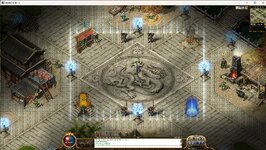
Upvote
0
- Feb 21, 2013
- 3,595
- 2
- 681
- 265
where can i download the client
is there a link to the default client
Did it fix those scrambled map files? At full size, was that tile mess like mine?
Upvote
0