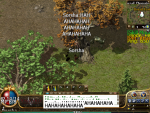
How on earth do i change the in game font size, because it is bloody huge lol!!!!!!!! :upset::upset:
Sarsha LOMCN n00bie Jan 15, 2019 7 0 12 Jan 15, 2019 #1 How on earth do i change the in game font size, because it is bloody huge lol!!!!!!!! :upset::upset: Attachments unknown.png 497.6 KB · Views: 53
Jamie LOMCN Developer Developer Mar 29, 2003 4,864 431 350 United Kingdom Jan 15, 2019 #2 Change your windows Font Scaling.
LightBringer Mir Evolved GM Veteran EvolvedGame Master Feb 13, 2014 3,914 1 1,837 260 Jan 15, 2019 #3 Keep it like that, it would make it much more interesting!
TheDayIDie Banned Banned Dedicated Member Jul 29, 2011 4,071 99 135 UK Jan 15, 2019 #4 Haha I wasn't expecting it to be that extreme. Did make me giggle.
Chriz Captain Lurker VIP Mar 24, 2003 1,199 1 340 315 LOMCN Jan 15, 2019 #5 @LOMValkyrie - this may help resolve the issue : https://www.lomcn.org/forum/showthread.php?100014-DPI-Scaling-fix @Sarsha - Right click desktop > Display Settings > Change Scale to 100% (Assuming Windows 10) - You will need to relog/reboot for it to take affect
@LOMValkyrie - this may help resolve the issue : https://www.lomcn.org/forum/showthread.php?100014-DPI-Scaling-fix @Sarsha - Right click desktop > Display Settings > Change Scale to 100% (Assuming Windows 10) - You will need to relog/reboot for it to take affect