


Hi i have a problem, basicly i download a working map viewer or editor, it will not work. I will load a file into the program, and the only thing i will get is BLACK screen in the program, instead of the map. Furthermore im not loading a wrong map or a map that the program does not support because i tried so many different programs with soo many different files. Can someone help?
http://www.lomcn.co.uk/forum/showthread.php?65774-MapViewer&highlight=map+viewer
Thats the viewer i downloaded recently and it wont work.
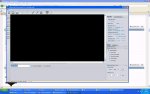
EDIT:
Also does any 1 know when i change something in sql crualdragon3g monster section for example, when i change exp, the hen cow etc exp goes down to very low?
Before edit, the cow will give me 32 exp, after adding a line in sql, i will receive 8 exp. Any 1 came across that?
http://www.lomcn.co.uk/forum/showthread.php?65774-MapViewer&highlight=map+viewer
Thats the viewer i downloaded recently and it wont work.
EDIT:
Also does any 1 know when i change something in sql crualdragon3g monster section for example, when i change exp, the hen cow etc exp goes down to very low?
Before edit, the cow will give me 32 exp, after adding a line in sql, i will receive 8 exp. Any 1 came across that?
Last edited:





 not gonna use them or release them untill i get them just right