

No TaskBar...

Mu online season 21 - grand opening

TheBoss

Golden Oldie
Golden Oldie
Sep 6, 2004
1,810
6
175
Middlesbrough
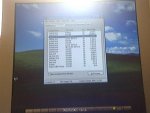
Well, pc loads up fine... wen its loads up theres no taskbar, desktop icons etc just the background.. any idea how i can fix this ? need sum files off the pc..

Need any more info just ask

Add a pic it mite help a bit more lol, took off webcam lmao..


-TB
 

Attachments
  • Picture 8.jpg
    Picture 8.jpg
    126 KB · Views: 37
Last edited:

Kaori

LOMCN MiR3 Queen!
VIP
Jun 3, 2004
3,584
38
265
Canada
use the window key...
Win-E = Explorer

if it doesn't work.. your explorer.exe is probably screwed up...

Win-R = Run (try running cmd, and you can play with dos there)

the other things you can do is... task manager (Ctrl-Shift-Esc) and see if you have a virus.
 

TheBoss

Golden Oldie
Golden Oldie
Sep 6, 2004
1,810
6
175
Middlesbrough
Kaori said:
use the window key...
Win-E = Explorer

if it doesn't work.. your explorer.exe is probably screwed up...

Win-R = Run (try running cmd, and you can play with dos there)

the other things you can do is... task manager (Ctrl-Shift-Esc) and see if you have a virus.

Explorer.exe aint even runing o_0 pc fuked then ? lol and ill leave DoS alone, ta
 

Ash

Peace Not War .
VIP
Mar 13, 2004
1,901
1
165
England (UK)
Best thing i can suggest if full system restore m8 :( i looked about and nothing helpful really accept this guide:
1/ Boot to your desktop
2/ Press CTRL+ALT+DEL to open Task Manager
3/ In Task manager click the New Task button on the General tab
4/ In the New Task dialogue box type: 'explorer.exe' (without the quotes) and press OK
5/ The Windows desktop should now appear
See if that works Or try a System Restore

But it didnt work for u :( hope u get sorted soon m8 :)
 

Kaori

LOMCN MiR3 Queen!
VIP
Jun 3, 2004
3,584
38
265
Canada
you can go to cmd right?
your explorer should be in c:\windows\explorer.exe
if it's not there.. probably something deleted it.

think you will need a spyware/virus check first... what program do you use?
goto those directory and run them... c:\program files\symantec for example...

and then you will need your windows xp cd again.. do a repair or upgrade

oh and can you take a closer screenshot? I want to see what is running...
 

Ash

Peace Not War .
VIP
Mar 13, 2004
1,901
1
165
England (UK)
Kaori said:
you can go to cmd right?
your explorer should be in c:\windows\explorer.exe
if it's not there.. probably something deleted it.

think you will need a spyware/virus check first... what program do you use?
goto those directory and run them... c:\program files\symantec for example...

and then you will need your windows xp cd again.. do a repair or upgrade

oh and can you take a closer screenshot? I want to see what is running...

yep, word :ppunk:

btw, is every person explorer on there computer different ye? coz was gonna say if not thn ill send mine to him :dunce:
 

TheBoss

Golden Oldie
Golden Oldie
Sep 6, 2004
1,810
6
175
Middlesbrough
Kaori said:
you can go to cmd right?
your explorer should be in c:\windows\explorer.exe
if it's not there.. probably something deleted it.

think you will need a spyware/virus check first... what program do you use?
goto those directory and run them... c:\program files\symantec for example...

and then you will need your windows xp cd again.. do a repair or upgrade

oh and can you take a closer screenshot? I want to see what is running...

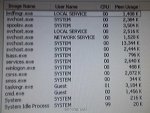
Heres a closer pic hope this helps...
Yeah i can get to CMD, i dnt think it s virus etc i think windows has fked right up lol.

-TB
 

Attachments

  • Picture 9.jpg
    Picture 9.jpg
    147.1 KB · Views: 33

Ash

Peace Not War .
VIP
Mar 13, 2004
1,901
1
165
England (UK)
hmm, sumit wrong with ya exploere as kaori has stated, coz wen ever i end mine in windows task manager my icons and taskbar go, but for u it just doesnlt seem to want to load up on windows boot up :O
 

TheBoss

Golden Oldie
Golden Oldie
Sep 6, 2004
1,810
6
175
Middlesbrough
ash1234 said:
hmm, sumit wrong with ya exploere as kaori has stated, coz wen ever i end mine in windows task manager my icons and taskbar go, but for u it just doesnlt seem to want to load up on windows boot up :O

Think ill just have to reformatt, i really dnt want to becoz i need files n stuff off the pc, ill wait n see wat urban says :) or any 1 else that can help.

-Tb
 

Ash

Peace Not War .
VIP
Mar 13, 2004
1,901
1
165
England (UK)
thats what i reccomended blam, probs best suggestion going that will work atm, but i think stan (his rl m8) round his sortin out now :)
 

kud125

Golden Oldie
Golden Oldie
Aug 18, 2004
829
1
104
i did this when i was pissing around in registry tryint o get rid of a virus try system restore and see if that fixes it mate or restore your registry if thats what you did - just a suggestion sorry if it doesnt help but i got that from experience
 

Kaori

LOMCN MiR3 Queen!
VIP
Jun 3, 2004
3,584
38
265
Canada
do you have norton ghost or something? and do you have a small C: partition?

I suggest using ghost to backup C: to other partition or hard drive or DVDRs first... I liked that because if I format the computer and there's always some stuff I forgot to backup... you can restore individual file(s) easily from ghost (like a big zip file)...

Norton ghost 2003 works in dos... if you need one I can send it to you.


btw.. which windows are you using? maybe you can get someone's explorer.exe and see what else you are missing...

also I see you are logging on as Guest... do you have the Administrator password? login there?
 

Ash

Peace Not War .
VIP
Mar 13, 2004
1,901
1
165
England (UK)
Kaori said:
do you have norton ghost or something? and do you have a small C: partition?

I suggest using ghost to backup C: to other partition or hard drive or DVDRs first... I liked that because if I format the computer and there's always some stuff I forgot to backup... you can restore individual file(s) easily from ghost (like a big zip file)...

Norton ghost 2003 works in dos... if you need one I can send it to you.


btw.. which windows are you using? maybe you can get someone's explorer.exe and see what else you are missing...

also I see you are logging on as Guest... do you have the Administrator password? login there?

i was thinking about could u use sum1 elses explorer.exe, if so i would av sent him mine, but wasnt sure wether each persons is different for there certain computer??