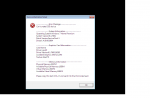
not sure what this is about

Mu online season 21 - grand opening

mooncloud

Loyal Member
Loyal Member
Apr 29, 2014
72
1
35
just loged in for first time in a while and then loged out to relog again and now i cant get in game at all
 

Attachments

  • ...............png
    ...............png
    25 KB · Views: 33

Babyhack

Devilsoul Owner
VIP
Feb 4, 2004
5,343
28
285
Dublin, Ireland
Game Initialization Failed
Problem:
Executing the mir2.exe results in a black screen and a message containing computer stats.

attachment.php

Solution:
1) Check your DirectX driver is a minimum of DX9, Installer Here.

2) Check your graphics driver is up to date, See Video.

3) If your "Available Graphics Memory" is below a 100M there is a good chance your graphics card is unable to handle the client, however, if you are using an on board graphics card then for some there may be an option in your BIOS to increase this (Do at your own risk):
  • Restart computer.
  • Hit F2 or F8 or Del or What ever your boot sequence tells you to hit, to enter the BIOS.
  • Move right to "Advanced"
  • Below the "Advanced" section there may be a "Video Memory" option, increase this to the max value it allows.
  • Reboot PC
  • Try mir2.exe again

Can't Create D3D Device
Problem:
Unable to get in game, presented with a pop up with the following information:
Code:
----------------Error Message--------------------
Can't create D3D device

----------------System Information--------------------
Operating System:Windows 7 Ultimate
System Version:6.1.7600
Patch Version:
DirectX :4.09.00.0904

----------------Graphics Card Information--------------------
[COLOR=#ff0000]Card Name: Standard VGA Graphics Adapter[/COLOR]
Driver:vga.dll
Driver Version:6.1.7600.16385
Available Graphics Memory:0M
Texture Size:0*0

----------------Memory Information--------------------
Physical Memory:3688M
Available Physical Memory:2348M
Virtual Memory:2047M
Available Virtual Memory:1851M

Solution:
"Card Name: Standard VGA Graphics Adapter" is the windows standard driver for all graphics cards and indicates that your graphics driver is not up to date, see guide on how to update drivers Here.