on a router, and cant play myself. help?

Mu online season 21 - grand opening

Far

tinmymouthpl0x
Staff member
Administrator
May 19, 2003
20,709
35
3,357
520
ive setup my server through a router (thanks to demonic), and everyone else can get on perfectly fine, apart from me.

if looked at a guide on rz, and a microsoft guide. about installing a loopback adaptor. i installed this, followed the guide, but each guide says slightly different so im not sure which is correct. anyway, neither worked.

has anyone got a good guide, or knows what i need to do so i can play my server on anoter pc in my house?
 

Kaori

LOMCN MiR3 Queen!
VIP
Jun 3, 2004
3,584
38
265
Canada
you are talking about playing on another computer on your LAN or same computer with the server?

loopback adapter is only good for playing on the same computer... and the setting should be
IP = net ip
subnet = 255.255.255.0
gateway = empty

or get a better router...
 
Upvote 0

Far

tinmymouthpl0x
Staff member
Administrator
May 19, 2003
20,709
35
3,357
520
Kaori said:
you are talking about playing on another computer on your LAN or same computer with the server?

loopback adapter is only good for playing on the same computer... and the setting should be
IP = net ip
subnet = 255.255.255.0
gateway = empty

or get a better router...

im not 2 fussed about playing on the same pc. i just want to be able to play on another pc in my house.
 
Upvote 0

Kaori

LOMCN MiR3 Queen!
VIP
Jun 3, 2004
3,584
38
265
Canada
someone posted how to setup those !serveraddr etc for lan playing earlier... see if you can find that one...

other than that... 2 solutions...
buy a linksys adsl router... WAG54G or something
or learn about how to edit your routing table.
 
Upvote 0

fred

Dedicated Member
Dedicated Member
Aug 4, 2003
56
0
83
USA !!!!!! lol
Farril said:
mentor broadband. model: ADSL FR4II


You can login to the game server from the network with the local ip address of the servers lan card it will work fine

as long as all the pc / server are on the same workgroup and in the same network hub
 
Upvote 0

Far

tinmymouthpl0x
Staff member
Administrator
May 19, 2003
20,709
35
3,357
520
fred said:
You can login to the game server from the network with the local ip address of the servers lan card it will work fine

as long as all the pc / server are on the same workgroup and in the same network hub

when it comes to these things your gonna have to dumb things down for me. could you explain exactly what i need to do to log on my server on another pc on my lan?

i dont fancy buying a new router, and learning how to setup the routers tables will also take 2 long.
 
Upvote 0

Kaori

LOMCN MiR3 Queen!
VIP
Jun 3, 2004
3,584
38
265
Canada
is your netIP and lanIP static?

if yes... it will be easier...

remove ALL microsoft loopback adapters...

Server comp:
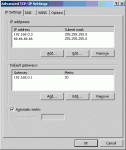
under tcpip settings... you have to goto advanced where you can add another IP and gateway... now add the net ip with the subnet 255.255.255.0

Other comp:
under tcpip settings... same place add another IP... now add the net ip +/- 1 with the subnet 255.255.255.0

don't need to add gateway... now you should be able to logon... problem with this setup... if someone in your neighbourhood is logging on.. they won't be able to... cuz of that subnet... you can reduce it tho... needs some extra calculations...
 
Upvote 0

Far

tinmymouthpl0x
Staff member
Administrator
May 19, 2003
20,709
35
3,357
520
yes my ip is static.

by removing the loopback adaptors do u mean totally, or just switch them off?

and also. 'undet tcip settings', is this when i right click my lan and goto properties yes?

sorry. im bringing out my thick side.

http://www.sexualpanda.com/tcip.JPG

is this the correct place to go? im on the 'other' pc atm.
 
Last edited:
Upvote 0

Kaori

LOMCN MiR3 Queen!
VIP
Jun 3, 2004
3,584
38
265
Canada
not gateway...

you need to switch from "Obtain IP Automatically" and use a static local ip... so set that to your 192.168.x.x instead.

now on the 3rd image, you can ADD IP on the top...

attached a sample... assuming my netip is 66.66.66.66

and on the other computer... you would use 66.66.66.x (x=other than 66)
 

Attachments

  • 1.gif
    1.gif
    8.7 KB · Views: 93
Upvote 0

Far

tinmymouthpl0x
Staff member
Administrator
May 19, 2003
20,709
35
3,357
520
Kaori said:
and on the other computer... you would use 66.66.66.x (x=other than 66)

ive done the hosting pc. and for my other pc im still confused as to what ip to have.

say my hosting ip is 192.168.1.7 what would i put in the other pc?
 
Upvote 0