Patcher Error Since Update

Mu online season 21 - grand opening

Apokalypse

Dedicated Member
Dedicated Member
Feb 26, 2004
13
0
28
Hi,

Ive just started playing the server, and then realised i first registered here a decade ago :encouragement:

Worked fine up until the downtime yesterday but now i get this error when starting the patcher :
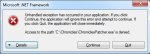
first.jpg

Ive tried deleting and redownloading the patcher, always running as admin etc and like i say it was working fine before, nothing else has changed.

Sorry i couldnt find an answer to this, if anyone can point me id be grateful.

Would mention that if i click continue it just stays on the below :

second.jpg

Cheers,
 

Koriban

Addict
Legendary
Loyal Member
Aug 18, 2006
5,842
215
260
Brighton
Hey, assuming you have the latest patcher, can you please Run it as an admin?

Right click the patcher, click Properties. On the Compatibility tab, click "Run this program as an Administrator". Sometimes doing it manually (right click>run as admin) just doesn't do the trick.

If that doesn't work, post here and we'll try and help you out.
 
Last edited:

Samuel

Mir Chronicles Dev
VIP
Feb 8, 2011
2,614
117
280
Hi,

Ive just started playing the server, and then realised i first registered here a decade ago :encouragement:

Worked fine up until the downtime yesterday but now i get this error when starting the patcher :

View attachment 15153

Ive tried deleting and redownloading the patcher, always running as admin etc and like i say it was working fine before, nothing else has changed.

Sorry i couldnt find an answer to this, if anyone can point me id be grateful.

Would mention that if i click continue it just stays on the below :

View attachment 15154

Cheers,

If you hit "details" can you paste in the stack trace it provides you?

Sam
 

Apokalypse

Dedicated Member
Dedicated Member
Feb 26, 2004
13
0
28
Ah, ive figured it out.

I did have the latest patcher and i'd set the above as suggested on both the mir2 and ChroniclesPatcher exe's, however, when i went to check the settings (opening through My Computer rather than the desktop shortcut) I saw that there was another patcher exe in my folder, NewChroniclesPatcher.exe or something similar. When i set the above permissions on it and ran it, it disapeared from my chronicles folder but now the main patcher has downloaded all the update and i can play again. :)

Great News, thank you for the help.
 

Samuel

Mir Chronicles Dev
VIP
Feb 8, 2011
2,614
117
280
Ah, ive figured it out.

I did have the latest patcher and i'd set the above as suggested on both the mir2 and ChroniclesPatcher exe's, however, when i went to check the settings (opening through My Computer rather than the desktop shortcut) I saw that there was another patcher exe in my folder, NewChroniclesPatcher.exe or something similar. When i set the above permissions on it and ran it, it disapeared from my chronicles folder but now the main patcher has downloaded all the update and i can play again. :)

Great News, thank you for the help.

This is the patcher trying to auto patch itself... It needs admin permissions to do its stuff... Glad its sorted.

Sam