
Request Save entire map as image file bmp
- Thread starter ervinzed
- Start date

You are using an out of date browser. It may not display this or other websites correctly.
You should upgrade or use an alternative browser.
You should upgrade or use an alternative browser.
Solution

Great idea, I’ll have a look into this soonIf you could make a separate map tab, that could open the option to have two different maps open at the same time in the same editor. That would allow for direct copy paste between the two open maps. Show/hide would be fine too.



Great idea,How much does it cost to create a map editor feature to save a map as an image file
this is to make it possible for maps to be edited in photoshop
Not sure how practical it would be though. You’d save each tile into some format that PS will take? Or just get rid of the map tiles and just use a flat map ?
Upvote
0

- Jan 26, 2013
- 400
- 23
- 45
A map as an imageGreat idea,
Not sure how practical it would be though. You’d save each tile into some format that PS will take? Or just get rid of the map tiles and just use a flat map ?
Saves object lib and map
One object per map
Upvote
0

- May 12, 2020
- 124
- 2
- 61
- 40
I'm glad you've cleared that up with no ambiguity whatsoever.A map as an image
Saves object lib and map
One object per map
Upvote
0

- Feb 21, 2013
- 3,595
- 2
- 681
- 265
I think the idea is to save the map in full size as an image (the first step anyway). The image could be processed in some program and then cut into tiles to be used as a game map again
(leaving aside the question of 'flat map' and all that).
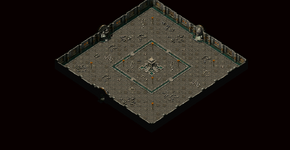
Map editor can't save real map size (as you see it in game). Even small maps, like this new Zuma KR are at maximum output like this one here. You need to click it to open the true size since as you know, the forum cuts the size for display here.
That's ZTKR_XXLargeMap.png which is the largest map image that the map editor can make of this KR when the code that makes the image is fully unrestricted. All the other map images (XLarge, Minimap, BigMap) are reduced map images, like for minimaps it is made four times smaller size I think.
This KR is 90x70 tile size.
The next image is full size as you would see it in game. The way I did it was make a screenshot of part of the map as you see it in the editor fully zoomed in, then scrolling the map to see the rest of it and make more screenshots, four in total. I dropped those four images into Inkscape and dragged them together and voila, I have real size KR as you see it in game.
I did it as jpegs but you could make it bitmaps. Whole province maps would overwhelm your computer if you made them full size image, no mater the format. I recall now that I was once interested in some astronomy pictures that were offered for download but they were huge size and you needed to use a special image viewer able to display them.
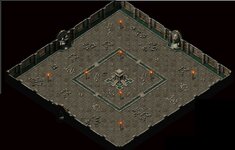
Suppose you would want to recolor the floor in some way that is more involved than just altering a hue (which you do on individual tiles with much less work).
If you did it on this image and it would alter those torches and the pedestal, you could place those objects over the messed up ones to get them back and non-flat to boot.
Or even better, you could hide the front layer in the editor before taking those screenshots and put the objects back once you cut and assembled the tiles of your processed image back into a map. The biggest job would be that cutting of the processed image into tiles (because the TileCutter Akaras coded has quirks) and assembling them.
I am not sure now if he understands that the client can't load a map image that is not cut into tiles.
But suppose you are a good graphic artist and want to alter a game map, not create the image of one from scratch as Wemade artists do it. You can't do it on individual tiles if, for example, you wanted to hand paint in photoshop something over some given area of ground tiles. You would want to take a snapshot of that tile area and paint you picture on it, then cut it back into the same tiles and save those into their library under the same tile numbers...
(leaving aside the question of 'flat map' and all that).
Map editor can't save real map size (as you see it in game). Even small maps, like this new Zuma KR are at maximum output like this one here. You need to click it to open the true size since as you know, the forum cuts the size for display here.
That's ZTKR_XXLargeMap.png which is the largest map image that the map editor can make of this KR when the code that makes the image is fully unrestricted. All the other map images (XLarge, Minimap, BigMap) are reduced map images, like for minimaps it is made four times smaller size I think.
This KR is 90x70 tile size.
The next image is full size as you would see it in game. The way I did it was make a screenshot of part of the map as you see it in the editor fully zoomed in, then scrolling the map to see the rest of it and make more screenshots, four in total. I dropped those four images into Inkscape and dragged them together and voila, I have real size KR as you see it in game.
I did it as jpegs but you could make it bitmaps. Whole province maps would overwhelm your computer if you made them full size image, no mater the format. I recall now that I was once interested in some astronomy pictures that were offered for download but they were huge size and you needed to use a special image viewer able to display them.
Suppose you would want to recolor the floor in some way that is more involved than just altering a hue (which you do on individual tiles with much less work).
If you did it on this image and it would alter those torches and the pedestal, you could place those objects over the messed up ones to get them back and non-flat to boot.
Or even better, you could hide the front layer in the editor before taking those screenshots and put the objects back once you cut and assembled the tiles of your processed image back into a map. The biggest job would be that cutting of the processed image into tiles (because the TileCutter Akaras coded has quirks) and assembling them.
Post automatically merged:
Great idea,
Not sure how practical it would be though. You’d save each tile into some format that PS will take? Or just get rid of the map tiles and just use a flat map ?
I am not sure now if he understands that the client can't load a map image that is not cut into tiles.
But suppose you are a good graphic artist and want to alter a game map, not create the image of one from scratch as Wemade artists do it. You can't do it on individual tiles if, for example, you wanted to hand paint in photoshop something over some given area of ground tiles. You would want to take a snapshot of that tile area and paint you picture on it, then cut it back into the same tiles and save those into their library under the same tile numbers...
Last edited:
Upvote
0







0.map would be 33600 x 22400 pixels, around 12gb uncompressed, and require around 60GB RAM to open in photoshop.
Back to the drawing board, sorry
Back to the drawing board, sorry
Upvote
1






That's what Colour Replace is for.Suppose you would want to recolor the floor in some way that is more involved than just altering a hue (which you do on individual tiles with much less work).
If you did it on this image and it would alter those torches and the pedestal, you could place those objects over the messed up ones to get them back and non-flat to boot.

However if you look closely I did miss some bits, and Photoshop crashed trying to get them

It's definitely a non starter considering the size of this map.
Upvote
0
- Jan 26, 2013
- 400
- 23
- 45
i have a program that cuts into tiles no matter the image sizeI think the idea is to save the map in full size as an image (the first step anyway). The image could be processed in some program and then cut into tiles to be used as a game map again
(leaving aside the question of 'flat map' and all that).
Map editor can't save real map size (as you see it in game). Even small maps, like this new Zuma KR are at maximum output like this one here. You need to click it to open the true size since as you know, the forum cuts the size for display here.
That's ZTKR_XXLargeMap.png which is the largest map image that the map editor can make of this KR when the code that makes the image is fully unrestricted. All the other map images (XLarge, Minimap, BigMap) are reduced map images, like for minimaps it is made four times smaller size I think.
This KR is 90x70 tile size.
View attachment 36326
The next image is full size as you would see it in game. The way I did it was make a screenshot of part of the map as you see it in the editor fully zoomed in, then scrolling the map to see the rest of it and make more screenshots, four in total. I dropped those four images into Inkscape and dragged them together and voila, I have real size KR as you see it in game.
I did it as jpegs but you could make it bitmaps. Whole province maps would overwhelm your computer if you made them full size image, no mater the format. I recall now that I was once interested in some astronomy pictures that were offered for download but they were huge size and you needed to use a special image viewer able to display them.
View attachment 36325
Suppose you would want to recolor the floor in some way that is more involved than just altering a hue (which you do on individual tiles with much less work).
If you did it on this image and it would alter those torches and the pedestal, you could place those objects over the messed up ones to get them back and non-flat to boot.
Or even better, you could hide the front layer in the editor before taking those screenshots and put the objects back once you cut and assembled the tiles of your processed image back into a map. The biggest job would be that cutting of the processed image into tiles (because the TileCutter Akaras coded has quirks) and assembling them.
Post automatically merged:
I am not sure now if he understands that the client can't load a map image that is not cut into tiles.
But suppose you are a good graphic artist and want to alter a game map, not create the image of one from scratch as Wemade artists do it. You can't do it on individual tiles if, for example, you wanted to hand paint in photoshop something over some given area of ground tiles. You would want to take a snapshot of that tile area and paint you picture on it, then cut it back into the same tiles and save those into their library under the same tile numbers...
i have 64 gig ram and 12gb gpu
can the minimap button be edited for full size image of the map instead of a minimap
Post automatically merged:
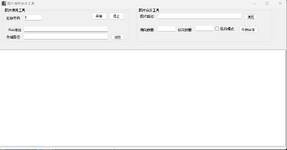
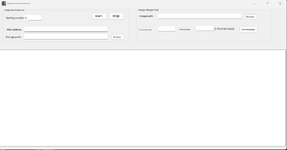
i have a picture get program
can someone translate it
this could be the screen shot program since it's called pictureget
Last edited:
Upvote
0
i have a program that cuts into tiles no matter the image size
i have 64 gig ram and 12gb gpu
can the minimap button be edited for full size image of the map instead of a minimap
Post automatically merged:
i have a picture get program
can someone translate it
this could be the screen shot program since it's called pictureget
View attachment 36327
Upvote
0
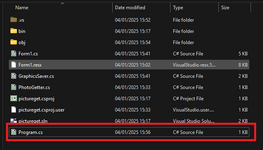
Yea i got the same thing, I thought maybe it was because the form1 was missing a designer but it doesn't seem like it's a visual form.thanks now it builds but doesnt start when 2x clicked
Upvote
0
- Feb 21, 2013
- 3,595
- 2
- 681
- 265
That's what Colour Replace is for.
However if you look closely I did miss some bits, and Photoshop crashed trying to get them
It's definitely a non starter considering the size of this map.
That looks pretty good, I'd say, even better than the original
Would you get the same uniform result across the image if you did it on individual tiles, one by one? Because if so, that would be less work than doing it on the map image and then having to cut it up, assemble...
Could Photoshop even import all tiles as separate images, do the job on them and export? I guess it can't be pointed to a folder with exported tiles and alter them by this recolor function as a batch process without first importing the tiles (either one by one or all of them in one stroke) into the program?
Either way, it would be less involved job to work with tiles than to do it on the image of map (never mind crashing your machine).
I had in mind different changes than this recoloring the whole map which could also be done on tiles (I think). Suppose you want to put a watermark on the map, like some Chinese custom maps have it on tiles in game. To do that, you need to do it the way I described, take a screenshot of the area (don't need to do the whole map), put on the watermark and then cut it up... that's something you can't do directly on individual tiles (unless you put a single letter per tile and the watermark is either horizontal or vertical.
I did a job for TheOnlyOne some time ago removing a watermark that ran around a pedestal in the center, like here in this KR it would be over that water (or blood?) channel which is straight line but you get the idea. I tried to find tiles without watermark to replace the ones with it but it was a middling success only.
-0-
It looks like image downloading but don't know what the Starting number would be for. Since the program header has mir icon, it might be import from a library but why the web address?
Right hand side looks like image stitching (or merge, ie, import into a library?) but again no idea what exactly it is meant to do.

Last edited:
Upvote
0
- Jan 26, 2013
- 400
- 23
- 45
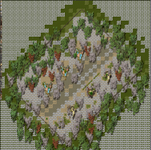
so i wrote some code to change the minimap to a full map save
i get this result full size but had to make it smaller
C#:
        public void createFullMap()
        {
            // Create a bitmap for the full-size map (adjust size as needed)
            Bitmap fullMapBitmap = new Bitmap(mapWidth * 32, mapHeight * 32, System.Drawing.Imaging.PixelFormat.Format32bppArgb);

            // Draw the back images
            for (int y = 0; y < mapHeight; y++)
            {
                for (int x = 0; x < mapWidth; x++)
                {
                    if ((M2CellInfo[x, y].BackImage & 0x1FFFFFFF) != 0)
                    {
                        try
                        {
                            Libraries.MapLibs[M2CellInfo[x, y].BackIndex].CheckImage((M2CellInfo[x, y].BackImage & 0x1FFFFFFF) - 1);
                            var mi = Libraries.MapLibs[M2CellInfo[x, y].BackIndex].Images[(M2CellInfo[x, y].BackImage & 0x1FFFFFFF) - 1];
                            if (mi.Image != null || mi.ImageTexture != null)
                            {
                                using (Graphics g = Graphics.FromImage(fullMapBitmap))
                                {
                                    // Drawing full-size back image
                                    Rectangle temprect = new Rectangle(x * 32, y * 32, 32, 32);
                                    g.DrawImage(mi.Image, temprect);
                                }
                            }
                        }
                        catch
                        {
                            // Handle any errors gracefully
                        }
                    }
                }
            }

            // Draw the middle images
            for (int y = 0; y < mapHeight; y++)
            {
                for (int x = 0; x < mapWidth; x++)
                {
                    if (M2CellInfo[x, y].MiddleImage != 0)
                    {
                        try
                        {
                            Libraries.MapLibs[M2CellInfo[x, y].MiddleIndex].CheckImage(M2CellInfo[x, y].MiddleImage - 1);
                            var mi = Libraries.MapLibs[M2CellInfo[x, y].MiddleIndex].Images[M2CellInfo[x, y].MiddleImage - 1];
                            if (mi.Image != null || mi.ImageTexture != null)
                            {
                                using (Graphics g = Graphics.FromImage(fullMapBitmap))
                                {
                                    // Adjusted rectangle for full-size middle image
                                    Rectangle temprect = new Rectangle(x * 32, y * 32, mi.Image.Width, mi.Image.Height);
                                    g.DrawImage(mi.Image, temprect);
                                }
                            }
                        }
                        catch
                        {
                            // Handle errors
                        }
                    }
                }
            }

            // Draw the front images (if not animated)
            for (int y = 0; y < mapHeight; y++)
            {
                for (int x = 0; x < mapWidth; x++)
                {
                    if ((M2CellInfo[x, y].FrontImage & 0x7FFF) != 0 && (M2CellInfo[x, y].FrontAnimationFrame & 0x80) < 1)
                    {
                        try
                        {
                            Libraries.MapLibs[M2CellInfo[x, y].FrontIndex].CheckImage((M2CellInfo[x, y].FrontImage & 0x7FFF) - 1);
                            var mi = Libraries.MapLibs[M2CellInfo[x, y].FrontIndex].Images[(M2CellInfo[x, y].FrontImage & 0x7FFF) - 1];
                            if (mi.Image != null || mi.ImageTexture != null)
                            {
                                using (Graphics g = Graphics.FromImage(fullMapBitmap))
                                {
                                    // Adjusted rectangle for full-size front image
                                    Rectangle temprect = new Rectangle(x * 32, y * 32, mi.Image.Width, mi.Image.Height);
                                    g.DrawImage(mi.Image, temprect);
                                }
                            }
                        }
                        catch
                        {
                            // Handle errors
                        }
                    }
                }
            }

            // Save the full-size map to a file
            string fullFileName = Path.GetDirectoryName(mapFileName) + @"\" + Path.GetFileNameWithoutExtension(mapFileName);
            fullMapBitmap.Save(fullFileName + "_FullMap.png", ImageFormat.Png);
            MessageBox.Show("Saved full map as: " + fullFileName + "_FullMap.png");
        }
i get this result full size but had to make it smaller
Upvote
0
- Feb 21, 2013
- 3,595
- 2
- 681
- 265
so i wrote some code to change the minimap to a full map save
C#:public void createFullMap() { // Create a bitmap for the full-size map (adjust size as needed) Bitmap fullMapBitmap = new Bitmap(mapWidth * 32, mapHeight * 32, System.Drawing.Imaging.PixelFormat.Format32bppArgb); // Draw the back images for (int y = 0; y < mapHeight; y++) { for (int x = 0; x < mapWidth; x++) { if ((M2CellInfo[x, y].BackImage & 0x1FFFFFFF) != 0) { try { Libraries.MapLibs[M2CellInfo[x, y].BackIndex].CheckImage((M2CellInfo[x, y].BackImage & 0x1FFFFFFF) - 1); var mi = Libraries.MapLibs[M2CellInfo[x, y].BackIndex].Images[(M2CellInfo[x, y].BackImage & 0x1FFFFFFF) - 1]; if (mi.Image != null || mi.ImageTexture != null) { using (Graphics g = Graphics.FromImage(fullMapBitmap)) { // Drawing full-size back image Rectangle temprect = new Rectangle(x * 32, y * 32, 32, 32); g.DrawImage(mi.Image, temprect); } } } catch { // Handle any errors gracefully } } } } // Draw the middle images for (int y = 0; y < mapHeight; y++) { for (int x = 0; x < mapWidth; x++) { if (M2CellInfo[x, y].MiddleImage != 0) { try { Libraries.MapLibs[M2CellInfo[x, y].MiddleIndex].CheckImage(M2CellInfo[x, y].MiddleImage - 1); var mi = Libraries.MapLibs[M2CellInfo[x, y].MiddleIndex].Images[M2CellInfo[x, y].MiddleImage - 1]; if (mi.Image != null || mi.ImageTexture != null) { using (Graphics g = Graphics.FromImage(fullMapBitmap)) { // Adjusted rectangle for full-size middle image Rectangle temprect = new Rectangle(x * 32, y * 32, mi.Image.Width, mi.Image.Height); g.DrawImage(mi.Image, temprect); } } } catch { // Handle errors } } } } // Draw the front images (if not animated) for (int y = 0; y < mapHeight; y++) { for (int x = 0; x < mapWidth; x++) { if ((M2CellInfo[x, y].FrontImage & 0x7FFF) != 0 && (M2CellInfo[x, y].FrontAnimationFrame & 0x80) < 1) { try { Libraries.MapLibs[M2CellInfo[x, y].FrontIndex].CheckImage((M2CellInfo[x, y].FrontImage & 0x7FFF) - 1); var mi = Libraries.MapLibs[M2CellInfo[x, y].FrontIndex].Images[(M2CellInfo[x, y].FrontImage & 0x7FFF) - 1]; if (mi.Image != null || mi.ImageTexture != null) { using (Graphics g = Graphics.FromImage(fullMapBitmap)) { // Adjusted rectangle for full-size front image Rectangle temprect = new Rectangle(x * 32, y * 32, mi.Image.Width, mi.Image.Height); g.DrawImage(mi.Image, temprect); } } } catch { // Handle errors } } } } // Save the full-size map to a file string fullFileName = Path.GetDirectoryName(mapFileName) + @"\" + Path.GetFileNameWithoutExtension(mapFileName); fullMapBitmap.Save(fullFileName + "_FullMap.png", ImageFormat.Png); MessageBox.Show("Saved full map as: " + fullFileName + "_FullMap.png"); }
i get this result full size but had to make it smaller
View attachment 36333
Is that a code that could be put into the map editor or maybe you did add this code to the editor for this example?
It looks like you are missing ground back tiles and the image is overall messed up but it is good start nonetheless
.If you've seen the current editor code, you will know it can't make full size map image as you asked previously.
If this code of yours would work, that would be terrific. I guess it doesn't collapse the editor on export (saving) given it is 32 bit program, since you did save out this image.
Upvote
0
- Jan 26, 2013
- 400
- 23
- 45
it's the crystal mir2 map editor modified the minimap buttonIs that a code that could be put into the map editor or maybe you did add this code to the editor for this example?
It looks like you are missing ground back tiles and the image is overall messed up but it is good start nonetheless
If you've seen the current editor code, you will know it can't make full size map image as you asked previously.
If this code of yours would work, that would be terrific. I guess it doesn't collapse the editor on export (saving) given it is 32 bit program, since you did save out this image.
there's something i'm missing
Upvote
0
That looks pretty good, I'd say, even better than the original
Would you get the same uniform result across the image if you did it on individual tiles, one by one? Because if so, that would be less work than doing it on the map image and then having to cut it up, assemble...
Could Photoshop even import all tiles as separate images, do the job on them and export? I guess it can't be pointed to a folder with exported tiles and alter them by this recolor function as a batch process without first importing the tiles (either one by one or all of them in one stroke) into the program?
Either way, it would be less involved job to work with tiles than to do it on the image of map (never mind crashing your machine).
Yes absolutely. You would simply recolour one tile and then run a batch on the rest of the folder with similar tiles.
Upvote
0
- Feb 21, 2013
- 3,595
- 2
- 681
- 265
if ((M2CellInfo[x, y].FrontImage & 0x7FFF) != 0 && (M2CellInfo[x, y].FrontAnimationFrame & 0x80) < 1)
Mind you, the map editor can have animations on both the front and middle layers although all animation on existing mir2 maps is on the front layer. But the editor can also edit mir3 maps and those all have animations on middle layer.
I have also added a toggle in my editor to switch animation btw layers.
Also, pple will want to keep the minimap size making, full size should be an option.
Last edited:
Upvote
0