- Feb 8, 2011
- 2,614
- 117
- 280
This thread is designed to contain known issues and potential work around(s).
If you experience and issue and find a way around it, please post it here and we will update the main post with the problem and solution.
Patcher:
The process cannot access the mir2.exe because it is in use by another program.
After patching the client says "Wrong client version"
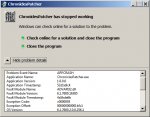
ChroniclesPatcher.exe is not a valid win32 Application
Stuck on "Download Patch List"
FileNotFoundException or missing mir2.exe after patch
Client:
Game Initialization Failed
Can't Create D3D Device
Stuck at Select Gate (Doors won't open after login)
Wrong Client Version
Missing bag items
Paypal:
We're sorry but we cannot send your payment at this time.
This thread will be continuously updated as and when issues arise.
Sam
If you experience and issue and find a way around it, please post it here and we will update the main post with the problem and solution.
Patcher:
The process cannot access the mir2.exe because it is in use by another program.
Problem:
The mir2.exe process is still running when the patcher attempts to update it.
Solution:
Close the mir2.exe client, delete it, and let the patcher download the latest mir2.exe again.
The mir2.exe process is still running when the patcher attempts to update it.
Solution:
Close the mir2.exe client, delete it, and let the patcher download the latest mir2.exe again.
After patching the client says "Wrong client version"
Problem:
Using an old version of the patcher that is downloading an older client.
Solution:
Upgrade to the latest patcher (V2.0.3) found here.
Using an old version of the patcher that is downloading an older client.
Solution:
Upgrade to the latest patcher (V2.0.3) found here.
ChroniclesPatcher.exe is not a valid win32 Application
Stuck on "Download Patch List"
Problem:
The patcher appears to hang at the "download patch list" stage and does not continue to download the required client libraries.
Solution:
Open the PatchClient.ini and change the host from "ftp" to "http":
The patcher appears to hang at the "download patch list" stage and does not continue to download the required client libraries.
Solution:
Open the PatchClient.ini and change the host from "ftp" to "http":
Code:
[COLOR=#141823][FONT=Helvetica Neue][AutoPatcher][/FONT][/COLOR]
[COLOR=#141823][FONT=Helvetica Neue]Host=http://162.243.83.44/NewerPatcher/[/FONT][/COLOR]
[COLOR=#141823][FONT=Helvetica Neue]Username=[/FONT][/COLOR]
[COLOR=#141823][FONT=Helvetica Neue]Password=[/FONT][/COLOR]
[COLOR=#141823][FONT=Helvetica Neue]UpdateUri=http://162.243.83.44/UpdatePatcher[/FONT][/COLOR]
FileNotFoundException or missing mir2.exe after patch
Problem:
You receive a FileNotFound error after patching and pressing "Play", or your MirChronicles directory is missing the "mir2.exe".
Solution:
Disable or add an exception to your firewall for the "mir2.exe".
You receive a FileNotFound error after patching and pressing "Play", or your MirChronicles directory is missing the "mir2.exe".
Solution:
Disable or add an exception to your firewall for the "mir2.exe".
Client:
Game Initialization Failed
Problem:
Executing the mir2.exe results in a black screen and a message containing computer stats.

Solution:
1) Check your DirectX driver is a minimum of DX9, Installer Here.
2) Check your graphics driver is up to date, See Video.
3) If your "Available Graphics Memory" is below a 100M there is a good chance your graphics card is unable to handle the client, however, if you are using an on board graphics card then for some there may be an option in your BIOS to increase this (Do at your own risk):
Executing the mir2.exe results in a black screen and a message containing computer stats.
Solution:
1) Check your DirectX driver is a minimum of DX9, Installer Here.
2) Check your graphics driver is up to date, See Video.
3) If your "Available Graphics Memory" is below a 100M there is a good chance your graphics card is unable to handle the client, however, if you are using an on board graphics card then for some there may be an option in your BIOS to increase this (Do at your own risk):
- Restart computer.
- Hit F2 or F8 or Del or What ever your boot sequence tells you to hit, to enter the BIOS.
- Move right to "Advanced"
- Below the "Advanced" section there may be a "Video Memory" option, increase this to the max value it allows.
- Reboot PC
- Try mir2.exe again
Can't Create D3D Device
Problem:
Unable to get in game, presented with a pop up with the following information:
Solution:
"Card Name: Standard VGA Graphics Adapter" is the windows standard driver for all graphics cards and indicates that your graphics driver is not up to date, see guide on how to update drivers Here.
Unable to get in game, presented with a pop up with the following information:
Code:
----------------Error Message--------------------
Can't create D3D device

----------------System Information--------------------
Operating System:Windows 7 Ultimate
System Version:6.1.7600
Patch Version:
DirectX :4.09.00.0904

----------------Graphics Card Information--------------------
[COLOR=#ff0000]Card Name: Standard VGA Graphics Adapter[/COLOR]
Driver:vga.dll
Driver Version:6.1.7600.16385
Available Graphics Memory:0M
Texture Size:0*0

----------------Memory Information--------------------
Physical Memory:3688M
Available Physical Memory:2348M
Virtual Memory:2047M
Available Virtual Memory:1851M
Solution:
"Card Name: Standard VGA Graphics Adapter" is the windows standard driver for all graphics cards and indicates that your graphics driver is not up to date, see guide on how to update drivers Here.
Stuck at Select Gate (Doors won't open after login)
Problem:
Unable to get past the login section to select character (stuck at stone doors).
Solution:
1) When stuck, hit "Alt + Enter" to swap screen modes, this has been known to allow users to get past this issue.
2) If your password contains special characters then please contain a member of the Chronicles Development Team as this could also stop you from being able to connect to the character select screen.
Unable to get past the login section to select character (stuck at stone doors).
Solution:
1) When stuck, hit "Alt + Enter" to swap screen modes, this has been known to allow users to get past this issue.
2) If your password contains special characters then please contain a member of the Chronicles Development Team as this could also stop you from being able to connect to the character select screen.
Wrong Client Version
Problem:
You log into Chronicles and are presented with a red output saying "Wrong Client Version".
Solution:
Ensure your mir2.exe is up to date by attempting the following:
You log into Chronicles and are presented with a red output saying "Wrong Client Version".
Solution:
Ensure your mir2.exe is up to date by attempting the following:
- Delete mir2.exe
- Upgrade to the latest patcher (V2.0.5) found here.
- Allow the patcher to download the latest mir2.exe.
- Attempt to log in again.
Missing bag items
Problem:
You are missing items in your bag, or you have opened up a bundle without enough space in your bag.
Solution:
You are missing items in your bag, or you have opened up a bundle without enough space in your bag.
Solution:
- Create space in bag.
- Exit the game.
- Navigate to Config/Chronicles/
- Delete CharaName_BagItems.dat
- Log back into game.
Paypal:
We're sorry but we cannot send your payment at this time.
Problem:
You log into Paypal to send a ******** and are presented with an error stating that paypal is unable to send your payment.
Solution:
Ensure your paypal account's verification state is verified. If not, then please verify your account by following these steps.
You log into Paypal to send a ******** and are presented with an error stating that paypal is unable to send your payment.
Solution:
Ensure your paypal account's verification state is verified. If not, then please verify your account by following these steps.
This thread will be continuously updated as and when issues arise.
Sam
Last edited by a moderator: