ok my advice for u is
click start
click run
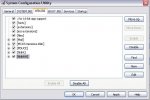
type "msconfig"
Click the startup tab and unselect everything there (untick it)
Then..
Same again,start run and this time type
"regedit"
Select the followings
HKEY_LOCAL_MACHINE
->SOFTWARE
-->Microsoft
--->Windows
---->Current Version
----->Run
Now if you look at the right side you will see more startup procedures, Check this carefully, identify each string and if you believe there is a virus which is causing the problem, right click and delete the string, or you can just delete them all.
Regards
MentaL




![¤]´)÷¤--§îr Äürøñ--¤÷(`[¤](/forum/data/avatars/m/0/64.jpg?1550430717)
 thnx to