Windowed Mode - Screen Cut //// Random Crash

Eun

Dedicated Member
Dedicated Member
Aug 1, 2013
29
0
27
asdgsgasef.jpg

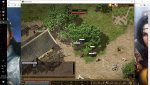
As you can see. the lower part of the screen i cut. Using the lowest resolution possible. Any workaround for this?

The mouse click doesnt click on the exact location too, it clicks a little lower than where it is pointed.

Random crash when afk or anywhere (minimal)

I'm on Windows 10 Home Edition
Intel HD 5500 (integrated GC)
8gb ram

---- It seems on the picture i can still adjust the position of the client, but no, that's the fix position for upper/lower direction.
 
Last edited:

Jamie

LOMCN Developer
Developer
Mar 29, 2003
4,862
418
350
United Kingdom
There is no support for using lower than the smallest resolution.

If you are adamant on it.

Exit game, (a must)
Open zircon.ini
Under graphics set the resolution you want
Then save.
 

Eun

Dedicated Member
Dedicated Member
Aug 1, 2013
29
0
27
I am currently using 1366 x 768 as desktop resolution. My in-game resolution is 1028 x 768. They seem compatible but for some reason (probably due to client window border) the lower part is cut.
 

KingCobra92

LOMCN Member
Untrusted Member
Veteran
Feb 9, 2015
1,077
314
145
Mine does the same, i imagine you need to adjust your resolution settings somewhere on your PC, i don't think adjusting the zircon client it self can fix it.
 

Eun

Dedicated Member
Dedicated Member
Aug 1, 2013
29
0
27
Seems like i was able to get a workaround for mouse click inaccuracy when on window mode. i manually set the resolution to 1028 x 740. Now it is clicking where it should be
 

Jamie

LOMCN Developer
Developer
Mar 29, 2003
4,862
418
350
United Kingdom
Seems like i was able to get a workaround for mouse click inaccuracy when on window mode. i manually set the resolution to 1028 x 740. Now it is clicking where it should be

This issue is because Windows forcibly resizes the game to fit on the screen,

when your game is 1024x768 Window mode, the resolution is for the playing area, windows then add the title bar / borders etc, which makes the whole window bigger than the screen (and then windows forces it smaller)