
Release Xiyue MapEditor - Akaras' mod updated by M2P
- Thread starter mir2pion
- Start date

You are using an out of date browser. It may not display this or other websites correctly.
You should upgrade or use an alternative browser.
You should upgrade or use an alternative browser.



is this updated now - https://github.com/Suprcode/Crystal.MapEditor ?
says in thread it isnt the latest.
If not, were is the source for this editor?
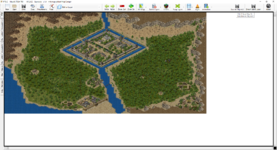
Bump, anyone? This editor keeps crashing every 5mins, and can't view half the objects as they too far to the left.
says in thread it isnt the latest.
If not, were is the source for this editor?
Bump, anyone? This editor keeps crashing every 5mins, and can't view half the objects as they too far to the left.
Last edited:

sddzrxh
LOMCN Member
- Mar 2, 2024
- 71
- 16
- 10
Even though it has been edited, you should give it a try.
Last edited by a moderator:

- Feb 21, 2013
- 3,592
- 2
- 680
- 265
Even though it has been edited, you should give it a try.
What's the point without the source code?
Also, I am no friend of introducing features that cut into map viewing area. There is a reason why its called Map Editor, not Map Viewer!
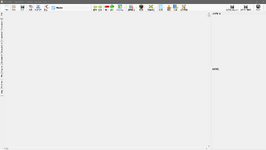



what are those two boxes on the right?What's the point without the source code?
Also, I am no friend of introducing features that cut into map viewing area. There is a reason why its called Map Editor, not Map Viewer!
View attachment 36094
EDIT: google translate says: MiniMap Preview & Layer Information
- Feb 21, 2013
- 3,592
- 2
- 680
- 265
It integrates Tile Set program, not sure now which version. This added menu icon saves the Tile Set change made in that panel.

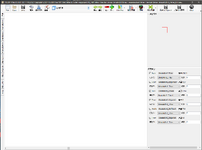
The editor doesn't show the map, also doesn't display Objects or libraries content (which explains why it won't show the map I opened). Maybe it needs to run inside Data (tested, no change) or something. But it knows about the loaded map since it shows which libs it is using.
Besides the usual Microsoft.DirectX.Direct3D.dll & Microsoft.DirectX.dll supporting files, it adds Map Editor.pdb & MapTileSet.exe
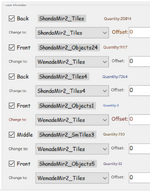
If this Tile Set program would be 'fixed' (I had very mixed experience with it and it was heavily on the disappointing side), that would be a plus.
Now it started loading maps, no idea why it didn't before. But the 'minimap' view seems to have weird aspect, probably the map itself also, one other thing, zooming out messes up tile display.
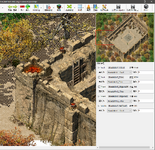
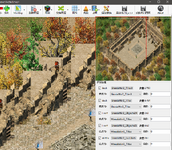
Maps won't load again after the editor restart and when they do load, something is seriously messed up with their display...
The editor doesn't show the map, also doesn't display Objects or libraries content (which explains why it won't show the map I opened). Maybe it needs to run inside Data (tested, no change) or something. But it knows about the loaded map since it shows which libs it is using.
Besides the usual Microsoft.DirectX.Direct3D.dll & Microsoft.DirectX.dll supporting files, it adds Map Editor.pdb & MapTileSet.exe
If this Tile Set program would be 'fixed' (I had very mixed experience with it and it was heavily on the disappointing side), that would be a plus.
Post automatically merged:
Now it started loading maps, no idea why it didn't before. But the 'minimap' view seems to have weird aspect, probably the map itself also, one other thing, zooming out messes up tile display.
Maps won't load again after the editor restart and when they do load, something is seriously messed up with their display...
Last edited:

ranlingqi
LOMCN Leecher
- Oct 18, 2021
- 2
- 0
- 12
This is an old version, the new version has fixed the issue of shrinking displayIt integrates Tile Set program, not sure now which version. This added menu icon saves the Tile Set change made in that panel.
View attachment 36097
The editor doesn't show the map, also doesn't display Objects or libraries content (which explains why it won't show the map I opened). Maybe it needs to run inside Data (tested, no change) or something. But it knows about the loaded map since it shows which libs it is using.
Besides the usual Microsoft.DirectX.Direct3D.dll & Microsoft.DirectX.dll supporting files, it adds Map Editor.pdb & MapTileSet.exe
View attachment 36095
View attachment 36096
If this Tile Set program would be 'fixed' (I had very mixed experience with it and it was heavily on the disappointing side), that would be a plus.
Post automatically merged:
Now it started loading maps, no idea why it didn't before. But the 'minimap' view seems to have weird aspect, probably the map itself also, one other thing, zooming out messes up tile display.
View attachment 36099
View attachment 36102
Maps won't load again after the editor restart and when they do load, something is seriously messed up with their display...
- Feb 21, 2013
- 3,592
- 2
- 680
- 265
There is no need to have the map displayed while you are re-assigning its libraries.
Also, you do this Tile Setting once in a while but then anytime you are editing maps, you have to put up with a third of your view being taken by this panel that does nothing for you. That minimap panel is also not all that useful, not at the expense of taking up so much map view space. It should be displayed on demand only, toggled on and off.
But the main point is, without the code source, the one who made these 'improvements' can stick it to his grubby chest. He takes but doesn't volunteer to give back!
Also, you do this Tile Setting once in a while but then anytime you are editing maps, you have to put up with a third of your view being taken by this panel that does nothing for you. That minimap panel is also not all that useful, not at the expense of taking up so much map view space. It should be displayed on demand only, toggled on and off.
But the main point is, without the code source, the one who made these 'improvements' can stick it to his grubby chest. He takes but doesn't volunteer to give back!
I just had a peak at the program and it's been obfuscatedThere is no need to have the map displayed while you are re-assigning its libraries.
Also, you do this Tile Setting once in a while but then anytime you are editing maps, you have to put up with a third of your view being taken by this panel that does nothing for you. That minimap panel is also not all that useful, not at the expense of taking up so much map view space. It should be displayed on demand only, toggled on and off.
But the main point is, without the code source, the one who made these 'improvements' can stick it to his grubby chest. He takes but doesn't volunteer to give back!
 It's weird people can take other's work, edit some small features into it, obfuscate it and then give it back out
- Feb 21, 2013
- 3,592
- 2
- 680
- 265
I think those who brought it here did it from a good will, not being aware of the whole context of what's going on.
Thanks for checking the program for obfuscation, that is something I wouldn't know how go about it.
When I make next release, I will only send the code to those few here who ask for it, like some server owners need to adjust libraries scope. Or I can ask what they need and adjust it myself.
I am of a mind of maximizing lib counts across the board but I recall vaguely that Far objected to that, something to do with slowing down the program (as always). I believe currently the ShandaMir2 libs are maxed out, you can add some 70 libs to the existing stock ones.
Thanks for checking the program for obfuscation, that is something I wouldn't know how go about it.
When I make next release, I will only send the code to those few here who ask for it, like some server owners need to adjust libraries scope. Or I can ask what they need and adjust it myself.
I am of a mind of maximizing lib counts across the board but I recall vaguely that Far objected to that, something to do with slowing down the program (as always). I believe currently the ShandaMir2 libs are maxed out, you can add some 70 libs to the existing stock ones.
Last edited:

- Aug 5, 2012
- 280
- 1
- 154
- 70
Even though it has been edited, you should give it a try.
Thanks for the link
I've tried all versions I can and this is the only one that can make me a bigmap reliably for extra large maps without crashing! You saved me ahaMirWanderer
LOMCN Rookie
- Aug 23, 2024
- 10
- 0
- 2
Does this still work, might just be me but from a fresh download of everything I put it in the client folder and if I try to open a .map nothing happens - the editor just shows blank
- Feb 21, 2013
- 3,592
- 2
- 680
- 265
Should work, lets see what could be wrong, I take it you put the editor exe along with the supporting dlls into the root of mir2 client folder. BTW did you download the map editor from the Resources link at the top of this forum?
You can open not just maps that are in the client but also from external locations, as long as those maps are using the libraries present in the client (in Data/map/WemadeMir2 etc .libs)
Some maps you get from elsewhere might be set to use .wil libraries and then the editor can't display them. Or they are set to use mir2 .lib libraries but some new ones not present in the client.
First make sure to test the map editor on those maps in the client that are sure to work, like Bichon map or something from classic mir2 map lineup.
You can open not just maps that are in the client but also from external locations, as long as those maps are using the libraries present in the client (in Data/map/WemadeMir2 etc .libs)
Some maps you get from elsewhere might be set to use .wil libraries and then the editor can't display them. Or they are set to use mir2 .lib libraries but some new ones not present in the client.
First make sure to test the map editor on those maps in the client that are sure to work, like Bichon map or something from classic mir2 map lineup.
MirWanderer
LOMCN Rookie
- Aug 23, 2024
- 10
- 0
- 2
Should work, lets see what could be wrong, I take it you put the editor exe along with the supporting dlls into the root of mir2 client folder. BTW did you download the map editor from the Resources link at the top of this forum?
You can open not just maps that are in the client but also from external locations, as long as those maps are using the libraries present in the client (in Data/map/WemadeMir2 etc .libs)
Some maps you get from elsewhere might be set to use .wil libraries and then the editor can't display them. Or they are set to use mir2 .lib libraries but some new ones not present in the client.
First make sure to test the map editor on those maps in the client that are sure to work, like Bichon map or something from classic mir2 map lineup.
Thank you. I just nuked it all and started again and it seems to work.
A new level of procrastination unlocked.