Help Zircon does not load when starting game.

MrToughGuy

LOMCN n00bie
Nov 8, 2025
6
0
1
I'd like help to understand why my Zircon.exe does not launch with the mir main screen, it tries and the resolution slightly adjusts then goes back to desktop screen.

Has anyone else run into this issue?.

Running on windows 11 PRO.
Visual 2022 / DevExpress.Win 25.1.6

1764012039130.png


1764012119591.png


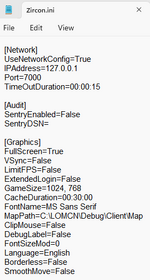
I was missing an .ini file for the client folder so i created one. hope this looks ok?

1764012227410.png


Finally trying to load Zircon, and it just tries to load then disappears.
 

trancefied

Loyal Member
Loyal Member
May 16, 2020
208
77
40
could be missing slimdx? double check on all zircon dependencies anyway.
zircon.ini is created automatically once client runs successfully for the first time.
 
Upvote 0

MrToughGuy

LOMCN n00bie
Nov 8, 2025
6
0
1
could be missing slimdx? double check on all zircon dependencies anyway.
zircon.ini is created automatically once client runs successfully for the first time.
Thanks i have downloaded the "ZirconClientDependencies" which helped installed missing components including slimdx. The game has gone further opening the screen.
Post automatically merged:

I am now getting "Disconnected" - Wrong version. when the main game is launched.

Can someone guide me, i have searched and done the below but still having the same error.

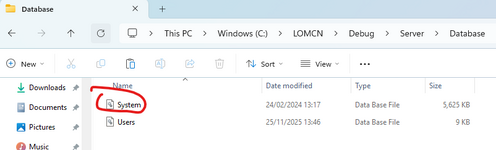
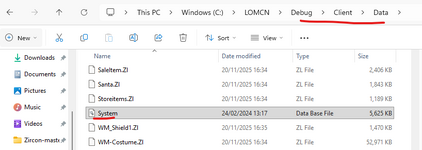
1. Steps taken so far: downloaded system.ini database file and placed them in Debug/Server/Database && Debug\Client\Data

1764078678754.png

1764078751762.png

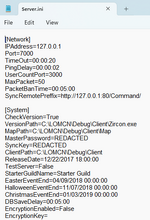
2. Checked all the IP's and ports

zircon.ini (Debug\Client)
1764078819351.png
server.ini (Debug\Server)
1764078858769.png

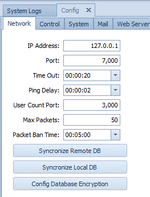
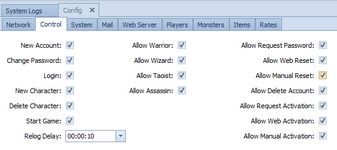
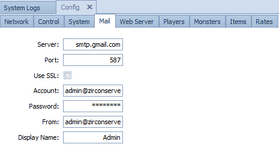
Server GUI (Config)
1764078913300.png

1764078940070.png

1764078955965.png

1764078978001.png
 
Last edited:
Upvote 0

trancefied

Loyal Member
Loyal Member
May 16, 2020
208
77
40
Thanks i have downloaded the "ZirconClientDependencies" which helped installed missing components including slimdx. The game has gone further opening the screen.
Post automatically merged:

I am now getting "Disconnected" - Wrong version. when the main game is launched.

Can someone guide me, i have searched and done the below but still having the same error.

1. Steps taken so far: downloaded system.ini database file and placed them in Debug/Server/Database && Debug\Client\Data

View attachment 38286

View attachment 38287

2. Checked all the IP's and ports

zircon.ini (Debug\Client)
View attachment 38288
server.ini (Debug\Server)
View attachment 38289

Server GUI (Config)
View attachment 38290

View attachment 38291

View attachment 38292

View attachment 38293
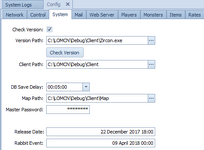
Turn off "Check version in server > config > system. this will bypass the version check.
to resolve this, make sure zircon files are the same version in version path and the actual client you're running.
 
Upvote 0

MrToughGuy

LOMCN n00bie
Nov 8, 2025
6
0
1
Turn off "Check version in server > config > system. this will bypass the version check.
to resolve this, make sure zircon files are the same version in version path and the actual client you're running.
Thanks, "unchecked checked versions" and that finally load the login screen, so this must mean the zircon files are the same version in the version path and actual client path.

Thanks @tracefield.
 
Upvote 0