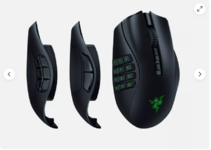
Had my razor deathadder for over 10 years and the scroller button has finally gone on it. Any recommendations as I'm just going to buy the razor deathadder again most likely as it's a safe bet. Only real requirement is for it to have side buttons.



the scroller button has finally gone on it

I've always had the MX/Revolution range for work and just recycle old work one as home mouse. Got MX master 3 at work, Mx Master 2 at home, and a Mx Master 1 for my chicken show laptopI've just got the Logitech Master 3 and it's the best mouse i've ever used, depends what you want it for.


I have one also i find it disconnects a lot and freezes a bit too also when pluging it in to use wired it doesnt seem to like working sometimes. a good mouse when it works but very flaky. it is my fifth Naga and this is the worst of the lot not sure i would buy another.I've currently got the Razer Naga V2 Pro Wireless, and I love it. Prior to this, I had 2x Logitech Hero G502's which was really comfy in your hand, and I loved that one too.

I've had wireless in the past and the constant Bluetooth drops were enough for me to never even contemplate getting anotherI have one also i find it disconnects a lot and freezes a bit too also when pluging it in to use wired it doesnt seem to like working sometimes. a good mouse when it works but very flaky. it is my fifth Naga and this is the worst of the lot not sure i would buy another.
I have one also i find it disconnects a lot and freezes a bit too also when pluging it in to use wired it doesnt seem to like working sometimes. a good mouse when it works but very flaky. it is my fifth Naga and this is the worst of the lot not sure i would buy another.
I've not experienced any of these issues and I've had this for about 6 months now. Are you both sure you are talking about the Naga V2 Pro? I've had the V1, and I agree it had disconnection issues, but the V2 comes with a USB Dongle and has both a Bluetooth and 2.4 Ghz connection (for the dongle). I've not experienced any disconnection issues, or latency issues with the V2, its been absolutely superb so far.I've had wireless in the past and the constant Bluetooth drops were enough for me to never even contemplate getting another
Post automatically merged:
The steel series Rival 5 looks right up my street. These mouses with 9-12 buttons on the side seem a little crazy for my fat thumb
Oh no it wasn't a razer. Can't remember what it was but it was bad enough to never want one againI've not experienced any of these issues and I've had this for about 6 months now. Are you both sure you are talking about the Naga V2 Pro? I've had the V1, and I agree it had disconnection issues, but the V2 comes with a USB Dongle and has both a Bluetooth and 2.4 Ghz connection (for the dongle). I've not experienced any disconnection issues, or latency issues with the V2, its been absolutely superb so far.
I've had wireless in the past and the constant Bluetooth drops were enough for me to never even contemplate getting another
First time i've used the MX range, well worth the money for comfort alone!Do Pets at Home still sell them?
Post automatically merged:
I've always had the MX/Revolution range for work and just recycle old work one as home mouse. Got MX master 3 at work, Mx Master 2 at home, and a Mx Master 1 for my chicken show laptop
Perhaps not best for gaming, but creature of habbit, and i map keys for CAD.

I’ve had the Rival 5 for 2 years now, never had an issue. Would recommendI've had wireless in the past and the constant Bluetooth drops were enough for me to never even contemplate getting another
Post automatically merged:
The steel series Rival 5 looks right up my street. These mouses with 9-12 buttons on the side seem a little crazy for my fat thumb
Just installed it and it feels niceI’ve had the Rival 5 for 2 years now, never had an issue. Would recommend

Razer Naga V2 Hyperspeed
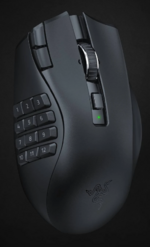
Haha its just learning how to use the first joint on the thumb, muscle memory in the end.View attachment 35659
Holy mice
I always find those side buttons too far back for comfort, I'd rather had them under my thumb and keep light touch over them all the time, so you don't have to crane thumb backwards or slide the whole hand back just to reach those buttons.
If it's anything like the Naga V2 Pro, it comes with 3x interchangeable side profiles.View attachment 35659
Holy mice
I always find those side buttons too far back for comfort, I'd rather had them under my thumb and keep light touch over them all the time, so you don't have to crane thumb backwards or slide the whole hand back just to reach those buttons.