
Request Save entire map as image file bmp
- Thread starter ervinzed
- Start date

You are using an out of date browser. It may not display this or other websites correctly.
You should upgrade or use an alternative browser.
You should upgrade or use an alternative browser.

Solution

Great idea, I’ll have a look into this soonIf you could make a separate map tab, that could open the option to have two different maps open at the same time in the same editor. That would allow for direct copy paste between the two open maps. Show/hide would be fine too.

- Feb 21, 2013
- 3,595
- 2
- 681
- 265
You mean you have bmp image of a map and want to make a .map file out of it to use in game?
Map editor has TileCutter program (shortcut Y open that tab) that Akaras made that you would use to cut your image into tiles. The program automatically saves the tiles in a library and then you need to put that library into Data/Maps/ShandaMir2 directory with other libraries there (give it a lib # different from other libraries there) and start map editor.
Go to SM2 libraries (I think F2 is the shortcut?) and open the library to display its tiles. select the first one and open the editor on map (F5) and create a new map of sufficient size - you should remember how many tiles you had horizontally and vertically and make the new map a bit bigger. The number in new map dialog is the number of tiles, horizontally and vertically.
Likely you cut up the bmp image into smTiles size (for now we are leaving discussion of map objects aside) but if you cut into Tiles that are twice the size, the new map size would be double of the tiles number, horizontally and vertically.
Next assuming you have selected that first tile in your new library and those tiles are smTiles and you are on map tab, click 3 to switch to front layer and that selected tile should appear at the mousetip, click on the map canvas to place it. Then use > to switch to the next tile in sequence and lay it down... you need to know when you get to the right map edge so you start a new row. Sometimes that is not easy to figure if the map has some bland edges.
This is actually the most tedious and laborious part of new map making. The TileCutter is somewhat adventurous program if I recall it right but should work for plain cutting of the whole image. There may be some unexpected behavior when cutting an area within the map image (you need to do that to make map objects), also when you save into a new library, it tends to add extra .lib so you end up with two .lib.lib, don't remember exactly since it is several years I experimented with it.
Map editor has TileCutter program (shortcut Y open that tab) that Akaras made that you would use to cut your image into tiles. The program automatically saves the tiles in a library and then you need to put that library into Data/Maps/ShandaMir2 directory with other libraries there (give it a lib # different from other libraries there) and start map editor.
Go to SM2 libraries (I think F2 is the shortcut?) and open the library to display its tiles. select the first one and open the editor on map (F5) and create a new map of sufficient size - you should remember how many tiles you had horizontally and vertically and make the new map a bit bigger. The number in new map dialog is the number of tiles, horizontally and vertically.
Likely you cut up the bmp image into smTiles size (for now we are leaving discussion of map objects aside) but if you cut into Tiles that are twice the size, the new map size would be double of the tiles number, horizontally and vertically.
Next assuming you have selected that first tile in your new library and those tiles are smTiles and you are on map tab, click 3 to switch to front layer and that selected tile should appear at the mousetip, click on the map canvas to place it. Then use > to switch to the next tile in sequence and lay it down... you need to know when you get to the right map edge so you start a new row. Sometimes that is not easy to figure if the map has some bland edges.
This is actually the most tedious and laborious part of new map making. The TileCutter is somewhat adventurous program if I recall it right
but should work for plain cutting of the whole image. There may be some unexpected behavior when cutting an area within the map image (you need to do that to make map objects), also when you save into a new library, it tends to add extra .lib so you end up with two .lib.lib, don't remember exactly since it is several years I experimented with it.
Upvote
0



To export 1:1 you can reuse the minimap button code and have it export the tiles 1:1i was planning on importing a map from bmp image
is this possible to create and add to the map editor or do i need an extra program
I’ll try and find the code I used when I’m home from work.
Yea Mir 1’s tiles are like 24x48 pixels so that image exported 1:1 will have the tiles be their actual size.This is nice, don't recall seeing it before (South of Bichon town).
It looks like these maps can zoom in more than the real 1:1 size
View attachment 37573
We didn’t notice a lot of the floor entrances across the world map but after looking at the caves that look to be underground caves, some caves line up with these overground entrances. So one cave could go from say top left map and the last floor of the cave can take you back up but like 4 maps to the side. So Mir 1 has caves that you access from traditional Mir 2 looking cave entrances but also underground caves using those stairs scattered across the world map.
Last edited:
Upvote
0

- Jan 14, 2014
- 753
- 295
- 255

The TileCutter is somewhat adventurous program if I recall it right
I think it basically worked for cutting tiles and small map objects when I released it but I always wanted to go back and improve that one... using the solid highlight to show which sections to cut was weird to use and caused unexpected results like you say
...it was originally only supposed to be for editing background tiles to add small/tiny details or for cutting new map objects so the player can pass behind but it could work on large maps I think (might crash)
It would cause a lot of duplicated tiles to be saved though...
Upvote
0

- Jun 13, 2003
- 1,184
- 154
- 290
It's possible but wouldn't be pretty as it can't tell what cells are objects or lights and it won't know what is walkable, still require plenty of manual editingi was planning on importing a map from bmp image
is this possible to create and add to the map editor or do i need an extra program
Upvote
0
- Feb 21, 2013
- 3,595
- 2
- 681
- 265
Yep, need to add limits. As for objects, there is an ingenious way I described elsewhere.
While the map is still loaded in the TileCutter, you select only the tiles over what will be the objects on the map and save the tiles in an objects.lib (mind you, I think they could then be moved into the library you originally made for the whole map.
Objects will be rough around the edges, hopefully not too rough, but that is OK. Only thing is, those objects will be 'single use', they will only fit the one place on the map they were cut from. In that place, you won't see the objects rough contours (they will blend perfectly into the background tiles) and when the character moves behind them, you won't notice that he hides a fraction earlier than what the real objects contours are.
For this to work, the object tiles should be cut right after the map was cut up, without it being moved under the grid (in case you adjusted the map image position under the grid on the initial loading). The object's tiles have to precisely align with the previously cut 'ground' tiles.
New Shanda maps are done this way, they are single purpose maps, can't reuse its objects anywhere else, they look good only when put in their own place on the original map. They cut the image into smTiles and put it all on front layer but I think the base image cuts could be big Tiles for easier assembling them into the map from libraries. It more than halves the job laying them down. But the objects would still need to be cut into small Tiles to avoid way too big object contour overlap.
I strongly suspect Shanda maps done this way weren't assembled manually but they have some program that re-assembles library tiles automatically. That's why they don't care about more assembly work. You would need the TileCutter to output a file with tiles positions noted in it which would then be used by another program to re-assemble the tiles automatically.
Anyone knows what role wix files play for wil libraries?
The file would have format like the following number grid so the assembler program would know how many tiles to place on each row in sequence.
1 2 3 4
5 6 7 8
9 etc
Alternative way to make objects would be to have the map editor mark the tiles that make up the object with a 'foreground' markup. GMJ map editor can do that by selecting key points of the intended object and then it detects the contours of that objects in a kind of lasso like fashion. Character moving onto those tiles is then shown as being 'behind it'. It could be made more simple process without the lasso like snapping exactly to object contours, just rough tile outline as in the above method. I think it is doable if you know how to code and how it works in files to draw char behind tiles.
While the map is still loaded in the TileCutter, you select only the tiles over what will be the objects on the map and save the tiles in an objects.lib (mind you, I think they could then be moved into the library you originally made for the whole map.
Objects will be rough around the edges, hopefully not too rough, but that is OK. Only thing is, those objects will be 'single use', they will only fit the one place on the map they were cut from. In that place, you won't see the objects rough contours (they will blend perfectly into the background tiles) and when the character moves behind them, you won't notice that he hides a fraction earlier than what the real objects contours are.
For this to work, the object tiles should be cut right after the map was cut up, without it being moved under the grid (in case you adjusted the map image position under the grid on the initial loading). The object's tiles have to precisely align with the previously cut 'ground' tiles.
New Shanda maps are done this way, they are single purpose maps, can't reuse its objects anywhere else, they look good only when put in their own place on the original map. They cut the image into smTiles and put it all on front layer but I think the base image cuts could be big Tiles for easier assembling them into the map from libraries. It more than halves the job laying them down. But the objects would still need to be cut into small Tiles to avoid way too big object contour overlap.
I strongly suspect Shanda maps done this way weren't assembled manually but they have some program that re-assembles library tiles automatically. That's why they don't care about more assembly work. You would need the TileCutter to output a file with tiles positions noted in it which would then be used by another program to re-assemble the tiles automatically.
Anyone knows what role wix files play for wil libraries?
The file would have format like the following number grid so the assembler program would know how many tiles to place on each row in sequence.
1 2 3 4
5 6 7 8
9 etc
Alternative way to make objects would be to have the map editor mark the tiles that make up the object with a 'foreground' markup. GMJ map editor can do that by selecting key points of the intended object and then it detects the contours of that objects in a kind of lasso like fashion. Character moving onto those tiles is then shown as being 'behind it'. It could be made more simple process without the lasso like snapping exactly to object contours, just rough tile outline as in the above method. I think it is doable if you know how to code and how it works in files to draw char behind tiles.
Last edited:
Upvote
0







In the nicest possible way, ya'll need to move on from these idea's. Theyre silly and theyre never going to work.
And any maps you could export, edit and cut back up would
Your efforts would be much better spent learning how the tiles and objects work and editing maps properly.
- You cant export big maps to a full scale image
And any maps you could export, edit and cut back up would
- Have ridiculously big lib size, like a whole objects lib just for a single map
- Be single layer, no concept of floor and object layers. @mir2pion's idea above of marking specific tiles as front layer is equally as silly, you will have players all over the screen half disappearing underneath floor tiles
Your efforts would be much better spent learning how the tiles and objects work and editing maps properly.
Upvote
0
- Feb 21, 2013
- 3,595
- 2
- 681
- 265
@mir2pion's idea above of marking specific tiles as front layer is equally as silly, you will have players all over the screen half disappearing underneath floor tiles
Check out this video I watched it at half speed, the guy is so hyper. The video quality is poor, you need to be logged in to see videos in higher quality.
At about 2:40 mins he puts a char on the house roof in the map editor (how neat is that?) to show that the house is not an object but a flat map which the char walks over like it was a floor (for now he doesn't have no-walk limit on it)
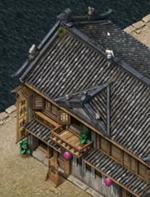
@~4:40 mins, he starts making pink point marks connected by pink line at roof gable extremities, goes all around the house perimeter
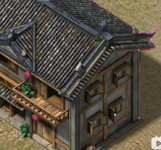
The selection points turn blue when the loop is connected.
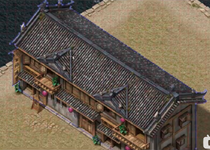
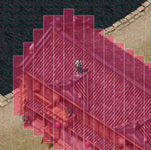
Next by clicking something in menu, he switches on this red highlight that he calls 'occlusion', ie, something like making it semitransparent. It is not a tile selection as we know it from our map editor.
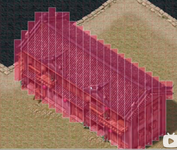
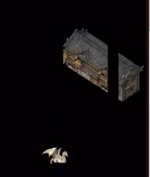
I think he selected the whole house above to place it as object on a blank map in the image below to demonstrate that it is cleanly selected by that lasso, no extraneous ground overlaps as you might think it would be from that red selection in the above image.
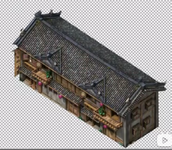
Then he places a character on the selection, clearly visible because of the selection.
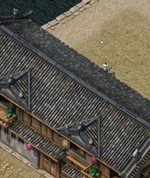
Once the selection is switched off, the character goes semitransparent behind the house and here you see him coming out from under it in the back or out on the water behind the roof gable.
Obviously he doesn't have no walk limits on the water to allow him to walk around the house to show off the effect of going behind the house edges.
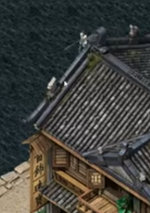
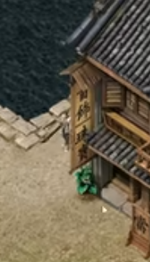
The house than needs to be covered with no walk tiles, leaving only some area behind it where the character can come close to the back wall and be seen semitransparent under the roof. That's all it takes to convert flat image into an object.
Another example then follows to change the flat map with the dragon into a dragon object that characters can go behind.
This lasso selection is what most graphics programs have and it quite another thing to have it here in map editor. The lassoed object gets cleanly selected around its perimeter and then he does something to make characters able to go behind it.
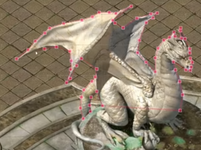
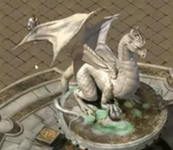
I think it is the red highlighting that marks what is an object. He deleted few strips of it from the house and later on in the video he hides ground tiles and you only see objects. That part of the house he removed the red hue highlight became again part of the ground.
Post automatically merged:
any maps you could export, edit and cut back up
I believe the idea is not export map into images to then cut them, ie, make them back into maps as you seem to imply. The idea is that there is an image that was never a map and you want make a map from it.
A while ago, I tested a map in client, a building interior with pillars inside and you could go behind those pillars as you can behind objects. Then I opened the map in map editor and was switching layers off and found it was all on front layer (smtiles).
It was a big puzzle to me that there were no back or middle layer tiles, everything was on front layer since it all vanished by hiding this layer leaving only a blank map canvas. How could it be if the map had those pillar objects on it?
I switched on front layer tile deleting and clicked on the floor and made a tile sized hole in it as expected but when I clicked halfway up on one of the pillars, nothing happened. I then switched on front tag view and saw tags at the pillar bases but deleting those tags to my amazement did nothing, the pillar was still there when the tag vanished. I mean, how can that be, was I dreaming or what.
Then I deleted another pillar tag and one smtile hole appeared in the map up but the pillar was still there, just with a tile size hole in it halfway up. Then I recalled that's where I clicked previously to delete a tile and nothing happened. Now it was clear, I did delete the tile but it was hidden by the pillar... yet the pillar was still there with a tile missing from it.
It was confusing but by experimenting with it some more, I found the trick how it was done which I described in the above post. This and the above GMJX map editor are the new smart ways of making maps. Its just that those maps are not modular, nothing from them is re-usable on other maps.
Last edited:
Upvote
0
The chinese video isnt perfect but it is way better than some of the ideas been proposed so far, it cuts out the image around the object without the tiles, splits it in to strips, and adds it to objects lib for you.
Upvote
0
- Jul 16, 2004
- 3,687
- 849
- 345


I proposed this idea to you years ago!The chinese video isnt perfect but it is way better than some of the ideas been proposed so far, it cuts out the image around the object without the tiles, splits it in to strips, and adds it to objects lib for you.
Upvote
0
I was about to say, this would make a great tool to quickly turn tiles into an object.The chinese video isnt perfect but it is way better than some of the ideas been proposed so far, it cuts out the image around the object without the tiles, splits it in to strips, and adds it to objects lib for you.
I’ve heard that @Lilcooldoode has some neat Mir 2 tools

wasn’t this tool the red icon one ? I think I still have it on my ssd. I remember trying to decompile the ****** to eventually give up
Upvote
0