- Jul 16, 2004
- 3,684
- 845
- 345


You can use shortcuts to make it as easy as possible to move btw the two views. Don't know if the GH editor version has them, mine in the resources here does.
Accessing tiles does need improvement but not at the expense of reducing map editing pane view! One possibility would be a show/hide solution - to have tile panel open on map editing view when you work with tiles and completely hide it otherwise. Kind of like graphic programs have a handle to click or pull at the edge of map view pane to make tiles panel visible (or a shortcut to open/close that panel). The width of thi tile view panel should also be adjustable.
There is however a much better solution once suggested by Chalace - typically you know the tile kind and its # and you want to find it in tiles tab in order to select it, so you can place it on map...
Currently you need to open the relevant tile view tab, scroll down to locate the tile and select it, then return to map tab. It is a chore even with shortcuts (specifically the scrolling part). The idea is to get the tile in question selected right on the map view editing pane without opening the tile view tab at all.
Once the tile is selected, you can use shortcuts < > to move to the previous or next tile #s. This covers like 99% of cases where you need to open tile view.
Putting tile view on the map view tab would still require to scroll around to locate the tile, which is where the bulk of the bother lies. Once the required tile is selected, you no longer need to go into this tile view but it would still take up precious map view pane editing area.
This is how it could be implemented: use the tile info panel to find tile location and # and while the mouse cursor is over the tile, right click to open context menu where you would have three links, one for each layer(*) and you would choose which one you want to select.
* the code would 'know' which kind of tile library to go to, WM2, SM2 etc.
Once you start putting panels on the map view tab, there is no end to it. What next? Objects list view added? Chinese like to put in Tile Set and MiniMap panels (the latter to enable you to see where you are on the map) which take up a whole third of map editing pane and are used only once in a blue moon (how often you use Tile Set, that is do dumb I have no words for it).
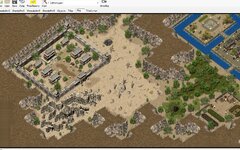
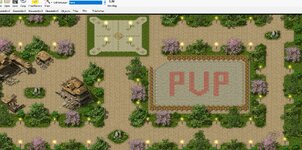
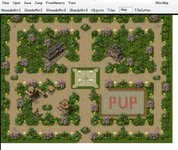
Ive already moved the Libs / Thumbnails / Auto Tiles and Object sets into a resizeable side bar (so its in the same view as the map)
I've also made it detachable, having the Tiles and objects viewable whilst editing is vital, for me atleast.
Whenever I design anything, the last thing I want is to have to switch out my view (even if the alternative is overlaying floating windows for the lists).
All that said, even with my edits (including sub-pixel smooth movement), i still dont like it.
I might dump the current editor and just make something that isn't dog **** and **** ass ugly.
Ps: So dumb pretty much any visual level environment editor uses the same space for assets and editing, like...Unity, Unreal, Photoshop, Blender.... how dumb must they be!