microsword
LOMCN Rookie
- Jun 22, 2025
- 20
- 11
- 4




 docs.google.com
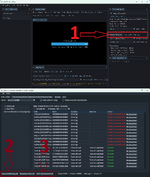
@Tikky sorry please ignore this issue report, full 2.966 client is working fine. 2.9.10.31 is not full asset version.View attachment 39231 View attachment 39232 View attachment 39231
Client 2.9.10.31, the tools opened them well on Desktop , but having issue on Win11 laptop. Logs attached, thanks in advance.
@Tikky sorry please ignore this issue report, full 2.966 client is working fine. 2.9.10.31 is not full asset version.
 www.lomcn.net

full 2.966 client is working fine. 2.9.10.31 is not full asset version
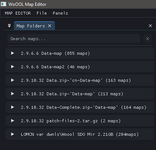

The pupose of the map editor isn't to make maps from the ground up, its to correct the silly mistakes that the developers leave in, like fire tiles being 1 block off, etc.I point the map editor to Data from 2.9.6.6 download (Data-Complete) as Path for all other Map sets which I have in other downloads since those other files sets (like the 2.9.10.32 download) don't have those SGL libraries and so far those maps I tried to open were OK
However I still don't know where those huge numbers of maps advertised in post titles are. Also wondering if the 2.9.10.32 files download might be meant to be merged with that first 2.9.6.6 file download. I didn't try to experiment with it mainly due to not having too much disk space to keep file duplicates in case the merger of the two downloads went wrong.
What I did was to enter Map Path to all the various map locations and some maps have flaws, obviously lacking libraries. Is the Data Path in Preferences tied to Map Path by its Name or it doesn't mater what Names you choose for those Paths links for Map or Data path, if you get what I mean. Maybe I should add Data Path to all these locations where the map folders are and regardless of the Names I use, the editor will look through all Data Paths for the libraries to use for the particular map from any of these map folders?
View attachment 39249
A tip for those who made several path entries like I did here and then a new editor version gets uploaded, you can just copy those path links in the settings.cfg and paste them into the config in the new editor issue.
I noted you switched off grid when maps open
Fix needed :
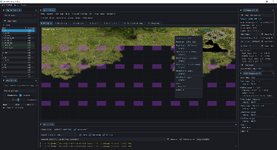
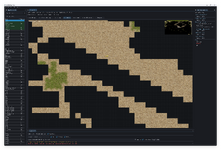
When you click Selection to start making prefabs, the mouse cursor becomes active and if you happen to ride it over other menus (or are they buttons?), they get selected. If you happen to move it over the Blocked Editor button, it becomes active and maps gets the red overlay for no-walk areas. This red mask cannot be switched off short of closing and reopening the map. Escape won't cancel that mask.
You can't get things right when making new program. If it should also function besides map viewer as a map editor, then someone who is able to make fixes in the code needs to do a sizable map editing job himself to uncover what should be fixed. I suppose you got more important things to do on the editor than do fixes like this one. Besides I don't think pple are eager to edit maps or make new ones, there are plenty nice maps here.
As to fixes, there will be many of them, I know it from my work on Crystal map editor. I have also found it is much better if you uncover what needs to be fixed during your own session with the editor than to have pple ask for them, eventually.
In 2.9.10.32 there is 741 maps in the Data1.wpf archive, and 163 maps in the (not archived) map folder. However I agree I put the wrong amount of maps, its 904 maps. Not sure where I got the extra 49... It was very late when I did the calculation. Corrected on the resource.I point the map editor to Data from 2.9.6.6 download (Data-Complete) as Path for all other Map sets which I have in other downloads since those other files sets (like the 2.9.10.32 download) don't have those SGL libraries and so far those maps I tried to open were OK
However I still don't know where those huge numbers of maps advertised in post titles are. Also wondering if the 2.9.10.32 files download might be meant to be merged with that first 2.9.6.6 file download. I didn't try to experiment with it mainly due to not having too much disk space to keep file duplicates in case the merger of the two downloads went wrong.
What I did was to enter Map Path to all the various map locations and some maps have flaws, obviously lacking libraries. Is the Data Path in Preferences tied to Map Path by its Name or it doesn't mater what Names you choose for those Paths links for Map or Data path, if you get what I mean. Maybe I should add Data Path to all these locations where the map folders are and regardless of the Names I use, the editor will look through all Data Paths for the libraries to use for the particular map from any of these map folders?
View attachment 39249
A tip for those who made several path entries like I did here and then a new editor version gets uploaded, you can just copy those path links in the settings.cfg and paste them into the config in the new editor issue.
I noted you switched off grid when maps open
Fix needed :
When you click Selection to start making prefabs, the mouse cursor becomes active and if you happen to ride it over other menus (or are they buttons?), they get selected. If you happen to move it over the Blocked Editor button, it becomes active and maps gets the red overlay for no-walk areas. This red mask cannot be switched off short of closing and reopening the map. Escape won't cancel that mask.
You can't get things right when making new program. If it should also function besides map viewer as a map editor, then someone who is able to make fixes in the code needs to do a sizable map editing job himself to uncover what should be fixed. I suppose you got more important things to do on the editor than do fixes like this one. Besides I don't think pple are eager to edit maps or make new ones, there are plenty nice maps here.
As to fixes, there will be many of them, I know it from my work on Crystal map editor. I have also found it is much better if you uncover what needs to be fixed during your own session with the editor than to have pple ask for them, eventually.
Exciting newswe are now making a Mir 1 server
, thank you both and other collaborators for the big job you have done on the WoOOL project. Those Woool maps are amazing, finally I was able to look at them, hope to see them in game sometimes in the future.
We are choosing to go from scratch on a modern stack... my day job is a backend software engineer so writing server architecture and making it is a bit more of a doddle. I am against any more ports to Zircon or Crystal because there is so many better ways of doing things.Exciting news
There was this mention of porting them to Zircon which would also mean to Crystal mir. Is that realistic given the number of layers these maps have and other possible complications?
Also, those working on Woool files might not like to see them ported as it might take some wind from their sails if pple would have already played on those maps in Zircon?
@Tikky Thanks for the direction for files. But I have one concern, why the newer 2.9.10.32 data size is much smaller than 2.9.6.6 Data file size,(18.31 GB vs 25.7GB)? Ideally 2.9.10.32 should have bigger data folder size.Data Rezipped -> Data-Complete.zipWoOOL - 2.9.10.32 (904 Maps, all the data)
Version: 2.9.10.32 Date of release: 25 December 2025 Hello guys, Me again, so we now have a complete 2.9.10.32 (including missing textures which are not included with client downloads). There was a lot of sweat, blood, and tears put into this to make this work with hours and hours and hours...
*shrugs*, dunno mate, i just make a tool to view them ...@Tikky Thanks for the direction for files. But I have one concern, why the newer 2.9.10.32 data size is much smaller than 2.9.6.6 Data file size,(18.31 GB vs 25.7GB)? Ideally 2.9.10.32 should have bigger data folder size.
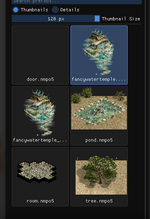
How are map prefaces created? It seems the map editor doesn't support this prefabrication method.