Excel help

Play Now

Tai

HEAD CAPTAIN
Staff member
Administrator
May 11, 2003
14,769
3
3,342
495
United Kingdom
Does anyone know if it's possible to create like a tally in a cell?

I need to be able to either press a key or click on a cell and it simply adds 1 to the tally, and outputs the number/tally total.

I'm a total Excel noob. Thx A-Levels.
 

JealY

LOMCN VIP
VIP
Nov 28, 2004
5,357
55
335
England
Why would you want a tally on an Excel spreadsheet?

That's like playing noughts & crosses on Photoshop.
 

Tai

HEAD CAPTAIN
Staff member
Administrator
May 11, 2003
14,769
3
3,342
495
United Kingdom
Think of it as someone wanting to keep record of how many pies they sell in a shop on a daily basis. Each time they sell a particular pie, they can mark it down. But without just typing in the new number each time
 

Robert

Actual Jesus
VIP
Jan 1, 1970
4,652
97
104
Yes.
It is most possible.

Need a bit more info though, as in how the data is organised etc.

Maybe attach the workbook highlighting what you want sub totalled?
 

Tyraes

Golden Oldie
Golden Oldie
Apr 16, 2007
722
1
41
115
You could use clickable arrows that when clicked +1 to the cell it's connected too.

So you'd have a table.

-> Pie 1 10
-> Pie 2 15

The arrow would change the numbers on the right. Im sure this would be easy to do. =SUM(A3+1) would be the simple sum you need to do, A3 being the pie total, so 10 and 15 in the example above.
 

Tai

HEAD CAPTAIN
Staff member
Administrator
May 11, 2003
14,769
3
3,342
495
United Kingdom
You could use clickable arrows that when clicked +1 to the cell it's connected too.

So you'd have a table.

-> Pie 1 10
-> Pie 2 15

The arrow would change the numbers on the right. Im sure this would be easy to do. =SUM(A3+1) would be the simple sum you need to do, A3 being the pie total, so 10 and 15 in the example above.

I would end up having too many arrows I think...for a list of pies along with times and days

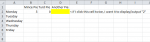
Here's a better idea of what I want...beginning to think it's not possible though

excel.PNG
 

Tyraes

Golden Oldie
Golden Oldie
Apr 16, 2007
722
1
41
115
The only simple way I could think is replacing the cell with a button...
 

Robert

Actual Jesus
VIP
Jan 1, 1970
4,652
97
104
Yes.
Add the code to the workbook:

Pies.jpg

Double click the cell to increase its current value by 1.

So four clicks would be 2.

Hope it helps!
 

Robert

Actual Jesus
VIP
Jan 1, 1970
4,652
97
104
Yes.
Hahaa no worries.

Open the workbook and click the developer tab.

Click visual basic and then select this workbook.

At the top will be two drop down boxes, (as in the above)
select workbook on the left then before dbl click on the right.

Type that code in.

Save workbook as an xlsm.

Job done!

Failing that...upload the workbook and I'll add it for you.
 

Tai

HEAD CAPTAIN
Staff member
Administrator
May 11, 2003
14,769
3
3,342
495
United Kingdom
Done!! Was a lil bit different cos i'm using 2010

You da man! I never knew you were so clever :O
 
Last edited:

Robert

Actual Jesus
VIP
Jan 1, 1970
4,652
97
104
Yes.
Haha there's probably lots you don't know about me!

Vb and excel are my work tools.
 

Koriban

Addict
Legendary
Loyal Member
Aug 18, 2006
5,842
215
260
Brighton
God damn hated excel =/

Was gunna say just create a macro then put insert it into the button through developer mode, but Robert's idea is better D: