So..
just a quick recap of everything.. i was having issues aswell and i did 3 things to get the ripman client to connect.
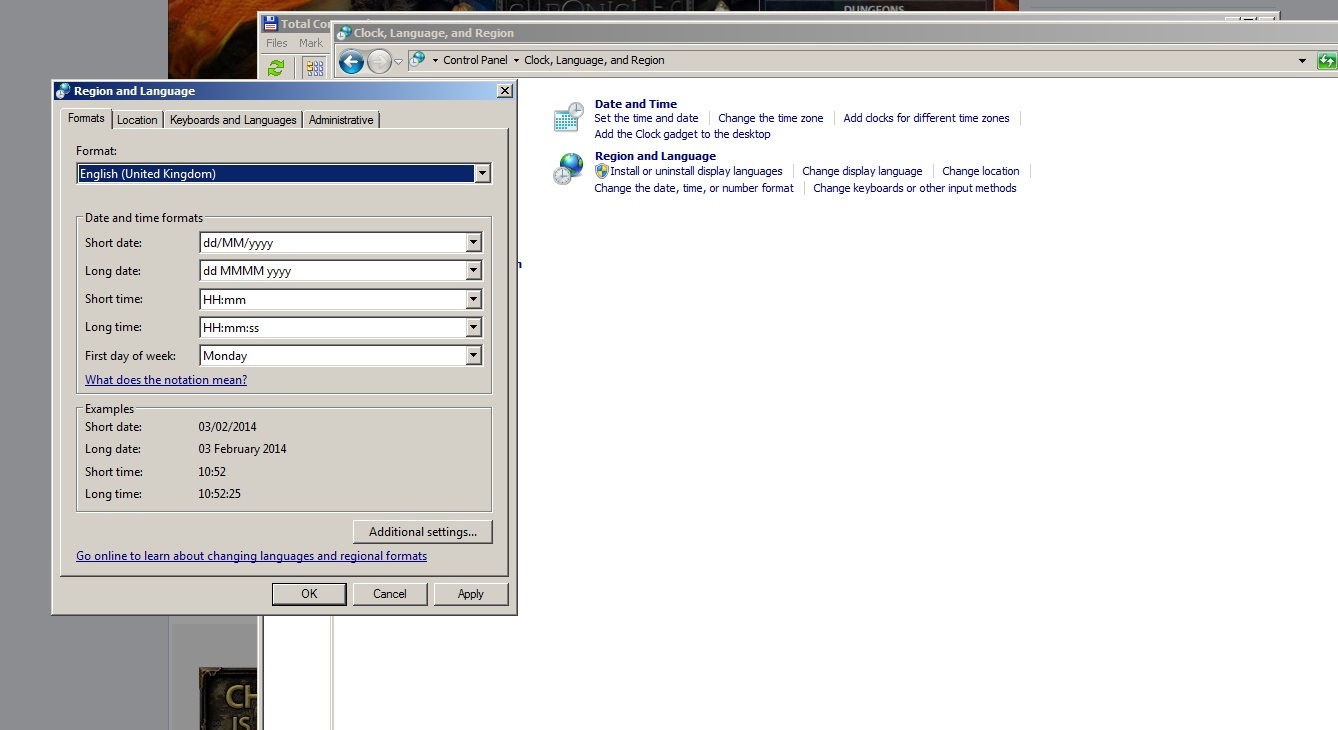
1) on win8 (think also win7) go to the control panel, click on language, click on change date time and number formats. then change number formats to English (United Kingdom)
2) change the time zone on the pc to UTC 0 (greenwich, london)
3) inside the ripman client, delete the mir2.exe, delete the servers.ini
re download them from here
http://www.mirchronicles.com/patcher/mir2.exe.zip
http://www.mirchronicles.com/patcher/servers.ini.zip
unzip and replace in the client folder
do not overwrite existing files. you must delete them for some reason.
TRY to see if this fixes the issue
------------
last test for all
open the command prompt with administration powers and type: ping game.chronicles.com
check if it is still giving the following IP 87.76.27.12
if it is then let's flush the dns cache of windows by typing
ipconfig /flushdns
now retry to ping game.chronicles.com to check if it has fixed the IP to the new one.
AND
btw do this with calmness else you might miss something and replying saying DOESNT WORK doesn't help you if you don't try.
just a quick recap of everything.. i was having issues aswell and i did 3 things to get the ripman client to connect.
1) on win8 (think also win7) go to the control panel, click on language, click on change date time and number formats. then change number formats to English (United Kingdom)
2) change the time zone on the pc to UTC 0 (greenwich, london)
3) inside the ripman client, delete the mir2.exe, delete the servers.ini
re download them from here
http://www.mirchronicles.com/patcher/mir2.exe.zip
http://www.mirchronicles.com/patcher/servers.ini.zip
unzip and replace in the client folder
do not overwrite existing files. you must delete them for some reason.
TRY to see if this fixes the issue
------------
last test for all
open the command prompt with administration powers and type: ping game.chronicles.com
check if it is still giving the following IP 87.76.27.12
if it is then let's flush the dns cache of windows by typing
ipconfig /flushdns
now retry to ping game.chronicles.com to check if it has fixed the IP to the new one.
AND
btw do this with calmness else you might miss something and replying saying DOESNT WORK doesn't help you if you don't try.
Last edited: