Graphical Error?

monkeydust

Dedicated Member
Dedicated Member
Oct 22, 2010
22
1
30
In your mum's bed
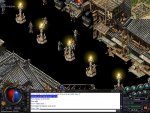
So I was heading to PI from BW. Tele'd to Border Vill and this happened.. Images00.jpg I tried logging out and back in but it was still like this :(
 

Foopah

LOMCN Veteran
Veteran
May 7, 2011
257
4
45
Livingston
Thread Hi-jacked! Muwhahahaha. Am still getting same ****ing issue after a full format and ****... Gonna quit if this problem persists after I go through my router settings tomorrow. Also, to the GM team all the other threads of people with connection issues or whatever have little to no help in them so that was a waste of an hour trawling through the forums for "help". 24 hours and if I am still getting this problem then **** this server!
 

Reverance

Final Heaven
Supporter
Veteran
May 25, 2013
1,006
178
130
Scotland
Thread Hi-jacked! Muwhahahaha. Am still getting same ****ing issue after a full format and ****... Gonna quit if this problem persists after I go through my router settings tomorrow. Also, to the GM team all the other threads of people with connection issues or whatever have little to no help in them so that was a waste of an hour trawling through the forums for "help". 24 hours and if I am still getting this problem then **** this server!

How about dropping a PM to them?, They can't see every single issue on here (Especially during the week)

As for the TC - Try a redownload confirming you have all the correct files (Download corrupts and misses out files sometimes)
 

monkeydust

Dedicated Member
Dedicated Member
Oct 22, 2010
22
1
30
In your mum's bed
Fixed the floor disappearing by shutting down the game then restarting. Hope this helps in future if it happens to anyone else :) Just close game completely then start back up and it should sort it out.
 

MiloFoxburr

LOMCN VIP
VIP
Mar 23, 2003
7,276
207
350
Dublin, Ireland
If it continues to happen after exiting the client (and restarting your system) you make need to reinstall the client as it sounds like the tiles file has corrupted. If you're a little tech savvy you could delete tiles.wzl and extract it again from the initial client download using something like 7zip or Winrar to open the archive.

-edit- Glad a restart of client sorted it ^^,
 

Liandrin2

Golden Oldie
Golden Oldie
Loyal Member
Jan 14, 2004
890
6
105
Looks like texture pop-in problem, basically means the game cannot load the textures quick enough and therefore stops trying to render them. Restarting will fix it as it will attempt to reload the textures.

Theres a bunch of things that can cause it but most common is either lack of RAM/VRAM while that texture is being loaded or simply the HDD not being able to keep up. Doing a disk defrag can help.