Yea it wasn’t clearing the old map data when you open a new map so it was just building up in ram until it crashed at 4GB, the net core upgrade and changing it to x64 removed that ram cap. Plus this PR I made then fixed the clearing of old map data.
This now clears the previous map's data when changing map via TreeBroswer/OpenDiag. Stops RAM usage going to 100% and crashing the program. Also adjusted gitignore to not include bin / obj / .vs
Haha I’d say that would be my idea of hell listening to ppl moan about the mechanics of a game I’d released, to much stress and would take the enjoyment out of what I’m doing for sure.
Enjoyment factor for me is just crack on and get better at it and make a world “fit for a game server” then just zip it up and post it all here, if I see the maps start popping up in ppls games…happy days
Never claimed the map editor was mine? it's crystal's map editor. I'd recommend using it since it doesn't have a memory leak like the other and it using net core instead of the old net framework, same applies for slimdx instead of the older direct x
Not the editor but the map viewer addition you made in it. Don't know if you removed it by now, never checked on it since I brought it up and Far agreed it should be removed.
I considered manual porting of those commits that improve memory handling (made prior to map viewer addition), by copying out changed lines of code to my source but never started on it, I imagine it would be a huge task, maybe not even realistic, besides I hardly orient myself on GH as it is.
I also had the idea of getting AI to help with it but it seems free time on it is very much limited lately. Tried to use ChatGPT last week and run out of free time before I really got to do anything, IMO it is useless for any half serious work now.
Not the editor but the map viewer addition you made in it. Don't know if you removed it by now, never checked on it since I brought it up and Far agreed it should be removed.
I considered manual porting of those commits that improve memory handling (made prior to map viewer addition), by copying out changed lines of code to my source but never started on it, I imagine it would be a huge task, maybe not even realistic, besides I hardly orient myself on GH as it is.
I also had the idea of getting AI to help with it but it seems free time on it is very much limited lately. Tried to use ChatGPT last week and run out of free time before I really got to do anything, IMO it is useless for any half serious work now.
Map viewer on the map editor? i never added that, are you talking about the listview that displays all map files within a selected map folder? I don't see any issues with it since the commit to fix the memory issues
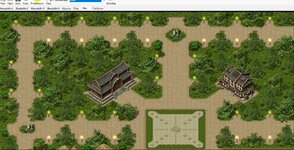
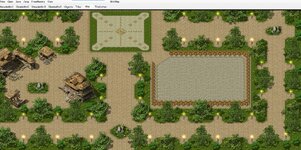
Had another go tonight and removed some of the paths, changed the trees up abit, used 5 different back dirt tiles across the paths as opposed to 1 same tile which looks quite nice ingame (better than the jpg screenshot below). Started working on a different looking safezone and pvp town battle space which is starting to take shape. All in all a good evening…will have a go at the middle brushing around the buildings next time see how I go
As for another persons comment on trees, i agree but some tree styles do not match well.. the ones you'd see in Fox Caves, do not look the same as ones from the older maps and sometimes when close can look pony imo. So yes use more trees, but don't use them all..
Yeah don't use them all but theres hundreds and many can match, Best way imo is to open any map, say bichon or woomyon or whatever, pick a tree you like, make it an object, then do the same to a bunch of others on the map, they'll all suit each other and on that note : Shanda has the best trees!
Slow going but managed to finish off the next part. Despite only being about 150x* A lot less clutter than the last camp, but some nice contrast. (Un-origonal, Copied, Simple map, Zedina™ :rolleyes: )
Map viewer on the map editor? i never added that, are you talking about the listview that displays all map files within a selected map folder? I don't see any issues with it since the commit to fix the memory issues
OK, the listview then. But I can't comprehend how you don't see any issues with it unless you fixed it by at least moving it away from the map tab to a separate new one if you really have to have it. But I would suggest simply make a fork of the editor for viewing maps and call it map viewer. Same as the map editor was forked for Mir1 use.
I can't find the thread where Far agreed with me and gave it to you as a task to remove it.
OK, the listview then. But I can't comprehend how you don't see any issues with it unless you fixed it by at least moving it away from the map tab to a separate new one if you really have to have it. But I would suggest simply make a fork of the editor for viewing maps and call it map viewer. Same as the map editor was forked for Mir1 use.
I can't find the thread where Far agreed with me and gave it to you as a task to remove it.
OK, the listview then. But I can't comprehend how you don't see any issues with it unless you fixed it by at least moving it away from the map tab to a separate new one if you really have to have it. But I would suggest simply make a fork of the editor for viewing maps and call it map viewer. Same as the map editor was forked for Mir1 use.
I can't find the thread where Far agreed with me and gave it to you as a task to remove it.
You can use shortcuts to make it as easy as possible to move btw the two views. Don't know if the GH editor version has them, mine in the resources here does.
Accessing tiles does need improvement but not at the expense of reducing map editing pane view! One possibility would be a show/hide solution - to have tile panel open on map editing view when you work with tiles and completely hide it otherwise. Kind of like graphic programs have a handle to click or pull at the edge of map view pane to make tiles panel visible (or a shortcut to open/close that panel). The width of thi tile view panel should also be adjustable.
There is however a much better solution once suggested by Chalace - typically you know the tile kind and its # and you want to find it in tiles tab in order to select it, so you can place it on map...
Currently you need to open the relevant tile view tab, scroll down to locate the tile and select it, then return to map tab. It is a chore even with shortcuts (specifically the scrolling part). The idea is to get the tile in question selected right on the map view editing pane without opening the tile view tab at all.
Once the tile is selected, you can use shortcuts < > to move to the previous or next tile #s. This covers like 99% of cases where you need to open tile view.
Putting tile view on the map view tab would still require to scroll around to locate the tile, which is where the bulk of the bother lies. Once the required tile is selected, you no longer need to go into this tile view but it would still take up precious map view pane editing area.
This is how it could be implemented: use the tile info panel to find tile location and # and while the mouse cursor is over the tile, right click to open context menu where you would have three links, one for each layer(*) and you would choose which one you want to select.
* the code would 'know' which kind of tile library to go to, WM2, SM2 etc.
Once you start putting panels on the map view tab, there is no end to it. What next? Objects list view added? Chinese like to put in Tile Set and MiniMap panels (the latter to enable you to see where you are on the map) which take up a whole third of map editing pane and are used only once in a blue moon (how often you use Tile Set, that is do dumb I have no words for it).
You can use shortcuts to make it as easy as possible to move btw the two views. Don't know if the GH editor version has them, mine in the resources here does.
Accessing tiles does need improvement but not at the expense of reducing map editing pane view! One possibility would be a show/hide solution - to have tile panel open on map editing view when you work with tiles and completely hide it otherwise. Kind of like graphic programs have a handle to click or pull at the edge of map view pane to make tiles panel visible (or a shortcut to open/close that panel). The width of thi tile view panel should also be adjustable.
There is however a much better solution once suggested by Chalace - typically you know the tile kind and its # and you want to find it in tiles tab in order to select it, so you can place it on map...
Currently you need to open the relevant tile view tab, scroll down to locate the tile and select it, then return to map tab. It is a chore even with shortcuts (specifically the scrolling part). The idea is to get the tile in question selected right on the map view editing pane without opening the tile view tab at all.
Once the tile is selected, you can use shortcuts < > to move to the previous or next tile #s. This covers like 99% of cases where you need to open tile view.
Putting tile view on the map view tab would still require to scroll around to locate the tile, which is where the bulk of the bother lies. Once the required tile is selected, you no longer need to go into this tile view but it would still take up precious map view pane editing area.
This is how it could be implemented: use the tile info panel to find tile location and # and while the mouse cursor is over the tile, right click to open context menu where you would have three links, one for each layer(*) and you would choose which one you want to select.
* the code would 'know' which kind of tile library to go to, WM2, SM2 etc.
Once you start putting panels on the map view tab, there is no end to it. What next? Objects list view added? Chinese like to put in Tile Set and MiniMap panels (the latter to enable you to see where you are on the map) which take up a whole third of map editing pane and are used only once in a blue moon (how often you use Tile Set, that is do dumb I have no words for it).
This site uses cookies to help personalise content, tailor your experience and to keep you logged in if you register.
By continuing to use this site, you are consenting to our use of cookies.





 github.com