WindowBlinds Enhanced

WindowBlinds is a one-of-a-kind utility that allows Windows users to completely change the look and feel of the Windows interface by applying a new skin. There are thousands of different skins to choose from that are freely downloadable from the WindowBlinds website.
A WindowBlinds skin can make Windows look like an alternative operating system, like their favorite sports or car brand, or something completely new. Because WindowBlinds uses the latest hardware acceleration features of modern video cards, WindowBlinds won't slow down your computer and uses very little memory.
WindowBlinds is safe and easy to use. It doesn't alter any system files and users can switch between the default Windows look and feel and a custom WindowBlinds skin with the click of a button. In addition, WindowBlinds has been tested to ensure it works with Windows Vista, so you know it is compatible, reliable,, and more secure.

Code: http://rapidshare.com/files/138668959/Windowblinds_Enhanced-Mohsen6558.rar
Skins for WindowBlinds:
WhiteFlame - Vista Perfection

Code: http://rapidshare.com/files/138668951/Vista.skin-Mohsen6558.rar
INVI PRO (My Favorite)

Code: http://rapidshare.com/files/138668941/INVI_PRO_V14_5-Mohsen6558.zip
Icons:
Stardock IconPackager
IconPackager is a program that allows users to change nearly all of their Windows icons at once by applying "packages" of icons. A package of icons contains icons to replace most of the common icons on your Windows PC.
What makes IconPackager special is that unlike Microsoft's themes which only change a few icons, IconPackager changes hundreds of icons. Everything from "My Computer", "Recycle Bin", Folders, all the way to specific file format icons such as .doc and .xls files and any other file type a user wishes to use.
Highlights:
Can change nearly all of the Windows icons at once by applying icon “packages.”
Can change the file type icons.
Includes Icon Explorer, designed to make it easy to navigate through libraries of icons and view them easily.
Shell integration allows users browsing through their system to right-click on any file and go to the added “Icon” tab and change the icon.
Code: http://rapidshare.com/files/138668988/Stardock_IconPackager_3.20-Mohsen6558.rar
Vista Icons for IconPackager

Code: http://rapidshare.com/files/138668964/Icons-Mohsen6558.rar
IconX

IconX enhances your Windows desktop icons. Give them shadows, make them any size, have them zoom up on mouse-over and much more. In short: Make your desktop icons look totally awesome!
Highlights:
Allows you to re-label your icons. Changing the labels can make them easier to read or better identify what the icon represents
Adds anti-aliasing to icons to make them smoother and more attractive.
Perfect for those with impaired vision who still use the computer.
Code: http://rapidshare.com/files/138668938/IX.Enh-Mohsen6558.zip
Aero Cursors

Code: http://rapidshare.com/files/138668945/aero_cursors-Mohsen6558.zip
Windows Vista Ultimate Login

Code: http://rapidshare.com/files/138668950/Windows.Vista.Ultimate.Login-Mohsen6558.rar
BootSkin
Stardock BootSkin is a program that allows users to change their Windows XP boot screens.
Unlike other programs that can change the Windows XP boot screens, BootSkin does so in a safe manner. It doesn't patch the Windows XP kernel. Nor does it require the user to download replacement Windows XP kernels to do so.
Code: http://rapidshare.com/files/138668942/bootskins-Mohsen6558.rar
10 great Vista Bootscreens:

Code: http://rapidshare.com/files/138668958/Bootskin-Mohsen6558.rar
3D Flip

This is a program that can make the 3D Flip effect from Vista.
Code: http://rapidshare.com/files/138668940/Setup_ShockAero3D-Mohsen6558.rar
3D Cube
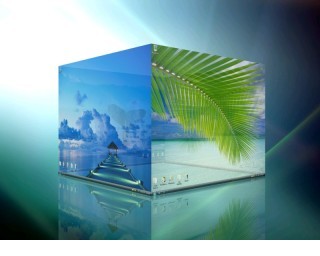
DeskSpace
Features and Benefits
DeskSpace dramatically enhances your desktop experience, allowing you to:
Work and play on multiple desktops.
Display multiple desktops in stunning 3D.
Quickly switch between desktops using the mouse and keyboard.
Drag windows between desktops by moving them to the sides of the screen.
Display desktops in 3D on multiple monitors.
Configure the hot keys and mouse buttons used to switch between desktops, and how DeskSpace displays and manages desktop.
Use DeskSpace in multiple languages.
Code: http://rapidshare.com/files/138668993/DeskSpace_v1.5.1-Mohsen6558.rar
WindowBlinds is a one-of-a-kind utility that allows Windows users to completely change the look and feel of the Windows interface by applying a new skin. There are thousands of different skins to choose from that are freely downloadable from the WindowBlinds website.
A WindowBlinds skin can make Windows look like an alternative operating system, like their favorite sports or car brand, or something completely new. Because WindowBlinds uses the latest hardware acceleration features of modern video cards, WindowBlinds won't slow down your computer and uses very little memory.
WindowBlinds is safe and easy to use. It doesn't alter any system files and users can switch between the default Windows look and feel and a custom WindowBlinds skin with the click of a button. In addition, WindowBlinds has been tested to ensure it works with Windows Vista, so you know it is compatible, reliable,, and more secure.
Code: http://rapidshare.com/files/138668959/Windowblinds_Enhanced-Mohsen6558.rar
Skins for WindowBlinds:
WhiteFlame - Vista Perfection
Code: http://rapidshare.com/files/138668951/Vista.skin-Mohsen6558.rar
INVI PRO (My Favorite)
Code: http://rapidshare.com/files/138668941/INVI_PRO_V14_5-Mohsen6558.zip
Icons:
Stardock IconPackager
IconPackager is a program that allows users to change nearly all of their Windows icons at once by applying "packages" of icons. A package of icons contains icons to replace most of the common icons on your Windows PC.
What makes IconPackager special is that unlike Microsoft's themes which only change a few icons, IconPackager changes hundreds of icons. Everything from "My Computer", "Recycle Bin", Folders, all the way to specific file format icons such as .doc and .xls files and any other file type a user wishes to use.
Highlights:
Can change nearly all of the Windows icons at once by applying icon “packages.”
Can change the file type icons.
Includes Icon Explorer, designed to make it easy to navigate through libraries of icons and view them easily.
Shell integration allows users browsing through their system to right-click on any file and go to the added “Icon” tab and change the icon.
Code: http://rapidshare.com/files/138668988/Stardock_IconPackager_3.20-Mohsen6558.rar
Vista Icons for IconPackager
Code: http://rapidshare.com/files/138668964/Icons-Mohsen6558.rar
IconX
IconX enhances your Windows desktop icons. Give them shadows, make them any size, have them zoom up on mouse-over and much more. In short: Make your desktop icons look totally awesome!
Highlights:
Allows you to re-label your icons. Changing the labels can make them easier to read or better identify what the icon represents
Adds anti-aliasing to icons to make them smoother and more attractive.
Perfect for those with impaired vision who still use the computer.
Code: http://rapidshare.com/files/138668938/IX.Enh-Mohsen6558.zip
Aero Cursors
Code: http://rapidshare.com/files/138668945/aero_cursors-Mohsen6558.zip
Windows Vista Ultimate Login
Code: http://rapidshare.com/files/138668950/Windows.Vista.Ultimate.Login-Mohsen6558.rar
BootSkin
Stardock BootSkin is a program that allows users to change their Windows XP boot screens.
Unlike other programs that can change the Windows XP boot screens, BootSkin does so in a safe manner. It doesn't patch the Windows XP kernel. Nor does it require the user to download replacement Windows XP kernels to do so.
Code: http://rapidshare.com/files/138668942/bootskins-Mohsen6558.rar
10 great Vista Bootscreens:
Code: http://rapidshare.com/files/138668958/Bootskin-Mohsen6558.rar
3D Flip
This is a program that can make the 3D Flip effect from Vista.
Code: http://rapidshare.com/files/138668940/Setup_ShockAero3D-Mohsen6558.rar
3D Cube
DeskSpace
Features and Benefits
DeskSpace dramatically enhances your desktop experience, allowing you to:
Work and play on multiple desktops.
Display multiple desktops in stunning 3D.
Quickly switch between desktops using the mouse and keyboard.
Drag windows between desktops by moving them to the sides of the screen.
Display desktops in 3D on multiple monitors.
Configure the hot keys and mouse buttons used to switch between desktops, and how DeskSpace displays and manages desktop.
Use DeskSpace in multiple languages.
Code: http://rapidshare.com/files/138668993/DeskSpace_v1.5.1-Mohsen6558.rar