Help New .Lib file with HD Mob is not loading in server

Play Now

Jamole

LOMCN Veteran
Veteran
Loyal Member
Feb 9, 2004
286
10
95
Hi everyone,

I’m hoping someone can point me in the right direction with an issue I’m having.
Any help is greatly appreciated, thank you in advance.

Issue:
I am trying to replace 022.lib (Skeleton from Oma Cave) with the new HD images from the download pack linked below.
However, after copying the new HD images into 022.lib, the updated Skeleton does not appear in-game.

My suspicion

I think the problem may be related to placements, or "frames" in the Library Editor - but I could be wrong!
  • I can’t find a way to import or create placements (are these the frames for each mob?)
  • The HD mob pack contains both a .lib file and a placements folder for each mob...
  • But, when I create a new .lib file in the Library Editor, I only see the .lib file inside Data/Monster/, and I'm not sure where the placement files are located, or how to update them
I tried moving the new Skeleton image so that it sits inside the yellow-striped bounding box (the X/Y coords show as -140 / -150), but that didn’t help either.

Additional info

1. downloaded the HD mob .libs from Here
2. using the following library editor: Here
3. Tried searching LOMCN but to no avail
4. I'm using crystal files

I’m happy to put the work in, I’m not looking for a shortcut, just a push in the right direction.

Many thanks,
 

LuckyDip

Golden Oldie
Golden Oldie
Jul 8, 2009
515
2
90
115
London
have you adjusted the frames in the lib itself? or have you just deleted and re entered the hd mobs images into the file? if so try make a fresh lib using the HD mobs and adjust the frames accordingly thats what i did with the hd mobs and have had 0 issues
 
Upvote 0

Jamole

LOMCN Veteran
Veteran
Loyal Member
Feb 9, 2004
286
10
95
have you adjusted the frames in the lib itself? or have you just deleted and re entered the hd mobs images into the file? if so try make a fresh lib using the HD mobs and adjust the frames accordingly thats what i did with the hd mobs and have had 0 issues
Hi,

Thank you for responding to me.

I have tried playing around with the frames tab but the mob doesn't seem to move on the grid layout (where the yellow striped box is) when changing the x y coordinates, so I'm not really sure what exactly I'm supposed to change, or what the boxes do. I tried using the default monster frames from the function menu, but that hasn't worked.

If I can get my hands on some kind of guide, or information about the frame or what to change and why then that would no doubt be a huge help.

*Sending this from my phone.


Update from laptop:

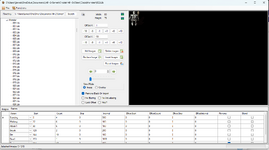
I've attached a screenshot of the editor I'm using, and opened the frames tab at the bottom of the window. I assume it's this section that I need to update for the new images, but I'm hoping that someone can shed some light on this for me as I'm finding it somewhat confusing.
Just a note that the lib. file I have open in the editor (in the screenshot) is the original skeleton .lib, not the new HD image.
 

Attachments

  • Screenshot 2025-11-17 200543.png
    Screenshot 2025-11-17 200543.png
    82.9 KB · Views: 19
Last edited:
Upvote 0

Jamole

LOMCN Veteran
Veteran
Loyal Member
Feb 9, 2004
286
10
95
have you adjusted the frames in the lib itself? or have you just deleted and re entered the hd mobs images into the file? if so try make a fresh lib using the HD mobs and adjust the frames accordingly thats what i did with the hd mobs and have had 0 issues
I just created a new lib file in Data/Monster folder, added the images of the HD mob (in this case, a skeleton from Oma Cave).
Once I added the new images in the library editor (via the add images button), I then removed all of the blank images via the functions menu.
Then I opened the frames tab at the bottom, and made sure that the standing, walking, attack, die animations matched the actual images themselves.
I saved the file, closed the editor.

I renamed the new lib from "newtest.lib" to "022", which was the name of the original skeleton.lib.

Loaded the server, @mob skeleton and still the old mob appeared.

I went back into the Data/Monster folder and opened 022.lib and it's now showing the old original skeleton images?!

Am I doing something incredibly stupid here, or am I missing a key step?

If anyone has any input, I'd gratefully appreciate it.

Thanks again
 
Upvote 0

Wittin

Ex-Δdministrator
VIP
May 7, 2003
1,341
1
244
295
Is the libraries date modified definitely updating after you apply the new images? I presume you are pressing save, as that is what commits the changes you see in the editor into the library.
 
Upvote 0

horizon02

LOMCN Veteran
Veteran
Aug 5, 2012
274
1
153
70
I just created a new lib file in Data/Monster folder, added the images of the HD mob (in this case, a skeleton from Oma Cave).
Once I added the new images in the library editor (via the add images button), I then removed all of the blank images via the functions menu.
Then I opened the frames tab at the bottom, and made sure that the standing, walking, attack, die animations matched the actual images themselves.
I saved the file, closed the editor.

I renamed the new lib from "newtest.lib" to "022", which was the name of the original skeleton.lib.

Loaded the server, @mob skeleton and still the old mob appeared.

I went back into the Data/Monster folder and opened 022.lib and it's now showing the old original skeleton images?!

Am I doing something incredibly stupid here, or am I missing a key step?

If anyone has any input, I'd gratefully appreciate it.

Thanks again

You loaded server AFTER replacing the mob lib..and the old one appeared, opened lib and the old mob is there? Are you saving the lib before closing it? are you overwriting it with a patcher when opening the client?
 
Upvote 0

Jamole

LOMCN Veteran
Veteran
Loyal Member
Feb 9, 2004
286
10
95
Is the libraries date modified definitely updating after you apply the new images? I presume you are pressing save, as that is what commits the changes you see in the editor into the library.
Yes, I'm saving it - 100%.
You loaded server AFTER replacing the mob lib..and the old one appeared, opened lib and the old mob is there? Are you saving the lib before closing it? are you overwriting it with a patcher when opening the client?
Your last question may be onto something.
When I ran the client, the autopatcher opens and runs and I can see that it is updating the file in 'monster' folder - I just assumed it was updating with the new lib file I created but perhaps it's overwriting it with the original.

Thank you for that insight, I'm going to have to do some digging into how to change the autopatcher and figure out how this ties in with my changes, because it doesn't make sense for it to overwrite everything I'm changing with the original files
 
Upvote 0

horizon02

LOMCN Veteran
Veteran
Aug 5, 2012
274
1
153
70
Yes, I'm saving it - 100%.

Your last question may be onto something.
When I ran the client, the autopatcher opens and runs and I can see that it is updating the file in 'monster' folder - I just assumed it was updating with the new lib file I created but perhaps it's overwriting it with the original.

Thank you for that insight, I'm going to have to do some digging into how to change the autopatcher and figure out how this ties in with my changes, because it doesn't make sense for it to overwrite everything I'm changing with the original files
Mir2Settings.ini (or something to that effect) find Patcher= True and change to = False
 
  • Like
Reactions: Jamole
Upvote 0

Jamole

LOMCN Veteran
Veteran
Loyal Member
Feb 9, 2004
286
10
95
Mir2Settings.ini (or something to that effect) find Patcher= True and change to = False
Thank you - I've changed the settings under 'launcher' and the autopatcher has stopped running and now the new mob images are working in-game :) Now I just need to play around with the frames so he doesn't always face north after walking one step lol.

Just a note in case anyone else stumbles across the same problem: I found the link below, which will hopefully shed some light on managing the autopatcher in the future, as I imagine I will want this on at some point! But that's a problem for future 'me'.


Thank you again horizon, really appreciate the support,
 
  • Like
Reactions: horizon02
Upvote 0

LuckyDip

Golden Oldie
Golden Oldie
Jul 8, 2009
515
2
90
115
London
Thank you - I've changed the settings under 'launcher' and the autopatcher has stopped running and now the new mob images are working in-game :) Now I just need to play around with the frames so he doesn't always face north after walking one step lol.

Just a note in case anyone else stumbles across the same problem: I found the link below, which will hopefully shed some light on managing the autopatcher in the future, as I imagine I will want this on at some point! But that's a problem for future 'me'.


Thank you again horizon, really appreciate the support,
there should be a command to generate normal mob frames in one of the tabs in editor, this will work for most mobs and can give you a general understanding of how they work
 
  • Like
Reactions: Jamole
Upvote 0