- Feb 9, 2004
- 286
- 10
- 95
Hi everyone,
I’m hoping someone can point me in the right direction with an issue I’m having.
Any help is greatly appreciated, thank you in advance.
Issue:
I am trying to replace 022.lib (Skeleton from Oma Cave) with the new HD images from the download pack linked below.
However, after copying the new HD images into 022.lib, the updated Skeleton does not appear in-game.
My suspicion
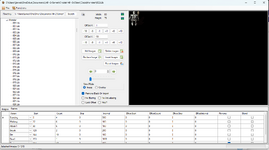
I think the problem may be related to placements, or "frames" in the Library Editor - but I could be wrong!
Additional info
1. downloaded the HD mob .libs from Here
2. using the following library editor: Here
3. Tried searching LOMCN but to no avail
4. I'm using crystal files
I’m happy to put the work in, I’m not looking for a shortcut, just a push in the right direction.
Many thanks,
I’m hoping someone can point me in the right direction with an issue I’m having.
Any help is greatly appreciated, thank you in advance.
Issue:
I am trying to replace 022.lib (Skeleton from Oma Cave) with the new HD images from the download pack linked below.
However, after copying the new HD images into 022.lib, the updated Skeleton does not appear in-game.
My suspicion
I think the problem may be related to placements, or "frames" in the Library Editor - but I could be wrong!
- I can’t find a way to import or create placements (are these the frames for each mob?)
- The HD mob pack contains both a .lib file and a placements folder for each mob...
- But, when I create a new .lib file in the Library Editor, I only see the .lib file inside Data/Monster/, and I'm not sure where the placement files are located, or how to update them
Additional info
1. downloaded the HD mob .libs from Here
2. using the following library editor: Here
3. Tried searching LOMCN but to no avail
4. I'm using crystal files
I’m happy to put the work in, I’m not looking for a shortcut, just a push in the right direction.
Many thanks,