TO clarify the Problems in the hope with a solution.

Play Now

TheRealSphinx

Dedicated Member
Dedicated Member
Feb 2, 2014
186
0
42
Germany
On Friday 31.01. - I could start the game connect (LOGIN SCREEN) then could go to the Character Screen (Made 3 CHARACTERS) and that was all - could not connect to the game cause it was not Online.

Now Sunday 2.2. - i can start the game (NEW/patched mir2.exe) I can select Chronicle Button - then it try to connect to the LOGIN GATE and it fails with this Msg. we cannot even enter our Logindetails to connect.
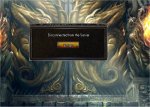
Bild4.jpg

---------- Post Merged at 10:40 PM ---------- Previous Post was at 10:35 PM ----------

Take it not personally *but slowly i give up. Looks like no1 has a solution for us cause on 500+ Players it works and others got fked up for wich reason ever. I sit the hole day to find a solution my Internet was glowing from over and over Downloading the FULL Client through the Patcher in the hope it would fix my connection problem to the Server.
 

dirtrunt

LOMCN n00bie
Apr 25, 2007
9
0
13
I have a different issue to this, I could patch fine but i just get a black screen and nothing else before the doors even show..

I also have a message in my debug file saying:

02/02/2014 21:37:38 now in fullscreen
02/02/2014 21:37:44 Out of memory
 

BigBaby

Dedicated Member
Dedicated Member
Jan 31, 2014
53
15
34
it fails as soon u click server name it say connecting to game then few seconds later it say disconnected from the server

we get kicked
before u moved to a new host we could get in and even mad chars when u opened it

i have been ingame just before the dossing

and since u moved to a new host i get disconnected from server

so it can not be our computers becouse we got in before

sumhow the new host must block or kick our ip or connection
 

mir2pion

TL;DR
Veteran
Feb 21, 2013
3,591
2
679
265
I get the same as you.
"u click server name it say connecting to game then few seconds later it say disconnected from the server"

=====
Edit: I stopped the patcher because it seemed to be stuck at #60 or 61 file and was just 'repatching' and I copied the game folder into virtual machine win7 and started from mir.exe in there and everything seems to be OK. I made acct and now am at char making screen. That same installation is still not able to log in to server on this win8 laptop (but it starts in win7 virt. machine on that same laptop).

Now as I write this, I recall solving the same connection issue on some previous mir, might even have been usa mir and it was DNS issue or something like that - it also happened when servers switched hosting and a bunch of folks couldn't connect. I vaguelly recall the solution might have been flushing dns but I tried that now and it didn't help (win+X and select Admin command prompt and enter 'ipconfig /flushdns'

It was something to do with particular PC being stuck on ip somehow but can't recall exactly what it was but now I am sure that's what is the problem others here have and which I got around by starting mir from virtual machine which in effect is like being on different pc) I recall now I did launch mir.exe prior to you changing mir server host and that might have caused the problem...

I have now also tried replacing FQDN address game.mirchronicles.com with IP [87.76.27.12] in servers.ini file but it didn't help. Somebody more qualified than I might figure out the solution with these pointers, myself for now will play from the virtual machine which works for me.
 
Last edited:

Zen2

LOMCN Veteran
Veteran
Jul 26, 2007
1,818
18
125
Are you sure you have ran the new auto patcher to get the latest client and ini's for the new host? the full client download will need auto patching too.
 

TheRealSphinx

Dedicated Member
Dedicated Member
Feb 2, 2014
186
0
42
Germany
Are you sure you have ran the new auto patcher to get the latest client and ini's for the new host? the full client download will need auto patching too.

I downloaded THE NEW PATCHER - DOWNLOADED x-Times THE HOLE CLIENT with all files and nothing - the new mir2.exe is dated 02.02.2014 - 13:01 with 2885 Kbytes
 

mir2pion

TL;DR
Veteran
Feb 21, 2013
3,591
2
679
265
Check my edited post above, from those pointers I give there some expert might figure out a solution for you unfortunated folks or play from VM like I do now.

Redownloading won't fix it, don't waste your time with that, the problem is the particular PC, or more exactly the OS
 
Last edited:

TheRealSphinx

Dedicated Member
Dedicated Member
Feb 2, 2014
186
0
42
Germany
I know redownloading wont help cause i did it 9x now - but i have no VM - i tried to run the Client in all avaible compatibility settings from win95 till win8 and nothing help...
 

Jest

LOMCN Veteran
Veteran
Oct 29, 2005
682
8
105
I get the same as you.
"u click server name it say connecting to game then few seconds later it say disconnected from the server"

=====
Edit: I stopped the patcher because it seemed to be stuck at #60 or 61 file and was just 'repatching' and I copied the game folder into virtual machine win7 and started from mir.exe in there and everything seems to be OK. I made acct and now am at char making screen. That same installation is still not able to log in to server on this win8 laptop (but it starts in win7 virt. machine on that same laptop).

Now as I write this, I recall solving the same connection issue on some previous mir, might even have been usa mir and it was DNS issue or something like that - it also happened when servers switched hosting and a bunch of folks couldn't connect. I vaguelly recall the solution might have been flushing dns but I tried that now and it didn't help (win+X and select Admin command prompt and enter 'ipconfig /flushdns'

It was something to do with particular PC being stuck on ip somehow but can't recall exactly what it was but now I am sure that's what is the problem others here have and which I got around by starting mir from virtual machine which in effect is like being on different pc) I recall now I did launch mir.exe prior to you changing mir server host and that might have caused the problem...

I have now also tried replacing FQDN address game.mirchronicles.com with IP [87.76.27.12] in servers.ini file but it didn't help. Somebody more qualified than I might figure out the solution with these pointers, myself for now will play from the virtual machine which works for me.

I think you've done it!!!

Replace your servers.ini with this.


[Options]
ServerCount=1
[Server0]
ServerName=Chronicles
ServerAddr=128.242.54.18
ServerPort=7000
 

mir2pion

TL;DR
Veteran
Feb 21, 2013
3,591
2
679
265
I pinged game.mirchronicles.com and it told me the IP was 87.76.27.12

No idea where you got ServerAddr=128.242.54.18

I am now quite sure the problem is somewhere in operating system which is somehow pointed into the previous server address. I know that dns problems shouldn't come into play when you enter numerical IP but for the life of me I can't quite recall how that same problem I mentioned was solved years ago, I think it wasn't that simple as replacing the fqdn (name address) with the numerical IP address.

Try this - go to your Network connections center and on left side of the panel (in win7 but likely the similar on win8) click 'Change adapter settings' and in the window that opens select the adapter you are using to connect - either Local Area Connection or Wireless Network Connection and right click it and select properties and there select Internet Protocol Version 4 (IPv4) and select Properties of that and there change DNS server settings - if you got it on automatic, click the Use the following DNS server addresses and enter at least primary, the secondary is optional = look up some public dns addresses on net by googling or use google's own dns which I think is 8.8.8.8 and 4.4.4.4 (use one as primary, the other secondary.

---
Edit: just tried that on my laptop and it didn't work. Also I copied out the working install from the virtual machine to host desktop and from there it can't connect - proving that the problem is hidden in OS somewhere, the way it connects, likely to do with DNS stuff somehow. Pple who did't try launching the install before the mir host was switched because of ddos attacks can connect but those who tried it can't connect now because their pc is somehow left with the orig connection funk, weird as it seems to be.
 
Last edited:

Julesca

Dedicated Member
Dedicated Member
Loyal Member
Feb 2, 2014
15
0
27
tried to run it on different pc (3 of them wasnt on friday) worked on none of them
 

mStation

Golden Oldie
Golden Oldie
Oct 29, 2003
2,042
69
235
♫♪♫ ♦♥♠♣ ♀♂♀
people, has i stated, i had the exact same problem, got disconnected or sometimes received the failed to connect after clicking the chronicles server button.

this seems not to be the same as overwriting so try it this way.
delete the mir2.exe
start the patcher..
make it download the mir2.exe
then stop the patcher
then start the game

this worked immediately for me

if you still have problems then retry but this time delete the mir2.exe and the servers.ini

if you prefer not to use the autopatcher then download from here
http://www.mirchronicles.com/patcher/mir2.exe.zip
http://www.mirchronicles.com/patcher/servers.ini.zip
 
Last edited:

Vagrant

Golden Oldie
Golden Oldie
Jul 13, 2004
2,323
77
235
Romania
people, has i stated, i had the exact same problem, got disconnected or sometimes received the failed to connect after clicking the chronicles server button.

this seems not to be the same as overwriting so try it this way.
delete the mir2.exe
start the patcher..
make it download the mir2.exe
then stop the patcher
then start the game

this worked immediately for me

if you still have problems then retry but this time delete the mir2.exe and the servers.ini

if you prefer not to use the autopatcher then download from here
http://www.mirchronicles.com/patcher/mir2.exe.zip
http://www.mirchronicles.com/patcher/servers.ini.zip

EDIT:

ok i just geolocated the IPs and
87.76.27.12 is the old future hosting IP so who is still getting this in thier dns lookup should edit the servers.ini to 23.21.142.221
still doesnt work tried you method then even tried the exe/ini you put up and the last ip 23.21.142.221 , still doesnt work
 

thedeath

LOMCN Developer
Developer
Mar 26, 2003
1,389
123
289
anyone who gets the disconnect etc
have you tried connecting through vpns?
install and use http://www.flyvpn.com/freetrial (as an example).
if it works you still can only play for 20 mins but at least you'll know it's your connection/your isp/server blocking your ip


flyvpn is what is often used to install battlefield/cod games when they launch in the us and arent available in uk yet so should do wonders for testing if it's a pure connection problem
 

Ripman

LOMCN Developer
Developer
Jul 22, 2003
1,129
20
265
Romania, Timisoara
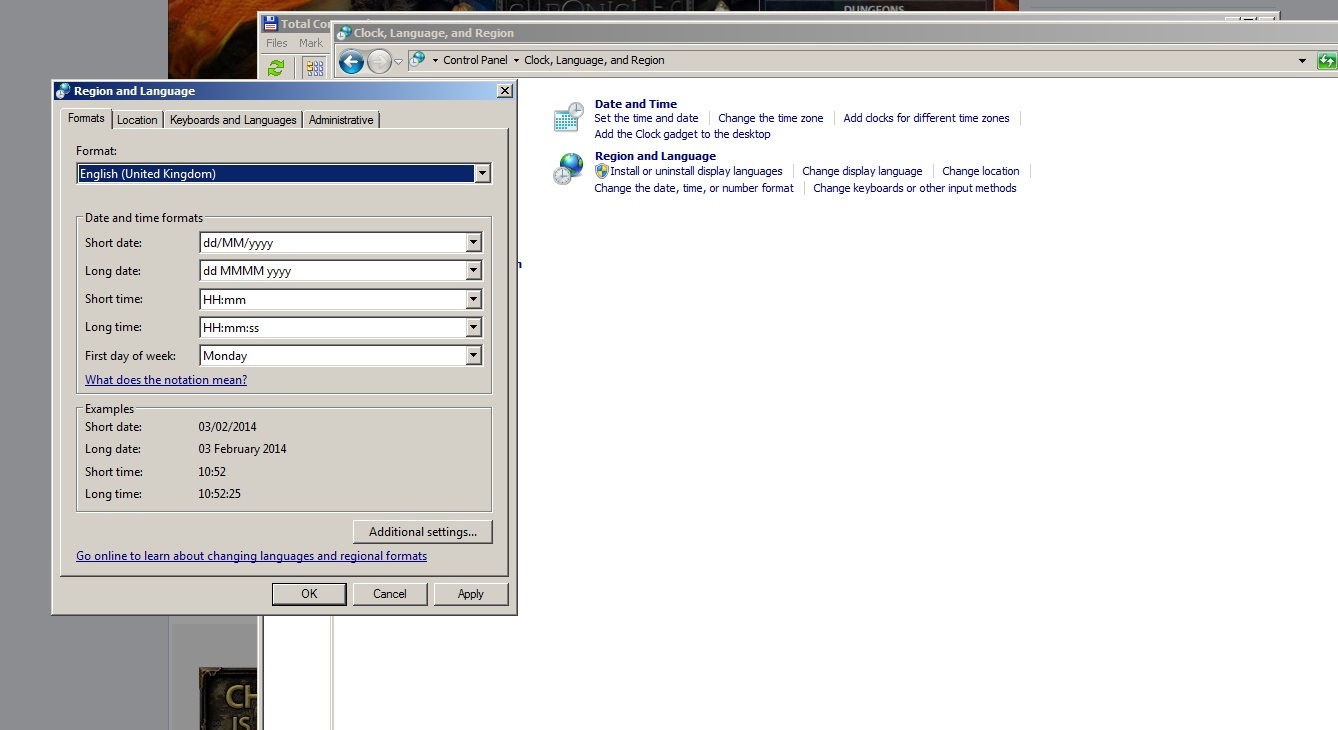
Please set your regional settings like this! and tell me if it is working!

mirchronicles_login_fix.jpg


Full image: http://www.legendofmir.eu/public/pictures/mirchronicles_login_fix.jpg

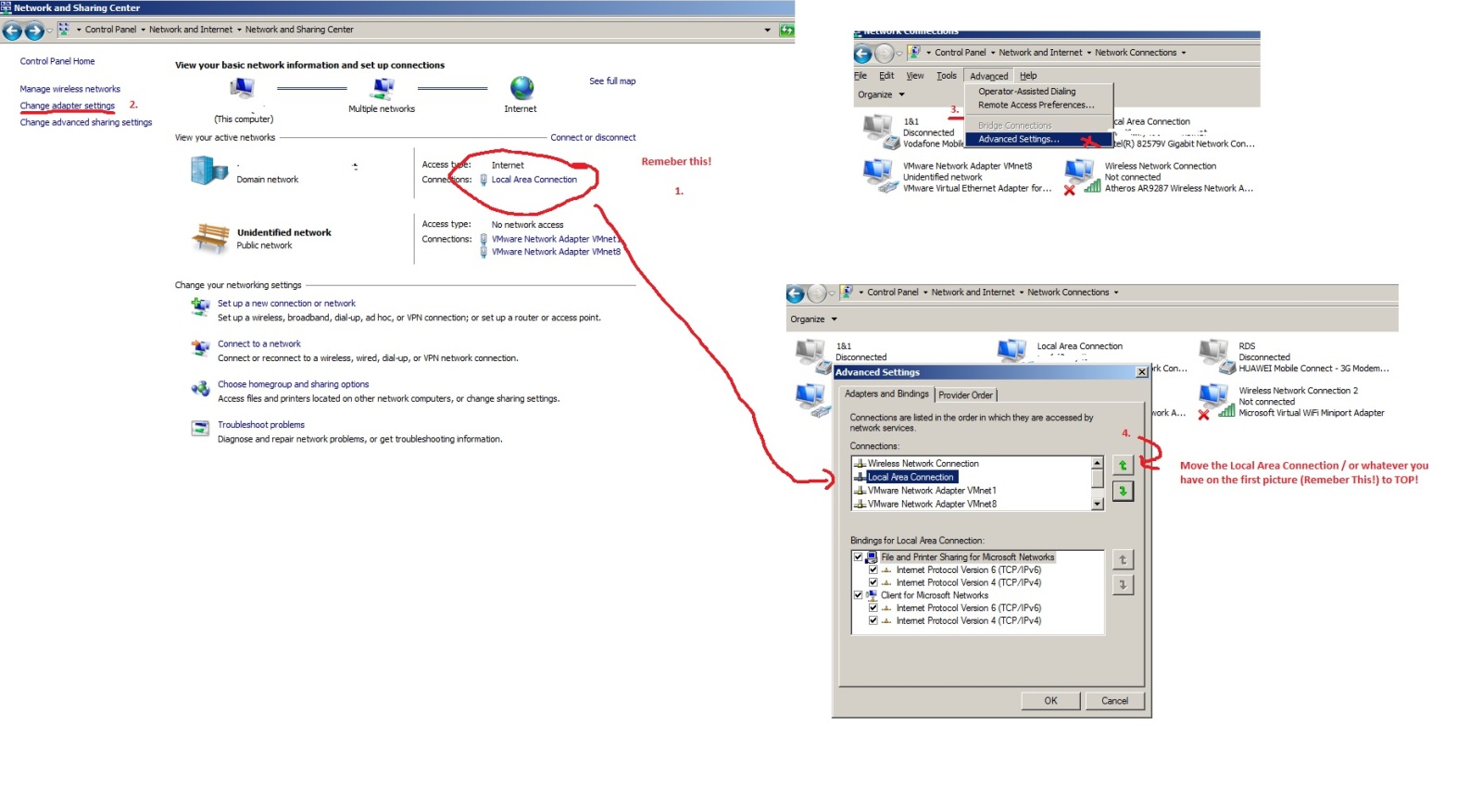
If people still have connection problems, some reported they get blocked at Char Select try this:

mirchronicles_charsel_fix.jpg


http://www.legendofmir.eu/public/pictures/mirchronicles_charsel_fix.jpg

Also paste this in your mir2.ini

[Basic Settings]
SwitchPoisonOrder=0
DropItemsShow=0
ShowRevBar=0
[Options]
FullScreen=1
InterfaceType=1
ScreenMode=-1
BitDepth=1
MP3Volume=70
SoundVolume=37
BGSound=1
Sound=1
 
Last edited:
  • Like
Reactions: Hazuki

omenking

Dedicated Member
Dedicated Member
Oct 18, 2013
122
0
43
Still getting the disconnect issue after typing in my details, tried all the solutions and nothing :(

---------- Post Merged at 09:45 PM ---------- Previous Post was at 09:17 PM ----------

Can anybody help? This is driving me absoultely crazy! Tried everything :(
 

zombicide13

LOMCN n00bie
Aug 23, 2011
3
0
12
downloaded the full client and updated the exe and ini ....worked without a hitch for me...sometimes I have to hit alt+enter to get to char select but other than that no problems here.... also im located in the U.S. and running the game on a crap laptop w/windows 7, good luck.
 

Rhasta

Dedicated Member
Dedicated Member
Jul 10, 2011
79
4
35
mine gets stuck on connect to character select... any help please