3in1 problems.

Desolation Mir2 (Med Rate Server)

Craig321

Dedicated Member
Dedicated Member
Jan 1, 2004
203
0
42
Hello,

Have been having problems getting my own 1.9 server up... there are no probs with configuring it or anything - that's easy.
I'm just having troubles with 3IN1 :(

I get the common error of no server notice, so I went to the threads that tell you how to fix it, one of them gave a link which didn't work :(

I went through the threads that tell you how to fix the problem but I couldn't fix it :(

Please help !!!

Cheers,
Craig.

 

Slanesh

Golden Oldie
Golden Oldie
Sep 6, 2004
522
6
105
Stoke, England
I was sent it on MSN so I can't link to it, so I had to upload it myself:

http://clan-tsa.co.uk/kaegur/RegServer.exe

Use that instead of 3in1

In !setup.txt change the IPs that you're supposed to change to 3in1 IP to 127.0.0.1 and it'll work offline when you load it up (but it has to be loaded every time you start the server).

My thanks to whoever made this program :D
 
Upvote 0

Craig321

Dedicated Member
Dedicated Member
Jan 1, 2004
203
0
42
Done all the necessary stuff and run it before I start server programs, have also changed the ports in the RegServer so I don't have to change them in the server files.
I still get the same problems :(

Any ideas of what I could be doing wrong?

Cheers
Craig.
 
Upvote 0

Slanesh

Golden Oldie
Golden Oldie
Sep 6, 2004
522
6
105
Stoke, England
Are you using it instead of 3in1? Run that and the other programs. If you're using the Foundation Offline files then run RegServer then 2,3,4,5,6 and 7 (don't run the first one)

Also make sure you have everything configured correctly (I know you said it's done, but make sure everything's correct).

Note: Bottom of !Setup.txt should look like:

Code:
[Reg]
Key=testfsdmir2
IP=127.0.0.1
ServerAddr=127.0.0.1
ServerPort=60320
 
Last edited:
Upvote 0

Craig321

Dedicated Member
Dedicated Member
Jan 1, 2004
203
0
42
Yep, it's being used instead of 3in1.
I'm using the files from my thread which I think were the first mir1.9 files.

I will check over the server to see if anything's wrong.

Craig.
 
Upvote 0

Craig321

Dedicated Member
Dedicated Member
Jan 1, 2004
203
0
42
Still the same one :(
I have made my character, and then I click start and the notice doesn't come up :(

Craig.
 
Upvote 0

Craig321

Dedicated Member
Dedicated Member
Jan 1, 2004
203
0
42
Ok, i used that one instead of the one that was previously given.
Still doesn't work :(
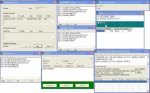
Here are my servers if it helps...

Oh, and on the m2Server the ip thingy at the bottom of it in the table did come up, just later on just before i tried to go ingame.

Craig.
 

Attachments

  • servers.jpg
    servers.jpg
    127.1 KB · Views: 74
Upvote 0

Ragnar

Hallowed be thy name
Legendary
Golden Oldie
Loyal Member
Jul 20, 2004
5,258
3
275
Craig321 said:
Ok, i used that one instead of the one that was previously given.
Still doesn't work :(
Here are my servers if it helps...

Oh, and on the m2Server the ip thingy at the bottom of it in the table did come up, just later on just before i tried to go ingame.

Craig.
Aight. Your gamegate is not connected. Check the Config.ini for your gamegate, if everything seems right, and it still wont work, try using the new gamegate wich blocks the ledu cheats. Also, what M2Server are you using?
 
Upvote 0

Craig321

Dedicated Member
Dedicated Member
Jan 1, 2004
203
0
42
GameGate config.ini:

Code:
[GameGate]
Title=ktest
ServerAddr=127.0.0.1
ServerPort=5000
GateAddr=127.0.0.1
GatePort=7200
ShowLogLevel=2
ShowBite=1
ServerCheckTimeOut=180000
ClientSendBlockSize=500
MaxConnOfIPaddr=50
BlockMethod=0
MaxClientPacketSize=6420
NomClientPacketSize=190
MaxClientMsgCount=100
kickOverPacket=1
ClientTimeOutTime=5000

At the moment I am using the M2Server that RipMan hosted for me.

Cheers
Craig.
 
Upvote 0

Craig321

Dedicated Member
Dedicated Member
Jan 1, 2004
203
0
42
Right, I've checked the config file and couldn't find anything wrong.

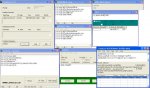
Here's a new screenshot of the servers:

Craig.
 

Attachments

  • servers.jpg
    servers.jpg
    127.2 KB · Views: 71
Upvote 0

Craig321

Dedicated Member
Dedicated Member
Jan 1, 2004
203
0
42
Still the same problem of the notice not coming up :'(
I will check through all & also my client and make sure all is ok.

Cheers for your help
Craig.
 
Upvote 0

MiloFoxburr

LOMCN VIP
VIP
Mar 23, 2003
7,276
207
350
Dublin, Ireland
No Notice/Black Screen Error

On a 1.9 emu server 99.999% of the time this is due to the fact that you are not running/connected to a reg server/3in1.exe
Downloads for reg servers and 3in1 can be found
HERE
Thanks to Damain and anyone else linked to these files

How to recover from 3in1 killing your internet (windows XP)
Link on how to fix this can be found HERE
Thanks to BabyBear and anyone else linked to this Guide

On a 1.4 server most of the time this is because UNPNP is not disabled on your system (UNPNP needs to be disabled for 1.9 emu servers also)
UNPNP can be found HERE
Thanks to Ferny and anyone else linked to these files

If your 3in1/reg server and UNPNP are not the problem then more then likely
you have an IP or Server Name wrong somewhere.
Go through your .txt and .ini files 1 by 1 and change the ips and server names by hand. (using a server starter may miss 1 or 2 ips)

Another guide on how to fix the black screen problem


BH
 
Upvote 0

Craig321

Dedicated Member
Dedicated Member
Jan 1, 2004
203
0
42
As I said, have looked through those and none helped / links didn't work within the threads.
I will take another look and see if there's anything I missed

Cheers
Craig.
 
Upvote 0

Craig321

Dedicated Member
Dedicated Member
Jan 1, 2004
203
0
42
Does the RegKey in all the files need to be the same as it is in the !setup.txt?

Craig.

//Edit

They're all the same now and it still does not work... notice still doesn't come up :(

Craig.

//Edit

Does nobody run 3in1 or something anymore as when they did I could get a server up perfectly.

Craig.
 
Last edited:
Upvote 0