Help how to edit maps ??

Mu online season 21 - grand opening

Xzanidu

Loyal Member
Loyal Member
Aug 20, 2019
27
1
15
Hi all so i have the Standalone Map editor . i can direct it to my client and open maps no problem at all i can ad remove assets easily enough . but how do i actually create or edit a new map. ive tried some simple things like just adding a tiled area down where sz is . but my problem is i cannot find any objects tiles ect to add anything. how and where do i find all the images items to build /edit maps thx in advance .
 

Far

tinmymouthpl0x
Staff member
Administrator
May 19, 2003
20,683
34
3,287
520
There's an objects download in the stickied thread. Put that in your client and then click the load objects button on the left and choose the folder
 
  • Like
Reactions: Xzanidu
Upvote 0

mir2pion

TL;DR
Veteran
Feb 21, 2013
3,591
2
679
265
You mean, mir3 maps are edited using the new Far's zircon map editor?
All the time I thought it was just for zircon map format, .zl is it, right?

Mir3 maps (.map) can be edited in mir2 map editor. The lib set for this crystal map editor always came with mir3 libraries.

We are in mir3 help section... maybe was supposed to be in zircon one?
 
Last edited:
Upvote 0

Fusion

LOMCN Veteran
Veteran
Dec 13, 2013
668
313
125
Ireland
Hi all so i have the Standalone Map editor . i can direct it to my client and open maps no problem at all i can ad remove assets easily enough . but how do i actually create or edit a new map. ive tried some simple things like just adding a tiled area down where sz is . but my problem is i cannot find any objects tiles ect to add anything. how and where do i find all the images items to build /edit maps thx in advance .
when you open the editor on the top left it says new once you press this a box should open up to ask what size map you want to make. once you decide press ok. Now to get a base tile on the map. on the right side there is tiles at top right click the drop down and pick one, if the issues is when you pick one of the drop downs and nothing shows, that would suggest that you have not set the files up right

Set the client path to your base client folder (NOT DATA)
Set the map path to be map folder you want to default saving to (Server or Client map folder)

Hope that helps
 
Upvote 0

Far

tinmymouthpl0x
Staff member
Administrator
May 19, 2003
20,683
34
3,287
520
You mean, mir3 maps are edited using the new Far's zircon map editor?
All the time I thought it was just for zircon map format, .zl is it, right?

Mir3 maps (.map) can be edited in mir2 map editor. The lib set for this crystal map editor always came with mir3 libraries.

We are in mir3 help section... maybe was supposed to be in zircon one?

zircon doesn't have its own map format like crystal. It uses the official korean mir3 map format.

So you can edit maps in the zircon editor and open them in crystal should you wish.
 
Last edited:
Upvote 0

mir2pion

TL;DR
Veteran
Feb 21, 2013
3,591
2
679
265
I didn't know that, in my mind Zircon files and .zl map extension were Jamie's proprietary format and that your map editor was just for Zircon maps with .zl extension.

you can edit maps in the zricon editor and open them in crystal should you wish.

Do you need to save them out in .map format then, or will Crystal files work with .zl extension?

From what you say, it would appear that Crystal files including its map editor can open and work with Zircon maps but your ZIrcon map editor and Zircon server/client are not backward compatible with crystal mir2 & mir3 *.map format.
 
Upvote 0

Far

tinmymouthpl0x
Staff member
Administrator
May 19, 2003
20,683
34
3,287
520
I didn't know that, in my mind Zircon files and .zl map extension were Jamie's proprietary format and that your map editor was just for Zircon maps with .zl extension.


Do you need to save them out in .map format then, or will Crystal files work with .zl extension?

From what you say, it would appear that Crystal files including its map editor can open and work with Zircon maps but your ZIrcon map editor and Zircon server/client are not backward compatible with crystal mir2 & mir3 *.map format.
.zl is just the data format for zircon. So if you open a mir3.map file in crystal, it would use the .lib data files that crystal uses. If you open a mir3.map file in zircon, it would use the .zl data files that zircon uses.

Just the same that if you opens mir3.map with the official mir3 korean client, it would use the .wil/.wix data files that client uses.

.Map files and data files (.zl, .lib, .wil etc) are not linked in any sense.

And yes, Zircon map editor/ Zircon client is not compatible with any other formats like mir2 as it doesn't contain the code to read multiple map formats like crystal (which can read about 10 different map formats)
 
  • Like
Reactions: mir2pion
Upvote 0

mir2pion

TL;DR
Veteran
Feb 21, 2013
3,591
2
679
265
I checked it out and indeed, Zircon maps open in Crystal Map Editor. Last time I really looked at Zircon was when it was released and I mistakenly thought that its maps also have .zl extension, not just the libraries.

I take it then, your new map editor only works with .zl libraries.

If Zircon .zl libraries have the same tiles in them as mir3 .lib ones in m2 Crystal client, it opens a way to use some features of your new map editor built for Zircon that mir2 map editor doesn't have (or you implemented some features better) when working on mir3 maps. Those maps can then be used in mir2 client.

Now if Zircon also had all mir2 libraries in its .zl format, your editor could be used where the crystal editor comes up short.

Is there a library editor for Zircon *.zl libraries that can export/import bmp tiles? If yes, then mir2 *.lib tiles could be exported and in turn imported into .zl libraries and voila, you could edit mir2 maps in your Zircon editor.

And how it is with objects in your Zircon map editor? Can those be used by Crystal map editor? I suppose I could look it up but might as well ask.
 
Upvote 0

Far

tinmymouthpl0x
Staff member
Administrator
May 19, 2003
20,683
34
3,287
520
No you can't just change .lib to .zl and have it work. Zircon map editor would need full knowledge of mir2 image positions and map formats etc.

The objects created will also only work in the zircon map editor, and I've not released the source code for the mir3 map editor.
 
Upvote 0

mir2pion

TL;DR
Veteran
Feb 21, 2013
3,591
2
679
265
o you can't just change .lib to .zl and have it work.
I know, but if I export bitmap tiles from mir2 libraries, then if there is a Zircon library editor that imports bmps into its .zl libraires, that would create a bridge btw the two lib systems even if no conversion of the two exist.

But maybe there is no equivalent of mir2 Library Editor and there is no way to export bmps from Zircon .zl libraries, or import them.

In this roundabout way, I changed .pak into .lib even if there is no convertor btw the two formats. I also changed .wil to .lib in this way even when a direct lib format conversion doesn't work (not sure if it works for some wils).
 
Last edited:
Upvote 0

wzy00963

LOMCN n00bie
Sep 23, 2024
7
2
3
HI Xzanidu,
I understand your question. I meet it too. I cant edit any object file or add any image to object, so I cant modify object file.
if you have some method please let me know. thanks you
 
Upvote 0

wzy00963

LOMCN n00bie
Sep 23, 2024
7
2
3
I tested same days, I find Mir3 map read the Object file as data ,the files had not extend name. but I cant find a tool to edit the kind file.
if any body have not the tool , I will write a tool to edit the Object file to add or delete pictures.
 
Upvote 0

Far

tinmymouthpl0x
Staff member
Administrator
May 19, 2003
20,683
34
3,287
520
show us a video of what you mean, because i have no idea what you're asking.

If you want to add images to a .ZL library, use the library editor provided. Nothing to do with the map editor.
 
Upvote 0

wzy00963

LOMCN n00bie
Sep 23, 2024
7
2
3
I know library editor,but it cant open the Object file and edit it. So the Object file just only to use the old file, The tool of Zircon Mir3 Map Editor (NetCore) doesn't do what it does. You know the Object file is very important for maps and characters。
Post automatically merged:

question.png
 
Last edited:
Upvote 0

Far

tinmymouthpl0x
Staff member
Administrator
May 19, 2003
20,683
34
3,287
520
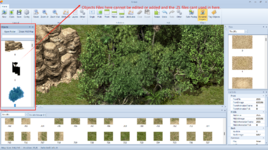
Objects are just maps. If you want to open an object to edit it, just go to "Open" and select the object file type instead of map.

If you want to create new objects, just use the "Multi" mode to select the cells you want, then click "Export"
 
Upvote 0

wzy00963

LOMCN n00bie
Sep 23, 2024
7
2
3
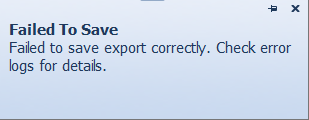
First at all, thanks for your answer,but when I export any file.An exception will be thrown,and I can't find any log files on my hard drive, and neither do the exported files
错误.png
Post automatically merged:

I analyzed it carefully, and the biggest possibility is that I am using the *.objects file format is wrong, because I don't have an Objects.object file, I use the kind of file downloaded from the Internet without an extension, please tell me how to create an *.object file
Post automatically merged:

The most fatal problem is that I still can't add any new images to the file.
Post automatically merged:

I'm just learning some development skills, I don't do things like private servers, I'm not interested, if you need someone to help you with any development work, I can do it for you, obligatory.
 
Last edited:
Upvote 0

Far

tinmymouthpl0x
Staff member
Administrator
May 19, 2003
20,683
34
3,287
520
if you're using the standalone map editor, theres another window which shows all the logs (a black command prompt type window), if you're using the plugin the logs show in the server.

there's no such thing as an Objects.object file, every object is in its own file - exactly like a map.
 
Upvote 0

mir2pion

TL;DR
Veteran
Feb 21, 2013
3,591
2
679
265
I know library editor,but it cant open the Object file and edit it.

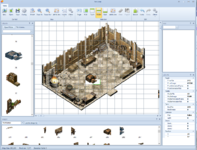
#.object(s) are preassembled Tile blocks, like a whole tree or a house, ready to be placed on a map (new blank canvas, or an existing map). Each object is built up from a number of tiles, the most basic map elements.

These #.objects, seen in the left vertical panel in the Map Editor are located in the Objects folder in the Client\Map folder.

Tiles which you see at the bottom in that horizontal panel are the basic elements from which those #.objects are built up. The tiles are located in the Zircon library files, *.Zl, and these libraries can be edited in the Library Editor (new or edited tiles can be added to those .Zl libraries in this editor, if you would want to edit the tiles themselves, you need to do it in a graphics editor, like Photoshop).

Here I have placed the building interior on new blank map and added the furniture object in the middle of the floor. It replaces two of those floor tiles and since this is my first time I briefly opened this editor, I don't know how to put the tiles back, ie., how to place that added piece of furniture on front layer, so it wouldn't interfere with those floor tiles. The objects like this house interior are always all placed on the middle layer and I don't know how to switch layers. Probably you can't in this case, since the added furniture will always be placed on the middle layer...
Not sure now how this works in mir2 Crystal Map Editor, I believe I can choose the layer on which to place the objects in that editor.
1729178677117.png


I suppose I just don't know my way around this editor, best way to solve your problems would be to document with screenshots every step showing what you are trying to do.

From this fast first look, I would like to have Escape key drop the selected object or a tile from the mouse tip, that would be more intuitive than mouse right click (at least that's what I found how to get rid of the selected object).
Mouse tips for menu items are not helpful at all, given they just restate the menu text.

 
Last edited:
Upvote 0